.png)

Parth Parmar
Integration
May 9, 2026


Insights, ideas, and expert perspectives shared by the author on design, development, and digital growth.
If you have built your website on Webflow and are now looking to accept payments, run a subscription service, or power a SaaS product, connecting Webflow to Stripe is one of the most strategic technical decisions you will make. Stripe is the world's leading payment infrastructure platform, trusted by companies ranging from early-stage startups to publicly listed enterprises. When integrated correctly into a Webflow site, it transforms a beautiful front-end into a fully functional, revenue-generating business system.
At Appsrow, we specialize in Webflow development and Stripe integration services built for real business outcomes. This guide covers everything founders, ecommerce brands, SaaS businesses, membership platforms, and agencies need to know — including what it involves, why it matters, what challenges to expect, and how Appsrow delivers it end-to-end.
Digital Payment Statistics You Should Know
Webflow to Stripe integration is the process of connecting your Webflow website to Stripe's payment infrastructure so that your site can securely collect payments, manage subscriptions, issue refunds, trigger webhooks, and automate financial workflows. While Webflow provides a powerful visual development platform with built-in ecommerce capabilities, its native payment options are limited. Stripe, on the other hand, offers a deeply flexible API ecosystem that supports one-time payments, recurring billing, usage-based pricing, multi-currency transactions, and much more.
A proper Webflow Stripe integration typically involves building custom checkout flows using Stripe's JavaScript library or Stripe Checkout, setting up server-side payment logic through backend services or serverless functions, configuring webhooks to respond to payment events, and connecting the payment data to your CRM, database, or email automation platform.
The reason most Webflow-based businesses seek a dedicated Stripe integration rather than relying on Webflow's default payment options comes down to flexibility and control. Webflow's native ecommerce supports basic payment collection through Stripe behind the scenes, but it limits how you can customize the checkout experience, handle subscriptions, implement usage-based billing, or trigger post-payment automation. For any business that is serious about revenue, relying on the default setup means leaving money and capability on the table.
Webflow's built-in Stripe connection handles basic product sales. Everything beyond that — including subscriptions, content gating, webhook automation, multi-currency billing, and post-payment CRM sync — requires a proper custom integration. That gap is where most businesses lose revenue without realizing it.
SaaS products live and die by their billing infrastructure. A proper Stripe integration gives you the foundation your subscription business actually needs to operate at scale.
Subscription-based businesses grow revenue approximately five times faster than businesses using traditional one-time payment models. Stripe's billing infrastructure is the engine that makes recurring revenue predictable and scalable.
Membership sites require a live, synchronized connection between payment status and content access. When Stripe and Webflow are properly integrated, access control becomes automatic and accurate.
Custom Stripe checkout for ecommerce goes far beyond what Webflow's default checkout can offer. It gives brands full control over the buying experience and the revenue levers that move conversion rates.
Over 70 percent of online shoppers abandon checkout due to friction, redirects, or lack of trust signals. An embedded custom Stripe checkout that keeps customers on your Webflow site eliminates the single biggest cause of checkout drop-off.
Despite Stripe's excellent documentation and developer experience, integrating it correctly with Webflow is not a point-and-click process. Many businesses attempt a DIY integration and run into significant challenges that create security risks, poor user experience, or broken payment flows.
The Core Problem
Webflow is a front-end publishing platform. Stripe is a server-side payment API. Bridging them correctly requires backend architecture, webhook infrastructure, and production-grade security practices that go well beyond what most no-code or DIY approaches can handle.
Stripe requires server-side code to handle the most critical parts of payment processing securely. Without a proper backend layer, your integration will either fail or expose serious security vulnerabilities.
Webhooks are how Stripe communicates payment events to your application in real time. Misconfigured or unhandled webhooks are one of the most common causes of broken integrations, leading to customers who paid but cannot access their purchase.
The most common failure point in DIY Stripe integrations is not the payment form itself — it is the webhook handler. When payment events are not reliably received and processed, your application falls out of sync with reality, and customers bear the cost.
Appsrow is a specialist Webflow development agency with a dedicated practice around Stripe payment integration. We have helped startups, SaaS companies, ecommerce brands, and membership platforms build production-ready Stripe integrations that are secure, scalable, and precisely matched to their business model. Every integration we build is custom-engineered for your specific use case and designed to grow with your business.
We build fully branded, embedded Stripe checkout experiences that stay on your Webflow site and convert better than redirected Stripe-hosted pages. Our implementations are built with Stripe Elements, designed to your brand specifications, and engineered to handle every payment scenario gracefully.
We configure complete subscription billing infrastructure for SaaS products and membership platforms using Stripe Billing. From plan architecture through dunning management and customer portals, we build the recurring revenue engine your business needs to scale predictably.
We build reliable, production-grade webhook listeners and backend automation systems that keep your entire business stack in sync with Stripe's payment events. When a payment happens, your whole operation responds automatically — no manual intervention required.
Every Appsrow integration is built with security and compliance as a foundation, not an afterthought. We follow Stripe's best practices and implement the safeguards required for PCI DSS compliance, fraud protection, and safe production operation from day one.
The default Stripe Checkout page is functional, but it rarely matches the brand experience that serious businesses need. Appsrow builds fully custom Stripe checkout flows embedded directly within your Webflow site, using Stripe Elements to render secure, PCI-compliant payment fields that look and feel native to your design.
Appsrow automates your entire ecommerce payment workflow so that every payment event triggers the right action downstream. From order confirmation emails to inventory updates and CRM records, we ensure your operations run without manual intervention.
Any business that accepts card payments must comply with PCI DSS, the Payment Card Industry Data Security Standard. Stripe significantly simplifies PCI compliance because it handles the most sensitive parts of payment processing on its own infrastructure. When implemented correctly through Stripe.js and the Payment Intents API, your business qualifies for SAQ A — the simplest compliance self-assessment, requiring minimal documentation effort.
Security checklist for Webflow Stripe integration:
IndustryTypical Stripe Use CaseSaaSSubscription plans, usage-based billing, billing portalEcommerceOne-time checkout, cart integration, order automationOnline educationCourse payment, membership access, installment plansAgencies and consultantsInvoicing, retainer payments, deposit collectionMembership communitiesRecurring subscriptions, content gating, plan upgradesNon-profitsDonation processing, recurring giving programsMarketplacesStripe Connect for multi-party payments and payoutsHealthcare and wellnessAppointment payments, subscription wellness plans.
Webflow is a world-class front-end platform. Stripe is a world-class payment infrastructure platform. Together, they give your business everything it needs to acquire customers, collect revenue, and scale operations without being held back by your technical stack. But realizing the full potential of this combination requires careful, experienced integration work that goes well beyond plugging in an API key.
Appsrow exists to make that integration seamless for your business. From simple checkout flows to complex subscription billing systems with full automation and CRM connectivity, our team has the Webflow and Stripe expertise to deliver integrations that are secure, scalable, and built for your specific revenue model.
Let's build your Webflow Stripe integration the right way. Appsrow offers dedicated Webflow development and Stripe integration services for startups, SaaS companies, ecommerce brands, and agencies. Our team is ready to scope your project, answer your technical questions, and deliver a production-ready payment integration that drives real business results. Get in touch with Appsrow today.
Connect your Webflow CMS, forms, and site data directly to Claude AI using the Model Context Protocol. Automate content, personalize experiences, and unlock agentic AI workflows without leaving your no-code stack.
The Model Context Protocol, or MCP, is an open standard introduced by Anthropic that defines how AI models like Claude connect to external tools, data sources, and APIs in a structured, secure way. Think of it as a universal adapter that lets Claude read, write, and act on real-world systems rather than just responding to text prompts.
In a traditional integration, connecting an AI to your website requires custom APIs, middleware, and significant developer effort. MCP changes that by providing a standardized protocol that any platform can implement, making AI integrations faster to build, easier to maintain, and more reliable in production.
MCP moves Claude beyond answering questions. With MCP, Claude can take actions: updating CMS records, generating dynamic content based on real user data, triggering workflows, and reasoning across multiple data sources simultaneously. For Webflow users, this means your website stops being a static publishing tool and becomes an intelligent, context-aware platform.
Trending AI concepts like agentic workflows, retrieval-augmented generation (RAG), AI agents, and tool use all depend on protocols like MCP to function reliably. By implementing the Webflow to Claude MCP connector, your business positions itself at the leading edge of AI-native web experiences.
Webflow is one of the most powerful visual website builders available today. It gives designers and marketers full control over layout, CMS, forms, and hosting without writing backend code. Claude is one of the most capable large language models (LLMs) available, built for nuanced reasoning, long-context understanding, and safe, reliable outputs. Connecting the two unlocks a category of functionality that neither can achieve alone.
With the Webflow Claude MCP connector, Claude can read your existing CMS collections, understand your content structure, and generate or update content programmatically. Whether you publish product descriptions, blog posts, or landing page copy at scale, AI-generated content can be reviewed and published directly within your Webflow workflow.
Webflow form submissions can be routed to Claude via MCP, where the AI can analyze responses, score leads, draft personalized follow-up emails, and trigger downstream actions in your CRM or automation stack, all without manual review for routine inquiries.
Claude can process user attributes, behavioral signals, and contextual data to serve personalized content recommendations, product suggestions, or adaptive copy variations. This is especially powerful for e-commerce Webflow sites, SaaS landing pages, and membership platforms.
Generate, review, and publish CMS content up to 10x faster with Claude handling first drafts based on your brand guidelines and existing content patterns.
MCP eliminates the need for complex middleware. Connect Webflow directly to Claude with clean, maintainable integration architecture.
Claude reads your actual CMS data, not generic prompts, so every AI action is informed by the real content and structure of your website.
MCP defines clear permission boundaries. Claude only accesses the data you explicitly expose, keeping your site and customer data protected.
One of the most time-consuming tasks in Webflow is keeping SEO metadata, Open Graph tags, and structured data up to date across hundreds of CMS items. A Claude MCP integration can audit your existing metadata, identify gaps, and generate optimized titles, descriptions, and schema markup in bulk, aligned with current search engine optimization best practices and semantic search trends.
Webflow's native localization features pair exceptionally well with Claude's multilingual translation and cultural adaptation capabilities. The MCP connector enables Claude to read your source content and write localized variants directly into the appropriate CMS locale fields, dramatically accelerating global content rollouts.
Appsrow is a specialist integration and automation agency with deep expertise in Webflow development and AI-powered workflows. Our team has been building production-grade MCP integrations since the protocol's public release, working with startups, scale-ups, and enterprise teams across industries.
Our engineers work fluently across the full integration stack required for robust Webflow Claude MCP connector builds. This includes Webflow's REST API and GraphQL CMS API, Anthropic's Messages API and MCP server architecture, Node.js and Python backend services, serverless deployment on platforms like Vercel and Cloudflare Workers, and webhook orchestration for real-time event-driven AI triggers.
Webflow CMS APIClaude API + MCPAgentic AI WorkflowsRAG SystemsServerless ArchitectureWebhook AutomationAI Content PipelinesWebflow LocalizationLLM Fine-Tuning Prepn8n / Make / Zapier
Unlike generalist agencies that pick up new frameworks reactively, Appsrow has been specializing in the intersection of no-code platforms and large language model integrations since 2023. We understand both the Webflow ecosystem deeply and the rapidly evolving landscape of AI agent development, model context protocols, and responsible AI deployment.
We don't just connect APIs. We design integration architectures that are scalable, observable, and built for the long term, with proper error handling, logging, rate limit management, and cost optimization baked in from day one.
We have delivered Webflow Claude MCP integrations for clients in SaaS, e-commerce, media and publishing, professional services, education, and healthcare compliance. Each engagement has sharpened our understanding of what works in production AI systems, and what fails when volume, latency, or data complexity increases.
Appsrow offers end-to-end services for teams that want to connect their Webflow site to Claude via MCP. Whether you are starting from scratch or augmenting an existing integration, we have a service tier to match your needs and timeline.
We design and deploy a production-ready MCP server that exposes your Webflow data as structured tools and resources for Claude to consume. This includes authentication, rate limiting, data schema mapping, and deployment to your preferred cloud infrastructure. The server becomes the secure bridge between Webflow's API and Claude's context window.
We build Claude-powered pipelines that can read your CMS collections, generate content according to your tone and style guidelines, populate fields such as title, body, SEO metadata, and Open Graph images, and submit items for human review before publishing. Ideal for blogs, product catalogs, knowledge bases, and event listings.
Transform how you handle Webflow form submissions. We integrate Claude via MCP to classify, qualify, and respond to leads intelligently, routing complex inquiries to your team and handling routine ones autonomously. Includes CRM sync, email drafting, and conversation logging.
We build retrieval-augmented generation (RAG) systems that index your Webflow CMS content into a vector database and expose it to Claude via MCP. Users can then ask natural language questions and receive precise, cited answers drawn from your actual site content, a major upgrade over keyword-based site search.
We architect an MCP-powered personalization layer that passes user context to Claude and returns tailored content recommendations, CTAs, or messaging variations. Works with Webflow Memberships, third-party auth providers, and analytics platforms to build genuinely adaptive website experiences.
Pair Webflow's Localization feature with Claude's multilingual capabilities via MCP. We build workflows that translate and culturally adapt your CMS content into multiple languages, write directly into locale-specific fields, and flag items for native speaker review when confidence is lower, cutting localization costs significantly.
Claude agents can perform routine Webflow maintenance autonomously via MCP: auditing broken links, identifying outdated CMS items, checking SEO health, and generating reports. We build these scheduled or event-triggered agent workflows and deliver results to Slack, email, or a Notion dashboard of your choice.
If your workflow requires Claude to interact with systems beyond Webflow, such as Stripe, HubSpot, Airtable, or a custom database, we extend the MCP server with additional tools. This gives Claude a complete operational picture of your business context, enabling more sophisticated multi-step agentic reasoning.
We work on fixed-scope project engagements for well-defined integrations, retainer arrangements for ongoing MCP development and maintenance, and discovery workshops for teams that want to map out the right AI automation strategy before committing to a build.
There are a growing number of agencies claiming AI expertise. Here is what specifically makes Appsrow the right partner for Webflow Claude MCP connector projects.
Most agencies know one side well. Appsrow teams bring senior-level experience in both Webflow development and AI systems engineering. This means integrations are built correctly at both ends, with no compromises in either the Webflow architecture or the Claude integration quality.
Every integration we deliver includes error handling, retry logic, cost monitoring, structured logging, and a staging environment. We build for what happens when things go wrong, not just the happy path. Our clients run mission-critical workflows on our integrations with confidence.
Claude API costs can escalate quickly without proper token management. We design every MCP integration with cost efficiency in mind, using prompt caching, context window optimization, and smart routing to minimize spend while maximizing output quality. You will always know your estimated monthly AI infrastructure cost before we go live.
We build on open standards. Your MCP server, integration logic, and prompt templates are fully documented and handed over to your team. If you ever want to switch providers, scale internally, or modify the integration, you own everything. There is no proprietary layer that traps your workflows.
We move fast. Most clients have a working proof of concept within one to two weeks, allowing you to validate the integration value with real data before committing to a full production build. This de-risks the investment and aligns the scope to what actually matters for your business.
The MCP specification and Anthropic's API are actively evolving. Appsrow clients on our maintenance retainer receive proactive updates when breaking changes or major new capabilities are released, so your integration stays current without requiring your team to monitor the AI development landscape.
HubSpot Integration
Most businesses are using HubSpot at 30% of its capacity. Here is how expert integration services transform it into your most powerful revenue-driving tool.
HubSpot is one of the most capable platforms available for marketing, sales, and customer success teams. It is intuitive, feature-rich, and built to scale. But here is the reality that most businesses discover only after months of frustration: HubSpot alone is not enough.
The average business runs between 8 and 15 software tools at any given time. Your CRM sits in one corner. Your e-commerce platform lives in another. Your customer support desk, your finance software, your analytics dashboards, and your communication tools each operate in their own silo. The result? Your team wastes hours every week manually copying data between systems, your reports are never fully accurate, and leads fall through the gaps between platforms.
The truth is this: HubSpot's real power is not in what it does on its own. It is in what it becomes when every tool in your business feeds into it, and it feeds back out. That is exactly what Appsrow delivers.
Appsrow specializes in end-to-end HubSpot integration services that connect your entire tech stack into one unified, automated, data-driven system. We have done it for startups finding their footing, for mid-size companies scaling rapidly, and for enterprises managing complex global operations. The result is always the same: more efficiency, better data, and meaningful revenue growth.
The question is no longer whether to integrate your systems. It is how quickly you can afford to do it. Here are the core reasons businesses that take integration seriously outperform those that do not.
Every time a sales rep copies a lead from a spreadsheet into HubSpot, or a support agent checks a separate CRM to understand a customer's purchase history, your business is hemorrhaging time. Studies consistently show that knowledge workers spend between 20 and 40 percent of their week on manual data tasks that automation should handle. Integration eliminates this entirely.
129% increase in incoming leads reported by businesses that implemented full HubSpot integration across their marketing and sales stack. Source: Market Veep, 2025.
If your marketing analytics live in Google Analytics, your revenue data sits in QuickBooks, and your pipeline is in HubSpot, you can never get a complete picture of what is actually working. Integration pulls all of this together so that every decision, from campaign spend to headcount, is backed by accurate, unified data.
When a customer contacts your support team, they should not have to repeat their order history, explain their previous interactions, or wait while your agent searches three platforms. Integration ensures that every touchpoint, from the first form fill to the latest support ticket, is visible to whoever needs it, in real time.
The processes that work at 50 customers break at 500. Manual workflows, copy-paste routines, and disconnected platforms become catastrophic bottlenecks as you grow. Integration builds a foundation that scales with your business rather than holding it back.
Key Insight
Businesses that implement full-stack HubSpot integration routinely report saving 15 or more hours per team member per week, and see lead-to-customer conversion rates improve significantly within the first 90 days of deployment.
Eliminate data silos so every team works from a single source of truth
Automate repetitive workflows to free your team for high-value work
Improve lead response times with real-time alerts and automated handoffs
Deliver personalized customer experiences powered by complete behavioral data
Generate accurate, multi-source reports that drive confident business decisions
Scale without chaos by building automation that grows with your operations
Appsrow offers a full spectrum of HubSpot integration services, from straightforward native app connections to complex custom API development. Every engagement begins with understanding your business, not just your software.
HubSpot's marketplace offers over 1,000 pre-built integrations covering the most popular tools in sales, marketing, customer service, and operations. Appsrow configures these integrations correctly from day one, including Salesforce, Slack, Zoom, Calendly, Shopify, Mailchimp, and QuickBooks, ensuring data flows cleanly and automations trigger as intended.
When your needs go beyond what native integrations offer, whether that is custom business logic, proprietary internal software, or a niche industry tool, Appsrow builds custom connectors using HubSpot's open APIs. We have built custom integrations for ERP systems, legacy databases, industry-specific platforms, and fully bespoke internal applications.
Moving from Salesforce, Zoho, Pipedrive, or another CRM platform? Appsrow handles the full migration of your contacts, deals, pipelines, activity history, and custom properties into HubSpot with zero data loss. We run full audits, clean your records, and validate every field mapping before any data moves.
Integration is only as powerful as the automation built around it. Appsrow designs and builds HubSpot workflows that nurture leads at every lifecycle stage, assign tasks to the right team members, trigger notifications, move deals through your pipeline, and execute follow-up sequences automatically based on real-time behavior.
Connect your Shopify, WooCommerce, or Magento store with HubSpot to gain full visibility into every customer's purchase journey. Track orders, recover abandoned carts automatically, segment buyers by purchase behavior, personalize post-purchase email flows, and tie revenue data directly to marketing campaigns.
When your support team uses Zendesk, Freshdesk, or Intercom, they should have full CRM context at their fingertips. Appsrow connects your helpdesk with HubSpot so agents see a customer's complete history, and ticket events automatically trigger CRM workflows, from logging interactions to initiating renewal sequences.
Connect Google Analytics, Databox, Tableau, or other analytics platforms to HubSpot to gain a unified view of marketing performance, customer behavior, and campaign ROI. No more toggling between dashboards. Your complete picture lives in one place.
There is no shortage of agencies that will tell you they can integrate HubSpot. The difference with Appsrow is depth. We are not generalists who learned HubSpot last year. We are a team that has built integrations across hundreds of projects, across dozens of industries, using every integration method HubSpot supports.
Our team holds official HubSpot certifications across CRM, marketing automation, and integration architecture. Every recommendation we make is grounded in verified platform knowledge, not guesswork.
We have delivered HubSpot integrations for SaaS companies, e-commerce brands, healthcare providers, manufacturers, financial services firms, and professional services agencies. Your industry context is never lost in translation.
From business analysts and integration architects to backend developers and QA engineers, Appsrow provides every role you need without the overhead of building an internal team.
For complex integrations, we build a working Proof of Concept before full deployment. You see exactly how the system will function before we go live, eliminating surprises and de-risking the project.
We believe in clear timelines, regular progress updates, and honest conversations when challenges arise. You always know exactly where your project stands and what is coming next.
We do not disappear after go-live. Appsrow monitors your integrations, handles updates when third-party APIs change, and provides continuous optimization as your business and your tech stack evolve.
500+ integrations delivered. 98% client satisfaction rate. 8+ years of HubSpot expertise. When you work with Appsrow, you are not just hiring a vendor. You are gaining a long-term technical partner who is invested in your growth.
Every Appsrow engagement follows a proven six-step methodology designed to deliver reliable, scalable integrations on time and on budget. No black boxes. No surprises. Just a clear process from consultation to go-live.
We begin by understanding your business goals, current technology stack, integration requirements, and pain points. Our team maps every touchpoint between systems, identifies gaps and risks, and defines clear success metrics before any work begins. This step is free and comes with no obligation.
Our architects design a robust integration blueprint tailored to your needs. We select the right approach for each connection, whether native marketplace apps, middleware platforms such as Zapier or Make.com, or direct custom API development. We choose what is right for you, not what is easiest for us.
For complex or multi-system integrations, we develop a working Proof of Concept that validates data flow, confirms compatibility, and demonstrates functionality in a controlled environment. You approve the POC before the full build begins, giving you confidence and control from the outset.
Our engineering team builds the integration with precision. Custom connectors are coded, workflows are configured, data field mappings are established, and every automation is tested against your real business scenarios. We keep you updated throughout and incorporate your feedback at every stage.
Before launch, we run comprehensive multi-stage testing covering data accuracy, error handling, edge case scenarios, and performance under real-world load conditions. We go live only when every metric meets our quality standard and yours. Rollout is staged and carefully managed to minimize any disruption.
We train your team thoroughly on the new setup, provide clear documentation, and remain your integration partner post-launch. Continuous monitoring ensures issues are caught before they affect your operations, and our support team is available to handle updates, optimizations, and new integration requests as your business grows.
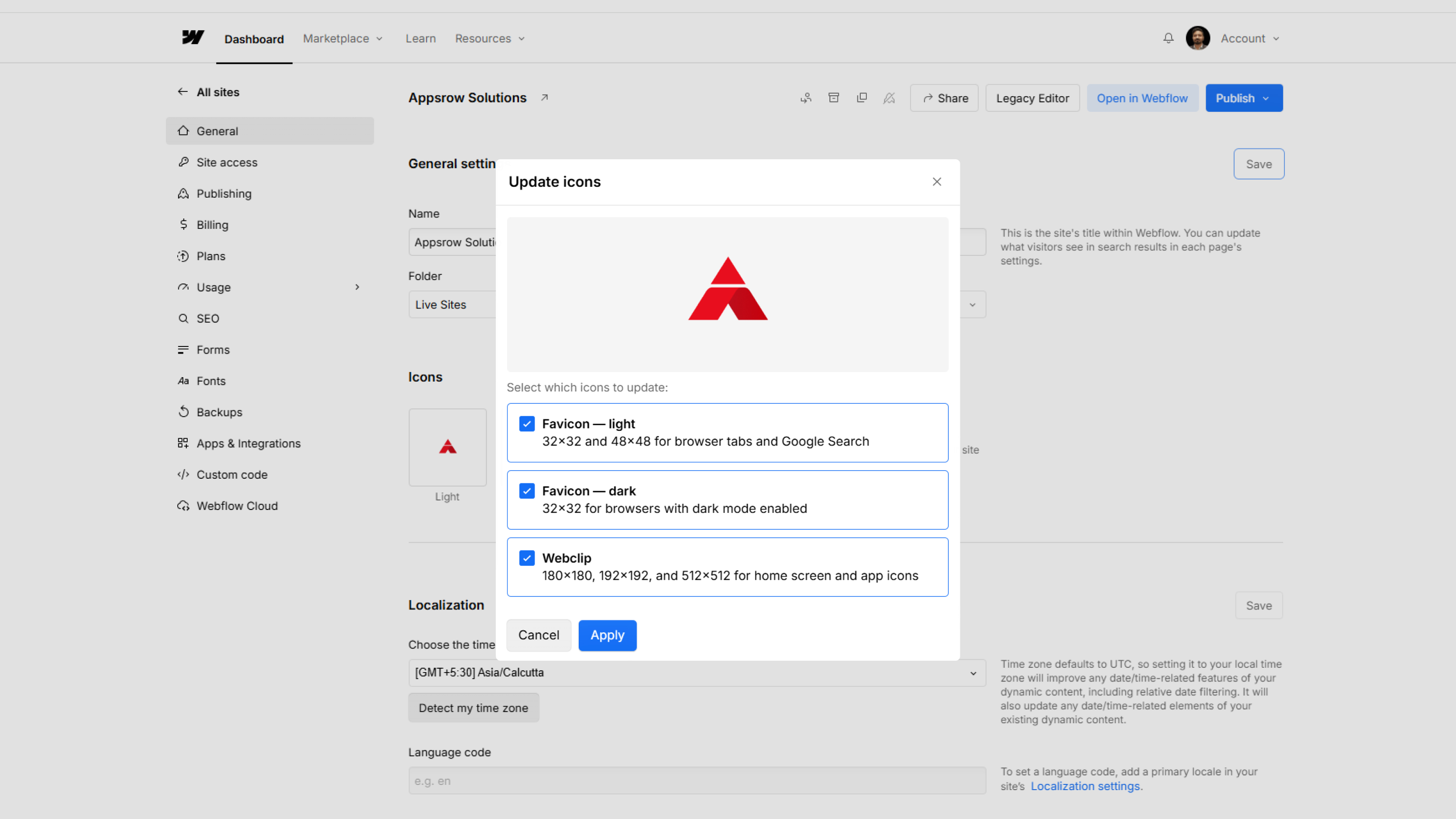
There's a certain kind of product update that doesn't make headlines, but makes your day a little better every time you open a browser. Webflow's latest favicon update is exactly that.
Launched on May 5, 2026, the update brings two meaningful changes to how favicons work inside Webflow - auto-resizing and dark mode support. Let's break down what actually changed and why it matters.
If you've managed Webflow sites for a while, you know the drill. You'd get a logo file from a client, open a favicon generator tool, download a zip, sort through the sizes, figure out which one goes where, upload it, and pray it looked okay in the browser tab.
Multiply that by a dozen client sites and it's the kind of low-grade friction that eats up time without anyone noticing - until you're knee-deep in 192×192 PNG files at 11pm.
One Upload. Every Size. Done.
The new behavior is refreshingly simple. You upload a single square image inside Site Settings, and Webflow automatically generates every size the site needs:
Accepted formats include PNG, JPG, GIF, ICO, and SVG. If you upload an SVG, Webflow converts it to PNG automatically to keep things compatible across browsers.
No plugins. No external tools. No more favicon-generator.org tabs open at midnight.
This is the part I think will matter most to designers who care about brand details.
Here's the problem: a lot of logos are designed with a white or light-colored icon. On a light browser tab, that's fine. But switch to dark mode - which a huge portion of users now prefer - and your favicon either vanishes or looks muddy against the dark chrome.
Webflow now lets you upload a second favicon specifically for dark mode. The platform uses the browser's prefers-color-scheme media query to detect which theme the visitor is using and serve the right version. So your light logo gets shown to light mode users, and your dark-mode-optimized icon shows up for everyone else.
The dark mode favicon option appears in Site Settings once you've uploaded your primary (light theme) favicon. It's optional - but for anyone serious about brand consistency across different environments, it's worth spending five minutes on.
Google uses a 48×48 favicon when displaying search results. That little icon next to your URL in the search listing is part of how users visually identify your site - especially when they're scanning through multiple results.
Previously, you had to make sure you'd specifically uploaded the right size for this to render correctly. Now, Webflow generates the 48×48 size automatically as part of the new favicon pipeline. No extra steps.
It's a small thing, but brand presence in search results adds up over time.
Head into your Webflow project → Site Settings → Favicon & Webclip. Upload your image, and if you want dark mode support, the option will appear below once your primary favicon is set.
Full documentation is available on the Webflow Help Center if you want to dig into the specifics.
Webflow continues to ship these small-but-meaningful workflow improvements alongside bigger platform features - and honestly, these are often the updates that save the most real-world time.
Content has become the backbone of modern websites. Whether it is blogs, landing pages, or product descriptions, consistent and high-quality content directly impacts visibility and conversions. However, creating and managing content at scale remains a major challenge.
By integrating Webflow with Claude AI, businesses can automate content creation, streamline workflows, and scale faster without compromising quality. This guide explains how to build a complete automation system using these tools.
Webflow is a visual development platform with a flexible CMS, while Claude AI is an advanced language model capable of generating and optimizing content. Together, they create an automated pipeline where content is generated, processed, and published efficiently.
The process starts with a trigger such as a keyword or scheduled job. Claude AI generates structured content, and the backend pushes it into Webflow CMS using APIs. This allows continuous content creation without manual effort.
Install required dependencies:
npm install axios dotenvConfigure environment variables:
CLAUDE_API_KEY=your_claude_api_key
WEBFLOW_API_KEY=your_webflow_api_key
COLLECTION_ID=your_collection_id
const axios = require('axios');

async function generateContent(topic) {
  const response = await axios.post(
    'https://api.anthropic.com/v1/messages',
    {
      model: 'claude-3-opus-20240229',
      max_tokens: 1500,
      messages: [
        {
          role: 'user',
          content: `Write a detailed SEO blog on ${topic}`,
        },
      ],
    },
    {
      headers: {
        'x-api-key': process.env.CLAUDE_API_KEY,
      },
    },
  );

  return response.data.content[0].text;
}
async function publishToWebflow(content, slug) {
  await axios.post(
    `https://api.webflow.com/collections/${process.env.COLLECTION_ID}/items`,
    { fields: { name: slug, slug: slug, 'post-body': content, _draft: false } },
    { headers: { Authorization: `Bearer ${process.env.WEBFLOW_API_KEY}` } },
  );
}
(async () => {
  const topic = "Webflow automation";
  const content = await generateContent(topic);

  if (content) {
    await publishToWebflow(content, "webflow-automation");
  }
})();
Automation becomes powerful when applied at scale. You can loop through multiple keywords or topics and generate content for each automatically. This approach is ideal for SEO-driven strategies.
async function optimizeContent(content) {
  return await generateContent(`Improve SEO:\n${content}`);
}
async function updateContent(id, updated) {
  await axios.patch(
    `https://api.webflow.com/collections/${process.env.COLLECTION_ID}/items/${id}`,
    {
      fields: { "post-body": updated }
    },
    {
      headers: {
        Authorization: `Bearer ${process.env.WEBFLOW_API_KEY}`
      }
    }
  );
}
Use structured prompts for consistent results. Validate AI-generated content before publishing. Implement error handling and monitor API usage. Maintain brand voice across all outputs.
AI-generated content may require refinement. API limits can affect scaling. Quality control and duplication checks are essential for maintaining standards.
Automating content creation in Webflow using Claude AI allows businesses to scale efficiently and reduce manual effort. By building structured workflows and integrating AI into CMS processes, you can create a system that continuously generates and improves content.
This approach represents the future of web development, where automation and intelligence work together to deliver better results faster.
The way websites are built is changing rapidly. What used to require manual updates, content teams, and repetitive workflows can now be handled intelligently using AI. In 2026, one of the most powerful combinations enabling this shift is the integration of Webflow with Claude AI.
Webflow gives you a visual development environment and a flexible CMS. Claude AI adds the ability to generate, analyze, and automate content using natural language. When these two systems are connected, you move from managing a website to operating an intelligent content engine.
This guide focuses on the technical side of the integration. You will learn how the connection works, how to implement it step by step, and how to build scalable workflows using APIs and automation.
Integrating Webflow with Claude AI means enabling an AI model to interact directly with your website’s content and structure. Instead of manually editing CMS entries or publishing new pages, you can delegate these tasks to an AI system.
This interaction is enabled through three key layers:
Together, these layers allow Claude to perform actions such as:
The simplest method is using the built-in connector available inside Claude. This approach does not require coding and is designed for quick setup.
Once connected, Claude gains controlled access to your Webflow workspace. You can instruct it using prompts, and it will perform actions such as creating blog posts or updating content.
This approach works well for teams that want speed without dealing with backend infrastructure.
For more advanced use cases, Webflow provides support through the Model Context Protocol server. This setup enables continuous interaction rather than isolated API calls.
With MCP, Claude can maintain context and perform ongoing operations such as bulk updates, live edits, and workflow automation.
This approach is suitable for large projects where content is updated frequently or dynamically.
The most flexible approach is building your own backend that connects Claude AI with Webflow APIs. This gives you complete control over how data flows and how automation is handled.
You can define custom workflows, implement validation logic, and integrate additional services.
Start by creating a Node.js environment. This backend will act as the bridge between Claude and Webflow.
mkdir ai-webflow-projectcd ai-webflow-projectnpm init -yInstall required dependencies:
npm install axios dotenv
Create a .env file to store sensitive credentials securely.
CLAUDE_API_KEY=your_claude_api_keyWEBFLOW_API_KEY=your_webflow_api_keyCOLLECTION_ID=your_collection_idKeeping API keys outside your source code is critical for security.
The first step in automation is generating content using Claude AI. This is done by sending a structured request to the Claude API.
const axios = require('axios');
async function generateContent() {
  const response = await axios.post(
    'https://api.anthropic.com/v1/messages',
    {
      model: 'claude-3-opus-20240229',
      max_tokens: 1200,
      messages: [
        { role: 'user', content: 'Create a detailed article about AI-driven websites in 2026' },
      ],
    },
    { headers: { 'x-api-key': process.env.CLAUDE_API_KEY, 'Content-Type': 'application/json' } },
  );
  return response.data.content[0].text;
}This function sends a prompt and retrieves generated text. You can customize the prompt to control tone, structure, and output length.
After generating content, the next step is pushing it into your Webflow CMS.
async function publishContent(content) {
  await axios.post(
    `https://api.webflow.com/collections/${process.env.COLLECTION_ID}/items`,
    {
      fields: {
        name: 'AI Generated Article',
        slug: 'ai-generated-article',
        _archived: false,
        _draft: false,
        'post-body': content,
      },
    },
    {
      headers: {
        Authorization: `Bearer ${process.env.WEBFLOW_API_KEY}`,
        'Content-Type': 'application/json',
      },
    },
  );
}This API call creates a new CMS item and publishes it instantly.
You can now connect both steps into a single automated process.
(async () => {
  const content = await generateContent();
  if (content) {
    await publishContent(content);
    console.log('Content successfully published');
  } else {
    console.log('Content generation failed');
  }
})();This script demonstrates a complete automation pipeline from content generation to publishing.
Webflow forms can be extended with AI to process and analyze user input. Instead of simply storing submissions, you can extract insights and automate responses.
For example, when a user submits a form, the data can be sent to your backend, processed by Claude, and classified based on intent or urgency.
Classify this lead as high, medium, or low priority based on intentThis allows you to build intelligent systems such as:
If you need continuous interaction between Claude and Webflow, you can use the MCP server.
Install the server:
npm install -g @webflow/mcp-server
Start the service:
webflow-mcp startOnce connected, Claude can interact with your Webflow project in real time, enabling continuous updates and dynamic workflows.
Generate and publish content without manual intervention, reducing dependency on content teams.
Build landing pages automatically based on campaigns or user behavior.
Analyze existing content and improve it for better performance and SEO.
Update large datasets quickly using automated scripts.
Both APIs have request limits. You should implement batching or queuing.
AI responses may vary. Use prompt engineering to improve reliability.
Ensure tokens are valid and permissions are correctly configured.
AI-powered websites are moving toward full automation. Instead of managing individual pages or content pieces, developers will manage systems that continuously generate and optimize digital experiences.
The integration of Webflow with Claude is a step in that direction. It enables faster execution, smarter workflows, and scalable growth.
Connecting Webflow with Claude AI transforms how websites are built and maintained. It replaces manual processes with intelligent automation and opens the door to scalable content systems.
Whether you choose a simple connector or build a custom backend integration, the outcome is the same. You gain speed, efficiency, and the ability to operate at a scale that was previously difficult to achieve.
As AI continues to evolve, integrations like this will become a standard part of modern web development. Adopting them early gives you a strong advantage in building future-ready digital products.
Parth Parmar is a Webflow expert in India and CTO at Appsrow, specializing in SaaS and enterprise website development.
He specializes in Webflow development, CMS architecture, performance optimization, and integrations.
Yes, he focuses on building scalable and high-performance SaaS websites.
SaaS, AI, enterprise, and technology-driven businesses.
Yes, including migration from WordPress, custom code, and other platforms.
A strong focus on performance, scalability, and conversion optimization.
From brand identity to Webflow development and marketing, we handle it all. Trusted by 300+ global startups and teams.
.png)
.png)
