Webflow
June 25, 2025
# min Read




Explore expert insights, practical guides, and proven strategies to help you build, scale, and optimize high-performing digital experiences.
In the fast-changing world of web development, choosing the right platform is key. It is vital for building a successful online presence. Of the many options, Webflow is a top choice for businesses and developers. This blog explains why to choose Webflow for web development. It highlights its unique features and benefits.
One of the standout reasons to choose Webflow is its no-code approach to web development. Webflow lets designers and businesses build stunning websites. They can do it without any coding. This accessibility lets users, with various tech skills, create their visions. It's ideal for small businesses and startups wanting a quick online presence.
Webflow has a powerful visual editor. It enables users to craft websites with ease. Its drag-and-drop feature lets users customize layouts, fonts, and colors. This ensures the final product aligns with their brand identity. This design flexibility helps businesses create unique, engaging websites. It helps them stand out in a crowded digital space.
In today’s mobile-first world, having a responsive website is non-negotiable. Webflow makes it easy to create responsive designs. They will look great on all devices. The platform generates responsive layouts. Users can then customize their designs for different screen sizes without coding. This feature improves user interaction and increases search engine rankings.
Another big advantage of Webflow is its built-in CMS. It enables users to control changing information with simplicity. Businesses can create and organize content, like blogs and portfolios, on one platform. This integration streamlines content management. It helps teams keep their websites updated and relevant.
When it comes to online visibility, SEO is crucial. Webflow fosters search engine optimization. It lets you customize meta titles, descriptions, and image alt text. The platform generates clean, semantic code. It boosts site performance and search engine rankings. Using Webflow, businesses can optimize their websites for search engines. This will drive more organic traffic.
For businesses looking to sell products online, Webflow provides robust e-commerce solutions. Users build exhaustive online marketplaces, track stock levels, and execute transactions correctly. This all-in-one approach removes the need for third-party plugins. It reduces security risks and ensures a smoother shopping experience for customers.
Webflow has a vibrant community of designers and developers. They share resources, tips, and best practices. This supportive environment fosters collaboration and innovation. It helps users find solutions to their challenges. Also, Webflow has extensive docs and support. They ensure users get help.
Webflow streamlines the design and development process, saving valuable time. Designers can prototype on the platform. This allows for real-time feedback and iterations. This efficiency cuts website launch time. Businesses can then go to market faster and stay ahead of the competition.
In conclusion, Webflow is the best choice for web development. It has a unique blend of features. They include no-code tools, design flexibility, and responsive features. It also has a CMS, SEO tools, e-commerce solutions, and a strong community. It accelerates the development process. Using Webflow, businesses can create stunning, functional websites. These sites will meet their needs and resonate with their audience.
If you want to boost your online presence, try Webflow for web development. Webflow's powerful features and easy interface can help your business thrive online.
Webflow
No Code
Introduction to Squarespace and Webflow
Squarespace is renowned for its user-friendly interface and visually appealing templates. It's an all-in-one platform that caters primarily to users looking for simplicity and elegant design solutions. The platform offers a range of pre-built templates that are easy to customize without needing extensive technical knowledge.
Webflow, on the other hand, is a more advanced tool that empowers users with greater design flexibility and customization options. It combines a visual drag-and-drop editor with the ability to manipulate code, making it ideal for designers and Webflow Developers who want more control over their website's look and functionality. Webflow also supports dynamic content and robust eCommerce capabilities.
Squarespace templates are known for their polished designs and simplicity. The platform offers a straightforward drag-and-drop interface that allows users to customize layouts, fonts, colors, and more. It's ideal for users who prioritize ease of use and aesthetics over intricate design control.
Webflow provides unparalleled design freedom with its visual editor and full access to CSS and HTML. Designers can create highly customized websites that precisely match their vision. It's suitable for those who require extensive design control and want to build unique, pixel-perfect websites.
Squarespace excels in user-friendliness, offering intuitive tools that guide users through the website building process. It requires minimal technical knowledge, making it accessible to beginners and those without coding experience.
Webflow has a steeper learning curve compared to Squarespace due to its advanced features. While the visual editor simplifies design tasks, understanding and utilizing its full potential may require some initial investment in learning.
Squarespace includes essential SEO features such as customizable meta tags, clean HTML markup, and mobile-friendly design. It's designed to help websites rank well on search engines with minimal effort.
Webflow provides robust SEO tools including customizable meta titles, descriptions, and URLs. Advanced users can take advantage of its clean code output and control over site structure to optimize for SEO performance.
Squarespace offers integrated eCommerce features that allow users to set up online stores quickly. It includes inventory management, secure payments, and customizable product pages. It's suitable for small to medium-sized online businesses.
Webflow's eCommerce capabilities are extensive, allowing for highly customizable online stores with advanced features like dynamic product lists and custom checkout flows. It's favored by businesses needing scalability and design flexibility in their eCommerce setup.
Squarespace offers tiered pricing plans starting from a basic personal plan to more advanced business and eCommerce plans. Pricing is transparent with no hidden fees, and it includes hosting and customer support.
Webflow also offers tiered pricing plans based on website complexity and eCommerce needs. It provides a free plan for basic usage and paid plans that scale with additional features. Users can opt for CMS and eCommerce functionality based on their requirements.
Choosing between Squarespace and Webflow depends largely on your specific requirements, technical expertise, and design preferences. If you prioritize ease of use, elegant design templates, and straightforward website management, Squarespace may be the better choice for you. On the other hand, if you seek advanced design control, customization freedom, and robust eCommerce capabilities, Webflow offers a powerful platform to create unique, high-performing websites.
UI/UX
Tech Comparison
Webflow
No Code
Search engines like Google prioritize mobile-friendly websites in their rankings. According to Hubspot, 68% of SEO experts believe that businesses should invest in mobile optimization. By adopting Webflow mobile responsive design, you can significantly enhance your search visibility and attract more organic traffic.
A mobile-optimized site allows users to navigate, read, and interact with your content seamlessly, reducing bounce rates and increasing engagement. Uxcam reports that 74% of users are likely to return to a website that offers a robust user experience, which can lead to higher conversion rates.
With 85% of adults using smartphones in the U.S., optimizing your site for mobile is essential to reach this vast audience. A mobile-first approach ensures you cater to the growing number of mobile-only internet users, allowing your business to capture a larger share of the market.
Responsive design is the cornerstone of Webflow mobile optimization. It allows your website to adapt seamlessly to various screen sizes.
Utilize Webflow's Breakpoints: Adjust your layout for Desktop, Tablet, and Mobile breakpoints. Always preview your site at each breakpoint to ensure optimal appearance and functionality.
Mobile-First Mindset: Start your design process with the smallest screens in mind, ensuring that essential features are mobile-friendly from the outset.
Scalable Layouts: Use Webflow's flexbox and grid layout options to create responsive designs that look great on all devices.
Optimize Typography: Adjust font sizes and spacing to enhance readability on smaller screens, using relative units like em and rem for flexibility.
Responsive Images: Leverage Webflow's image capabilities to ensure images resize appropriately without compromising load speed.
Mobile navigation should be intuitive and easy to use, as many users browse with one hand.
Mobile-Friendly Menus: Implement a hamburger menu or a bottom navigation bar to save space while providing easy access to key sections.
Prioritize Key Links: Ensure the most important navigation elements are easily accessible, even if it means simplifying your menu.
Tappable Buttons: Design buttons and links that are large enough (44x44 pixels) and spaced adequately to prevent accidental clicks.
Search Functionality: Include a visible search tool to help users quickly find the information they need.
Back to Top Button: Implement a floating button that allows users to return to the top of lengthy pages effortlessly.
Forms can be challenging on mobile, but optimizing them can significantly enhance user satisfaction.
Minimize Fields: Reduce the number of fields to make forms easier to complete on mobile devices.
Use Appropriate Input Types: Utilize HTML5 input types to ensure the correct keyboard layout appears for users.
Enable Auto-Fill: Allow browser auto-fill to speed up form completion.
Clear Labels and Placeholders: Provide straightforward labels and helpful placeholder text to guide users.
Instant Validation: Use inline validation to give users immediate feedback on any errors.
Since touch is the primary method of interaction on mobile, optimizing for touch is essential.
Increase Touch Target Sizes: Ensure all clickable elements are large enough and spaced apart to avoid mis-taps.
Touch-Friendly Carousels: If using sliders, ensure they support swiping gestures.
Avoid Hover Effects: Since mobile devices do not support hover states, ensure critical information is not hidden behind hover effects.
Smooth Scrolling: Ensure scrolling is fluid and responsive, avoiding unique scroll behaviors that may confuse users.
Page speed is critical for mobile users, as slow-loading sites lead to higher bounce rates.
Optimize Images: Compress images using Webflow’s tools without sacrificing quality, and consider next-gen formats like WebP.
Minify Code: Use Webflow's automated minification for JavaScript and CSS to reduce file sizes.
Enable Browser Caching: Utilize caching to speed up load times for returning visitors.
Prioritize Above-the-Fold Content: Structure your pages so that critical information loads first, enhancing perceived speed.
Content consumption on mobile differs from desktop, necessitating a tailored approach.
Easily Scanned Content: Use short paragraphs, bullet points, and clear headings to make text easier to digest.
Expandable Content Sections: Organize lengthy information using accordions or expandable sections.
Responsive Video: Ensure videos are responsive and do not require plugins to play.
Mobile-Friendly Tables: Use responsive designs for tables or alternative methods for displaying data.
Optimizing your Webflow site for mobile is an ongoing process that requires attention to detail and user-centric design. By implementing the best practices outlined above, you can enhance your Webflow mobile optimization, leading to better search engine rankings, increased engagement, and improved conversion rates.
Regular testing and iteration are crucial to maintaining an optimal mobile experience. Continuously monitor user behavior and preferences, and be ready to adapt your site to meet changing demands. By prioritizing mobile optimization, you are not just keeping up with trends; you are future-proofing your website for the increasing reliance on mobile internet usage.
Webflow
The world of web design and development is changing rapidly, and many are asking whether Webflow is leading this transformation. As a no-code platform, Webflow has gained popularity among designers and developers due to its easy-to-use interface and powerful features. This blog explores why Webflow might be the future of web design, backed by insights from industry experts.
Webflow stands out by combining the ease of a website builder with the flexibility of a coding platform. It allows designers to create custom, responsive websites using HTML, CSS, and JavaScript without needing extensive coding skills. This unique approach appeals to designers who want creative control while delivering high-quality websites.
No-code tools like Webflow are becoming increasingly popular as businesses seek faster, more efficient web solutions. With Webflow's intuitive interface, users can create professional-grade websites without the steep learning curve of traditional coding methods. This shift is empowering more people to bring their ideas to life.
Webflow has significantly influenced the web design and development landscape by democratizing website creation. It has opened opportunities for designers and developers of all skill levels, leading to increased innovation and creativity. By enabling the creation of visually stunning websites without sacrificing functionality, Webflow has set new standards for modern web design.
As Webflow evolves, it is poised to play a crucial role in the future of web design and development. Its growing user base and commitment to innovation suggest it will become a preferred platform for creating cutting-edge websites. Key areas where Webflow is likely to excel include:
1. Ecommerce: Webflow's robust ecommerce features make it a top choice for businesses looking to sell products online. Its drag-and-drop interface simplifies the creation of product and checkout pages, ensuring a seamless user experience.
2. Headless CMS: Webflow's powerful content management system (CMS) allows for highly customizable, content-driven websites. This flexibility is essential for businesses aiming to create unique online experiences.
3. Interactions and Animations: Webflow's user-friendly tools for creating complex interactions and animations make it a favorite among designers, enhancing the overall user experience.
In summary, Webflow's innovative approach to web design and development, along with the growing demand for no-code tools, indicates that it may indeed be the future of the industry. As Webflow continues to expand its capabilities, it will shape how websites are created in the coming years.
Whether you are an experienced designer or new to web design, Webflow provides a powerful platform for creating stunning, functional websites. By adopting Webflow's no-code approach, designers and developers can focus on crafting exceptional user experiences without the complexities of traditional coding.
Webflow
Design Inspiration
Webflow is a visual website builder. It lets users create custom sites without coding. Its high customization and design control appeal to designers and creatives. Webflow's pricing starts at $14 per month for the basic plan. More advanced options are available for larger businesses.
Shopify is a dedicated eCommerce platform. It prioritizes ease of use and features for online selling. Its ease of use and support make it popular with entrepreneurs. Shopify's basic plan costs $21 per month. It has several tiers for different business sizes.
Webflow excels in customization, allowing users to create unique and visually appealing websites. Its visual editor provides access to CSS, JavaScript, and HTML, enabling designers to craft tailored experiences. In contrast, Shopify offers a variety of templates but lacks the same level of design flexibility, focusing more on functionality and ease of use.
Shopify is specifically built for eCommerce, featuring robust tools such as abandoned cart recovery, automated shipping calculations, and extensive payment options. Webflow, while it has e-commerce capabilities, is more limited in this area and may require additional integrations for advanced features.
Shopify's user-friendly interface makes it easy for beginners to set up and manage their online stores. Webflow, while powerful, has a steeper learning curve, which may deter those unfamiliar with web design principles.
Both platforms have competitive pricing structures, but Shopify's entry-level plan is slightly higher. However, Shopify's comprehensive eCommerce features may justify the cost for many users.
The choice between Webflow and Shopify ultimately depends on your specific business needs. If you prioritize design flexibility and customization, Webflow may be the better option. However, if you seek a straightforward, feature-rich eCommerce platform with extensive support, Shopify is likely the superior choice.
In summary, Webflow vs Shopify boils down to whether your focus is on unique design or ease of use and robust eCommerce functionality. Evaluate your priorities carefully to determine which platform aligns best with your business goals.
Webflow
No Code
Ecommerce
Tech Comparison

Webflow: Known for its advanced design capabilities, Webflow offers complete control over HTML, CSS, and JavaScript. It's a favorite among designers and developers who want to create highly customized and unique websites.
Wix: Offers a user-friendly drag-and-drop editor, making it accessible for beginners. While it provides numerous templates and customization options, it doesn't offer the same level of design flexibility as Webflow.

Webflow: While powerful, Webflow has a steeper learning curve due to its advanced features. It's ideal for users who have some technical knowledge or are willing to invest time in learning.
Wix: Extremely easy to use with its intuitive drag-and-drop interface. It's perfect for beginners and those who need a website up and running quickly without much hassle.
Webflow: Offers robust SEO tools, including custom meta tags, URL structures, and automatic sitemaps. Its clean code and fast load times also contribute to better SEO performance.
Wix: Provides basic SEO tools suitable for most users. While it has improved over the years, it still doesn't match Webflow's advanced SEO capabilities.
Webflow: Strong e-commerce capabilities with customizable checkout processes, payment gateways, and dynamic content. Ideal for businesses looking for a tailored e-commerce experience.
Wix: Offers solid e-commerce functionality with easy setup and management. Suitable for small to medium-sized online stores, though it may lack some advanced features available in Webflow.

Webflow: Pricing can be higher due to its advanced features and customization options. Plans start at around $12 per month for basic sites, with e-commerce plans starting at $29 per month.
Wix: Generally more affordable, with plans starting at around $14 per month. E-commerce plans start at $23 per month, making it a budget-friendly option for many users.
Webflow: Provides extensive documentation, tutorials, and community forums. Direct customer support is available, but response times can vary.
Wix: Offers 24/7 customer support via phone, email, and chat, making it a reliable option for users who might need immediate assistance.
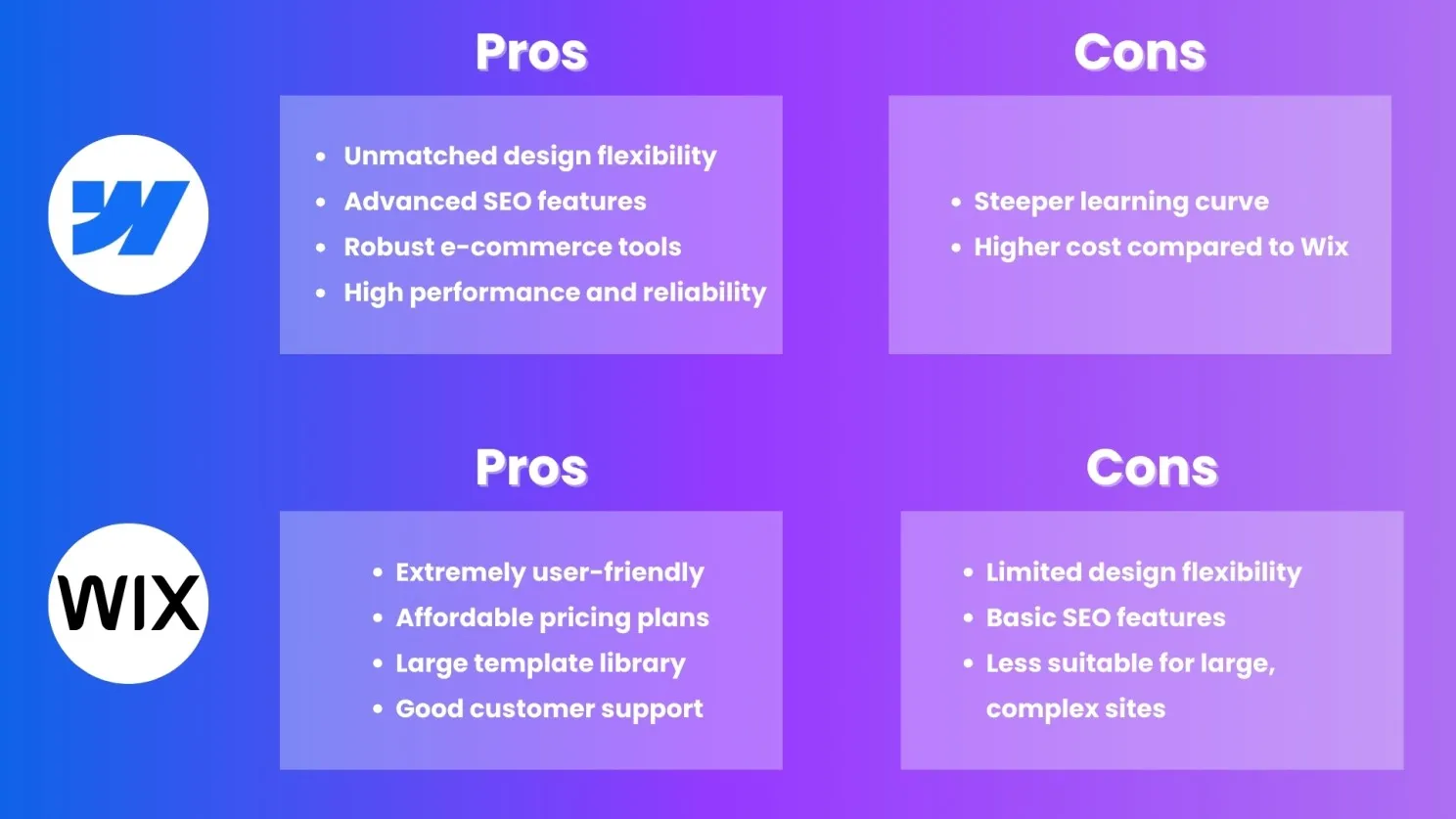
Both Webflow and Wix have their strengths and cater to different user needs.
Choose Webflow if you need advanced design flexibility, superior SEO capabilities, and customized e-commerce features.
Choose Wix if you prioritize ease of use, affordability, and robust customer support.
Ultimately, the choice depends on your specific requirements and technical expertise. Evaluate your needs carefully to select the platform that aligns best with your goals.
By comparing Webflow vs Wix based on these key aspects, you can make a more informed decision on which platform will best serve your website-building needs.
Need Guidance Building Your Website? 📞Book a 30-Minute Free Call with us to discuss your project and get expert advice on which platform is best for you.
No Code
Tech Comparison
June 25, 2025
Discover why Webflow is an excellent choice for small to mid-sized businesses. See how its easy interface, customization, and SEO features can help you. It can help you create a results-driven, professional website.
In today's digital era, having a strong online presence is crucial for businesses of all sizes. As a small to mid-sized business owner, you need a website. It must look great and showcase your products or services. It should also build your brand and drive sales. Webflow is an excellent choice for your growing business. It has features that make it ideal for building and managing your website.
User-Friendly Interface: A key advantage of Webflow is its drag-and-drop editor. It's very intuitive. You can quickly learn to use Webflow's design tools. They let you build and customize your website without coding. You don't need to be tech-savvy. This makes Webflow accessible to business owners from various backgrounds.
Extensive Customization: While platforms like WordPress often need plugins and custom development to achieve specific functionalities, Webflow provides a high level of customizability out of the box. You can customize your website to match your brand and business needs.
SEO-Friendly Features: SEO is key for driving organic traffic to your site. Webflow is built with SEO in mind, offering tools that help you optimize your site easily. This includes customizable meta titles, descriptions, and image alt text. It also includes clean, semantic code. It boosts your site's performance and search ranking.
Website Maintenance: It requires regular updates and security checks. This can be time-consuming and hard to do. Webflow takes care of these aspects. Your site will be secure and up to date. It lets you run your business. You won't worry about your website's tech.
Reduced Dependence on Developers: A key benefit of Webflow is that it requires fewer developers. You may still need their help with advanced customizations. Webflow's streamlined design lets business owners manage their websites with clarity.
1. Explore Templates: Start by exploring Webflow's extensive library of templates. Select an option that mirrors your industry's profile and required features. Templates adapt to your needs, conforming to your exact specifications.
2. Set Up Your Site: Create a Webflow account and set up your site. Webflow offers a variety of plans, so choose one that fits your business needs.
3. Customize with the Visual Editor: Use Webflow's visual editor to customize your template. Change colors, fonts, and layouts to match your brand. Add your content and adjust sections to fit your business needs.
4. Use Webflow's SEO tools to optimize your site for search engines.
5. Launch Your Site: Once you're satisfied with your design and content, it's time to launch your site. Webflow's hosting solution ensures your site is fast and secure.
Webflow is great for small to mid-sized businesses. It helps them make a professional, high-performing website. Its easy-to-use interface and strong SEO tools are perfect for your growing business. It has extensive customization options and is easy to maintain. Webflow reduces the need for developers. It lets you manage your website. So, you can focus on what matters—growing your business.
If you want to boost your online presence, choose Webflow. Webflow's powerful features and easy interface can help you. It can create a website that looks great and drives business results.
Digital Marketing
Webflow
Startup & Business
Webflow simplifies on-page SEO by providing intuitive tools to edit meta titles, descriptions, and URL slugs. These elements help search engines understand your content and improve click-through rates (CTR).
Actionable Tip: Use concise and keyword-rich meta titles and descriptions for every page.
A well-structured site is easier for search engines to crawl and index. Webflow allows you to create clear hierarchies using folders and logical navigation menus.
Pro Tip: Ensure all key pages are linked from your homepage to enhance internal linking and crawlability.
Google prioritizes mobile-friendly websites in its rankings. Webflow’s responsive design features make it easy to create sites that look great on all devices.
Actionable Tip: Use Webflow’s responsive design tools to ensure your content adapts to various screen sizes without losing quality.
Large image files can slow down your website, negatively impacting both user experience and SEO. Webflow’s image compression tools help you reduce file sizes without compromising quality.
Pro Tip: Use WebP format for faster loading times.
Alt text improves accessibility and helps search engines understand the content of your images. Webflow makes it easy to add alt text for every image on your site.
Actionable Tip: Write descriptive and keyword-rich alt text for better SEO.
Schema markup helps search engines display rich snippets in search results, such as reviews, FAQs, and product information. Webflow supports custom code, allowing you to add schema markup manually.
Pro Tip: Use a schema markup generator to create structured data for your site.
Webflow’s hosting is powered by Amazon Web Services (AWS) and Fastly, ensuring fast loading times. However, additional optimizations can further boost performance.
Actionable Tip: Minimize JavaScript, enable lazy loading for images, and use a Content Delivery Network (CDN).
Content is the backbone of SEO. Use Webflow’s CMS to publish high-quality blogs, case studies, and guides regularly.
Pro Tip: Conduct keyword research to align your content with what your audience is searching for.
Core Web Vitals are crucial for SEO and user experience. These include metrics like Largest Contentful Paint (LCP), First Input Delay (FID), and Cumulative Layout Shift (CLS).
Actionable Tip: Regularly test your Webflow site’s performance using tools like Google PageSpeed Insights and make necessary adjustments.
Backlinks from authoritative sites signal to search engines that your content is trustworthy and valuable. While this isn’t directly related to Webflow, your platform’s strong SEO foundation will amplify the benefits of backlinks.
Pro Tip: Reach out to industry blogs or collaborate with influencers to earn quality backlinks.
SEO is not a one-time effort. Use Webflow’s integration with analytics tools like Google Analytics and Google Search Console to track performance and identify areas for improvement.
Actionable Tip: Set monthly SEO audits to ensure your site remains optimized as search engine algorithms evolve.
Boosting your Webflow site’s SEO requires a mix of technical and creative strategies. By leveraging Webflow’s robust features and following these tips, you can improve your search engine rankings and attract more organic traffic.
Need help optimizing your Webflow site for SEO? Contact us today to discuss tailored strategies that drive results!
Webflow
Tips & Tutorials
SEO & Performance
One way to create a multi-language site is to duplicate your existing pages for each language. This method allows full control over content. But it can be tedious for larger sites. Make manual page updates when original content undergoes alteration. Also, hreflang tags are crucial. They help search engines recognize the different language versions of your pages.
Weglot is a no-code tool. It makes it easy to create a multi-language site in Webflow. It converts your content and provides dashboard access for streamlined control. Weglot lets you add language subdomains for better SEO. It also adds a front-end language switcher for users. This tool is perfect for those who want a quick setup. It requires no manual translations.
Polyflow is a Webflow-customized solution that suits users perfectly. It automates the translation of static and dynamic content. This makes it easier to manage many languages. Polyflow supports 120+ languages. It helps you reach a global audience without the tedious work of traditional methods. Its intuitive dashboard also allows for real-time monitoring of translation progress.
Webflow has introduced a focus on localization, which goes beyond simple translation. This feature lets you customize the website for different regions. You can change images and adjust the layout. The localization process has three parts: design, content translation, and publishing. This approach ensures language precision and cultural understanding across your site.
- Multilingual SEO: Ensure your chosen method supports SEO best practices. Using language subdomains and proper hreflang tags can enhance visibility in search engines.
- Editing Options: Choose tools that make it easy to edit and manage translations. This eliminates manual updates across many pages.
A seamless language switcher and relevant content can boost user engagement and satisfaction.
Creating a multi-language site in Webflow can be easy. The right tools and strategies can help. Each method—duplication, Weglot, or Polyflow—has unique benefits. They can help you reach and engage a diverse audience. Focus on multilingual SEO and user experience. It will maximize your multilingual website's impact.
Webflow

From brand identity to Webflow development and marketing, we handle it all. Trusted by 300+ global startups and teams.
The Appsrow blog covers Webflow tips, design trends, development best practices, SEO strategies, and digital marketing insights. We share practical knowledge from our Webflow development and design projects, offering actionable content created by experienced professionals who understand real-world challenges and solutions.
Appsrow publishes new blog articles regularly, typically multiple times per month covering various Webflow and web development topics. Our content often relates to Webflow SEO strategies and industry trends, maintaining a consistent publishing schedule that provides fresh, valuable content for our community of readers.
Yes, you can subscribe to receive notifications when Appsrow publishes new blog content via email or RSS feed. Subscribers get early access to valuable insights about Webflow design trends, development techniques, and exclusive content. Staying subscribed ensures you never miss important updates and expert tips.
Appsrow occasionally accepts high-quality guest posts from industry experts on relevant topics. We maintain strict quality standards to ensure content provides genuine value to our readers. Guest contributors from SaaS companies or agencies must demonstrate expertise and align with our content guidelines and editorial standards.
Yes, all Appsrow blog articles are optimized following best practices including keyword research, meta optimization, and structured content. We practice what we preach about Webflow SEO, and our blog serves as both an educational resource and demonstration of our expertise in content marketing and search optimization.
Absolutely! Appsrow encourages sharing our blog content on social media platforms to help others benefit from the information. Each article includes social sharing buttons, and articles about AI industry trends or Webflow tips often perform well on platforms like LinkedIn and Twitter within professional communities.
Yes, Appsrow occasionally publishes case studies showcasing successful client projects and results achieved. These real-world examples demonstrate our capabilities including Webflow migration success stories and provide practical insights into our methodology, approach to solving specific challenges, and quantifiable business outcomes.
Yes, Appsrow welcomes content suggestions from readers and considers them for future articles. We value community input and want to address topics that matter most, whether about conversion optimization techniques or Webflow best practices. Your suggestions help us create more relevant and valuable content.
Appsrow creates content for various skill levels, from beginners to advanced users, with clear indication of difficulty. Our tutorials include step-by-step instructions for Webflow design and development, with screenshots and practical examples making complex topics accessible without oversimplifying important concepts.
The Appsrow blog provides actionable insights that help improve your website, marketing efforts, and online presence. You can learn best practices for Webflow development, stay updated on industry trends, and discover solutions to common challenges, helping businesses make informed decisions about their digital strategies.