.png)
Webflow
May 6, 2026
# min Read




Explore expert insights, practical guides, and proven strategies to help you build, scale, and optimize high-performing digital experiences.
Webflow
AI & Automation
Tips & Tutorials
Webflow
AI & Automation
Webflow
AI & Automation
Tips & Tutorials
Webflow has become the go-to platform for designers and brands that want pixel perfect control without writing a single line of code. From SaaS startups to creative studios, the platform is powering some of the most visually striking websites on the internet right now.
In this blog, we have handpicked 10 of the best Webflow websites based on design quality, user experience, animations, and overall creativity. Every description below reflects what these sites look like today, based on live verification.
Let us dive in.
Website: appsrow.com
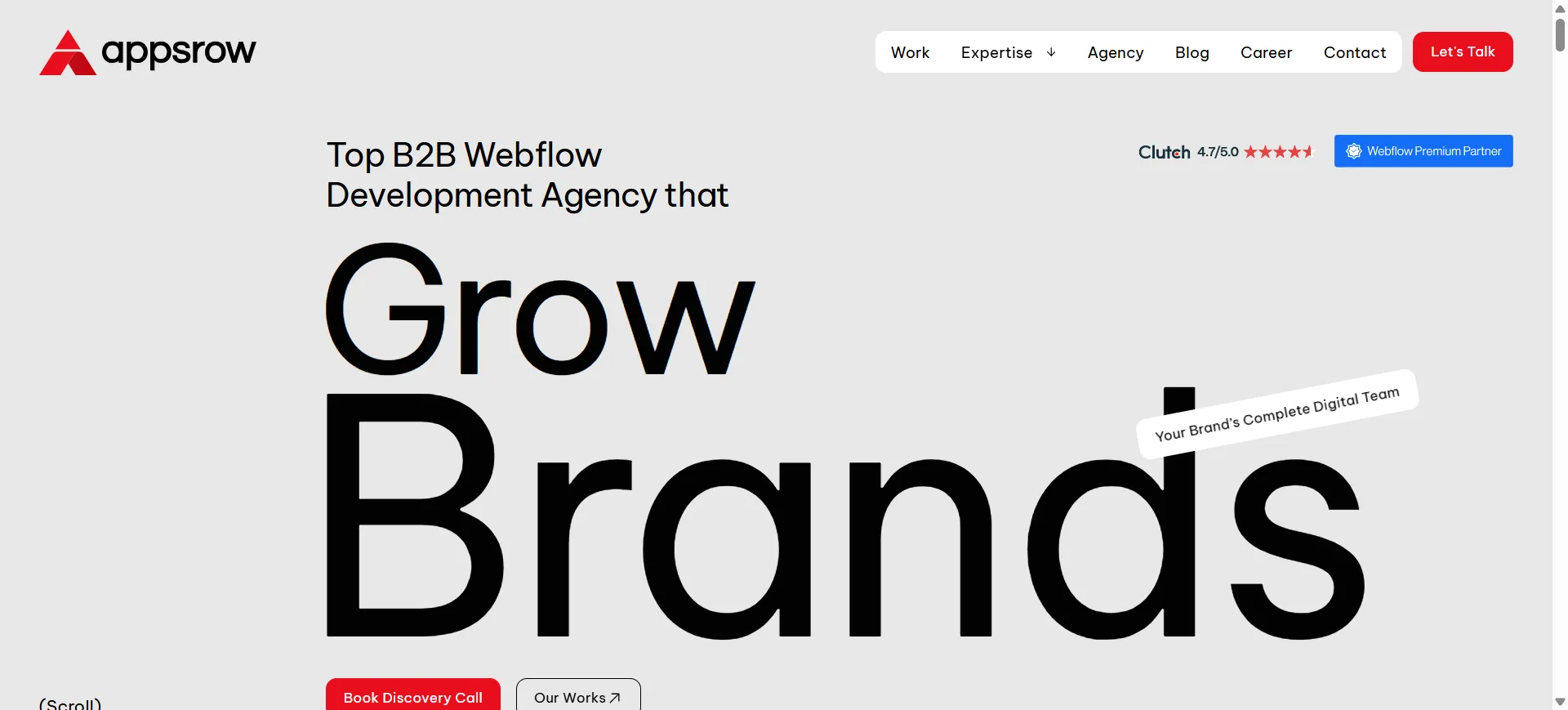
Appsrow is a Webflow Premium Certified Partner agency based in Ahmedabad, India, specializing in Webflow design and development for SaaS brands, startups, and modern businesses. Their own website is a showcase of everything they preach to clients.
What stands out:The current homepage leads with a bold headline, "Top B2B Webflow Development Agency that Grow Brands," paired with a full width hero video and strong trust badges (Clutch 4.7 rating, Webflow Premium Partner, Global Leader). The site uses scrolling rows of client logos across 28+ global brands, real project case studies with performance metrics visible (95+ speed, 100% accessibility), and testimonials from founders of actual client companies. The micro interactions and scroll based animations are restrained and purposeful, which is exactly how a Webflow agency site should feel.
Design takeaway: If you want visitors to trust your agency, your own website has to be your best work. Appsrow nails this with live proof points and zero fluff.
Website: anrok.com
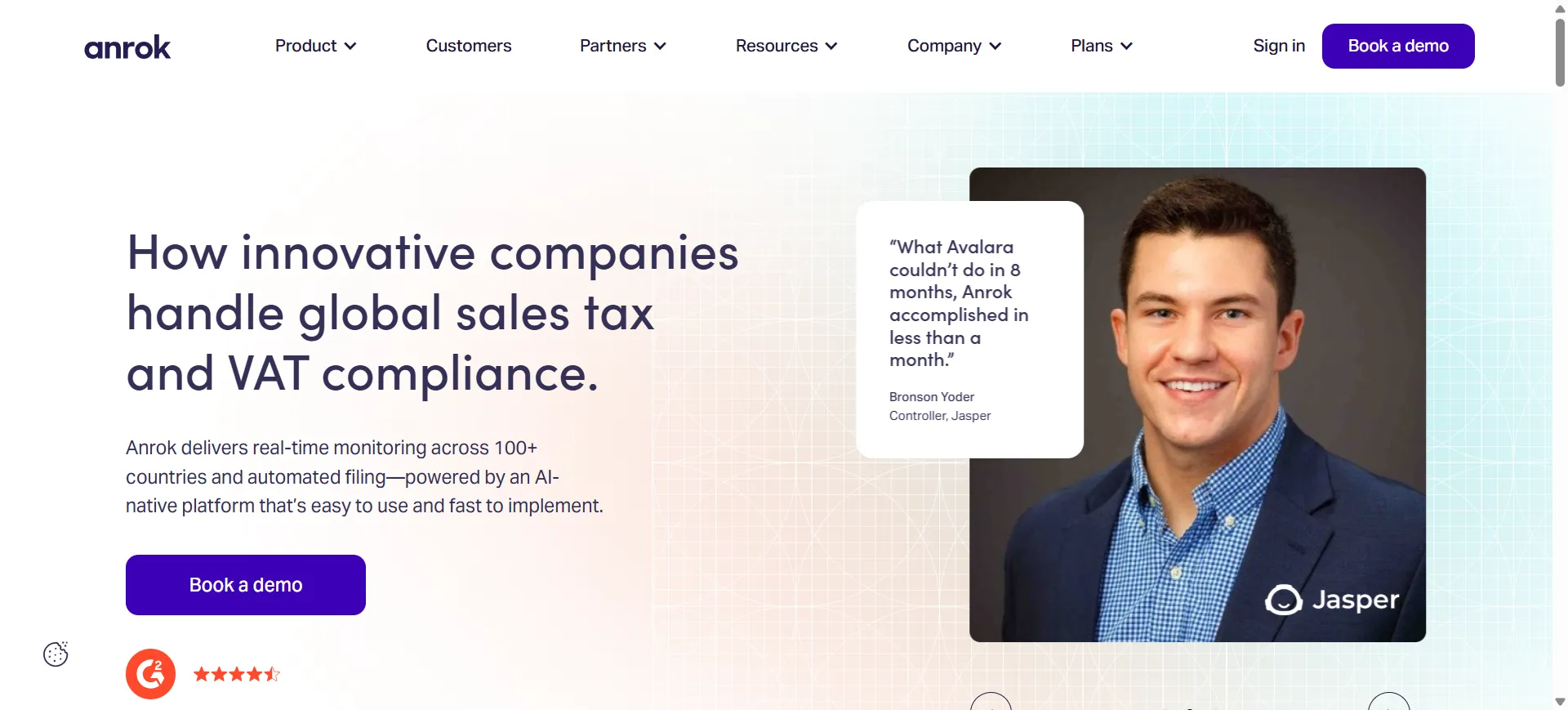
Anrok is a global sales tax and VAT compliance platform for modern SaaS companies. Their website turns a genuinely dry topic into something engaging through smart design choices.
What stands out:The current homepage opens with the headline "How innovative companies handle global sales tax and VAT compliance" and features Anrok Atlas, their new AI native tax interface, front and center. The site uses a clean type hierarchy, generous white space, and a striking scrolling strip of customer logos (Anthropic, Notion, Vanta, Cursor, Mercury, Cohere, and more). Customer quote cards with real photos build instant credibility. The restrained color palette keeps the focus on copy and product.
Design takeaway: White space plus high trust logos is a more effective combination than any animation.
Website: superlist.com
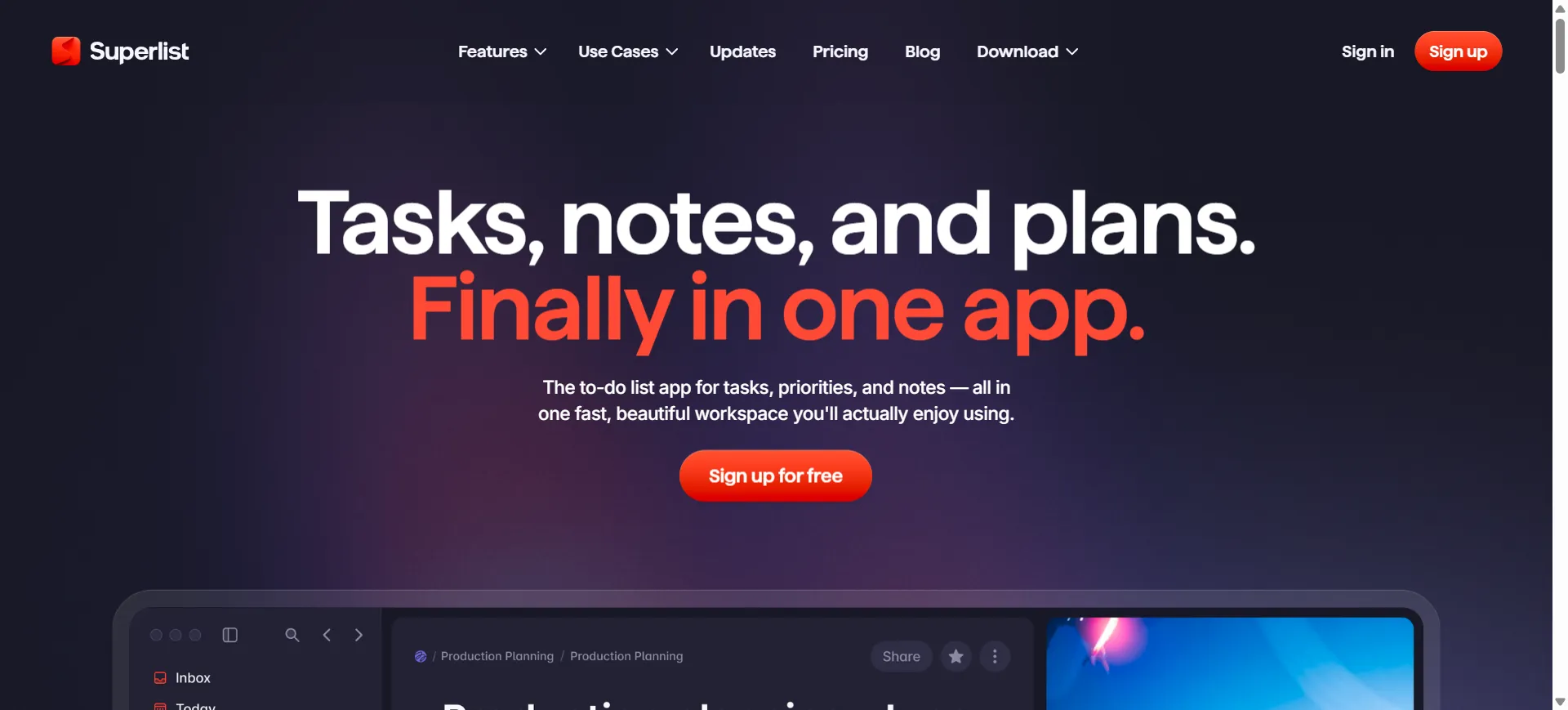
Superlist is built by the team behind Wunderlist and blends AI powered task management, meeting notes, and real time collaboration in one app.
What stands out:The homepage currently positions Superlist as the most beautifully designed task app of 2026. It uses a mix of polished product screenshots, playful color, and thoughtful micro interactions (the task completion sounds and toggle animations are famously delightful). Bold color blocks divide sections while the design system flexes between serious productivity and playful personality.
Design takeaway: You can be professional and playful at the same time if your design system is tight.
Website: rootly.com
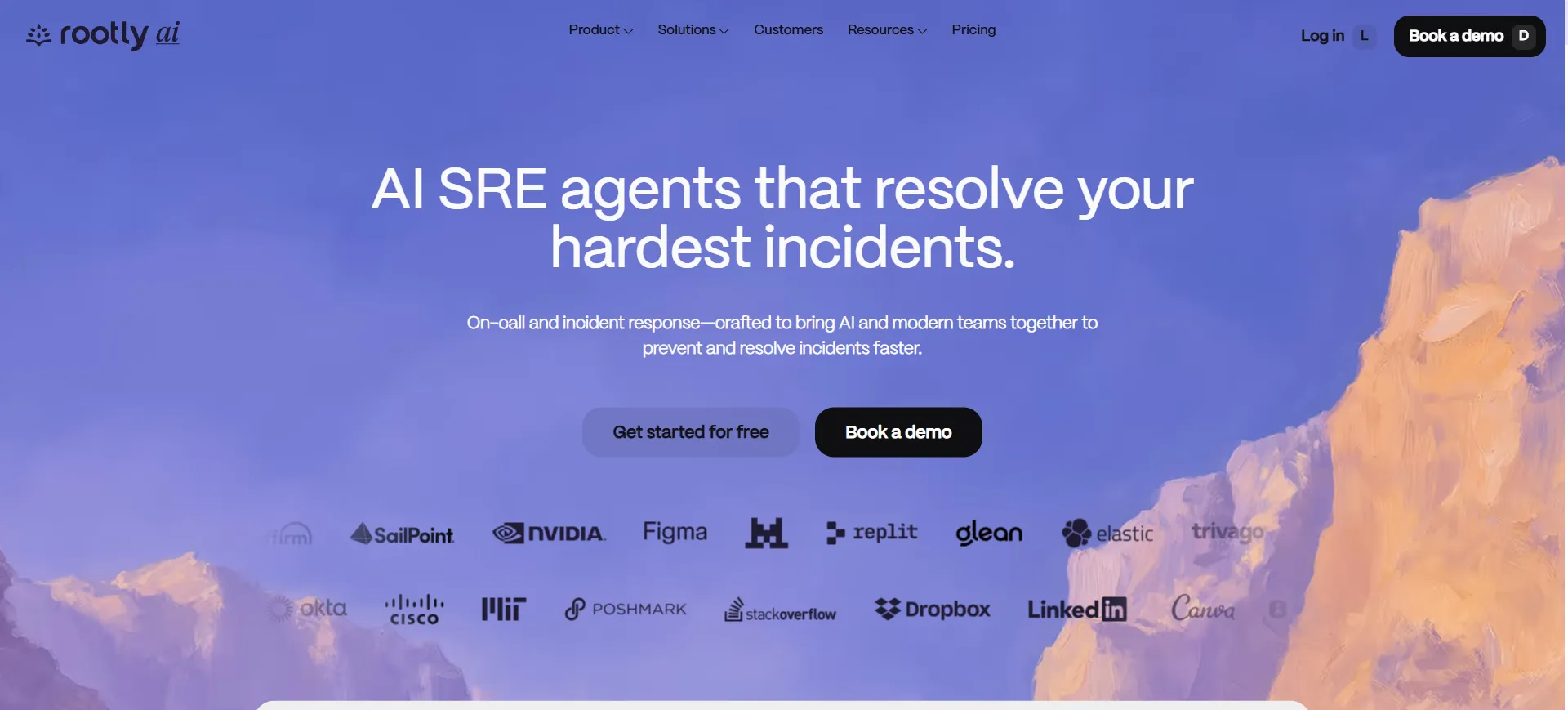
Rootly is an AI native incident management platform that lives inside Slack. Their website is a standout example of the 2026 trend of treating product UI as gallery art.
What stands out:The product screenshots are placed against impressionist style painted backdrops, which elevates the software as something carefully crafted rather than mass produced. This contrast between modern SaaS UI and classical illustration is visually arresting and instantly memorable, and it is specifically called out in Webflow's own 2026 design trends roundup.
Design takeaway: Pair your product UI with an unexpected visual backdrop to make it feel premium and intentional.
Website: riverside.fm

Riverside is a platform for recording high quality podcasts and video remotely. The website matches the professional vibe of its target audience, creators and podcasters.
What stands out:Riverside uses a dark theme punctuated by pops of accent color, which immediately communicates professionalism. The hero section features the platform in action, and trust signals like well known podcasters and brand logos are placed right below the fold to build credibility fast.
Design takeaway: Dark mode, when done well, signals premium and professional. Use it when your audience expects polish.
Website: modash.io
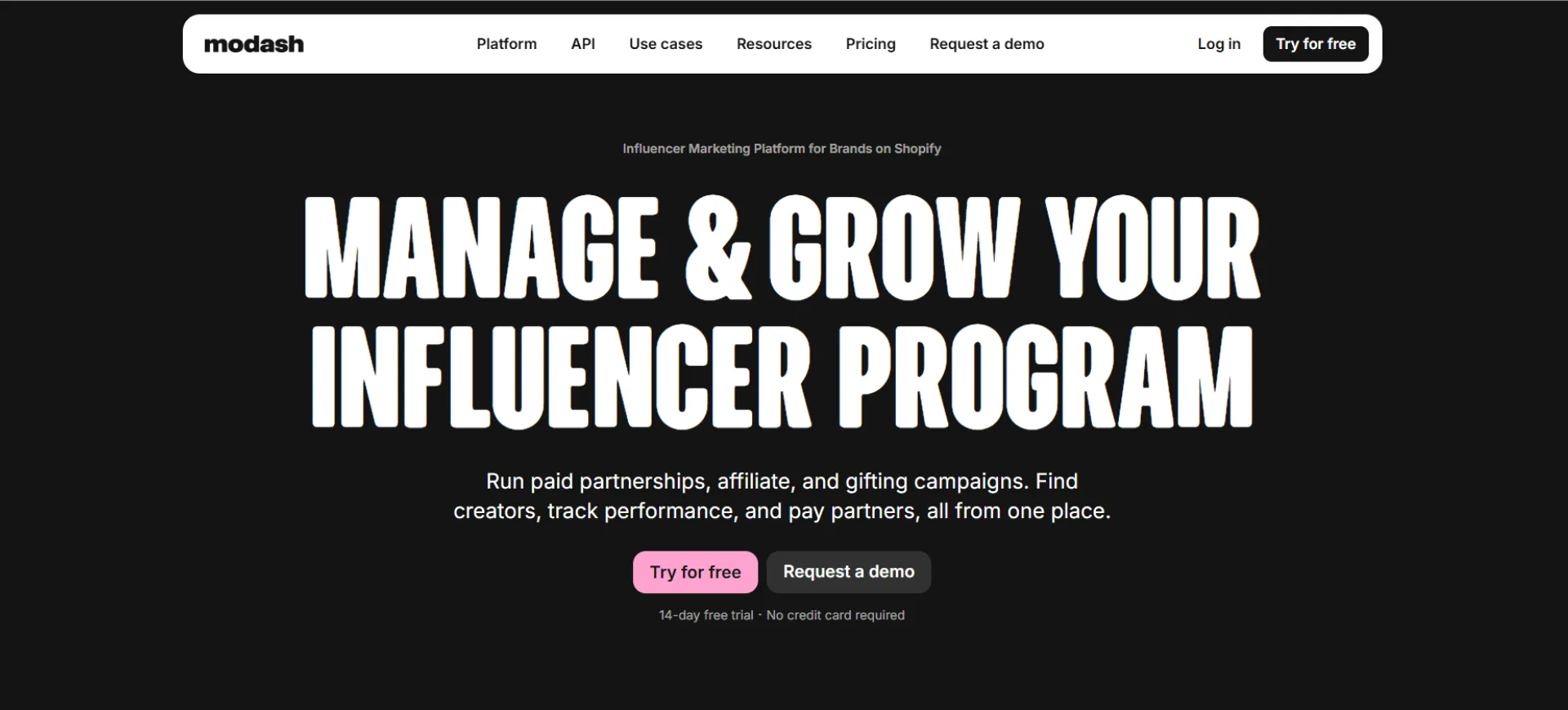
Modash helps marketing teams find and analyze influencers across Instagram, TikTok, and YouTube. With a database of 250 million plus profiles, the pressure was on to explain a complex product simply.
What stands out:The copy is direct and the visuals are informational without being cluttered. The team reportedly rewrote the hero section to be much simpler, and the click through rate doubled. The site uses clean layouts, real product screenshots, and testimonial sections that build trust without getting in the way of the main message.
Design takeaway: Simple copy beats clever copy. If users can tell what you do in three seconds, your design is working.
Website: nimbble.nl
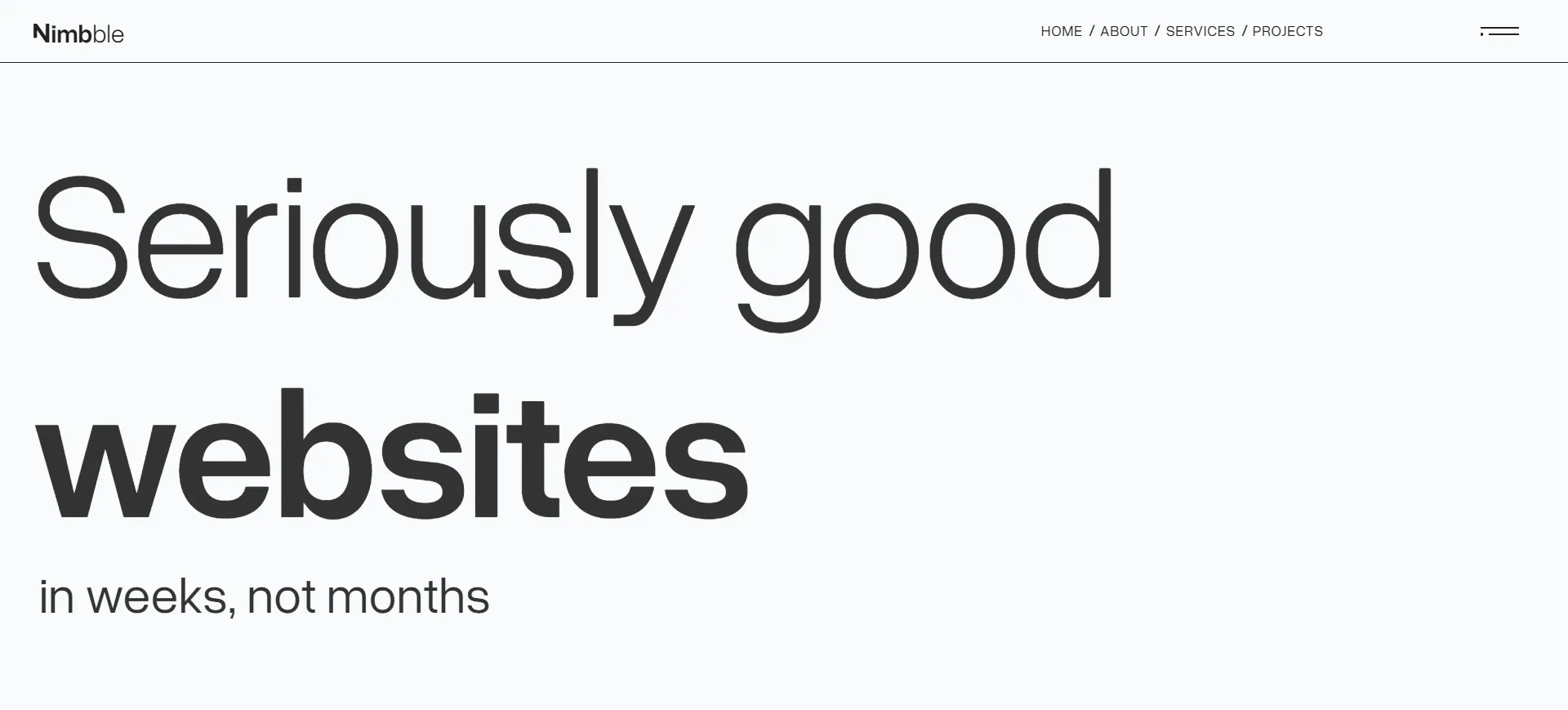
Nimbble is an Amsterdam based collective of digital designers and developers, best known for their own dark themed website that has appeared in Webflow showcases more than once.
What stands out:Their tagline, "Seriously good websites in all shapes and sizes," is delivered through bold outlined typography, scroll reveal content, and smooth animations that never get in the way of the message. The navbar transforms into a menu icon to create a cinematic viewing experience. They recently launched a revamped version of the site after it was featured in Webflow's own roundup of modern UI design, which tells you how seriously they take their own craft.
Design takeaway: When everyone else is using light mode, a bold dark design becomes a differentiator.
Website: faircraft.bio
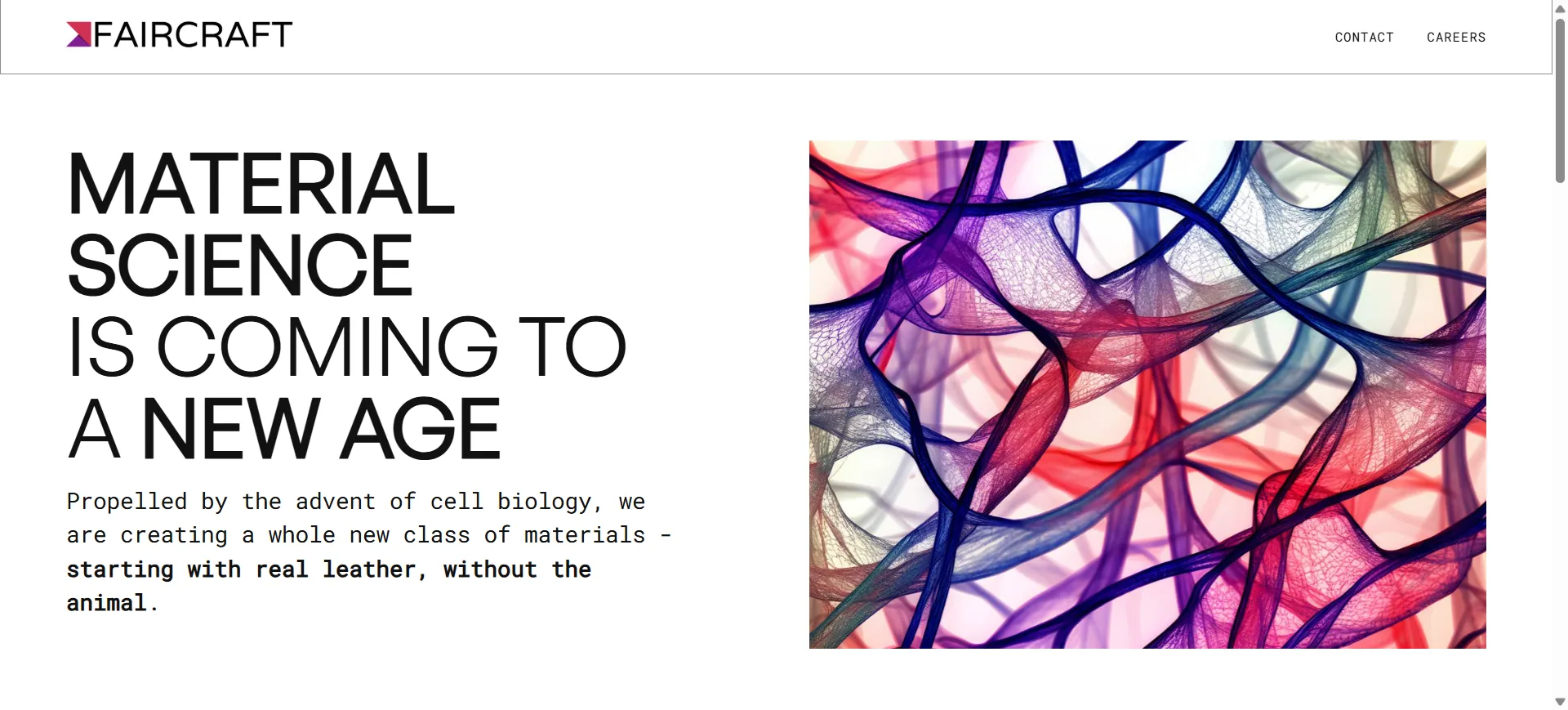
Faircraft is a Paris based biotech startup producing lab grown leather using tissue engineering. The website needs to communicate both science and luxury, which is a tough brief.
What stands out:The site leads with the line "Real leather, grown in a lab," supported by refined typography, earthy tones, and close up texture shots that almost let you feel the material through the screen. Scroll animations are subtle and never get in the way of the message. The result is a website that feels like a premium fashion brand and a research lab at once, which is perfect for a company working with Balenciaga, Loewe, and Stella McCartney.
Design takeaway: For brands in niche or technical industries, let your visuals carry the emotion while the copy handles the facts.
Website: thefurrow.webflow.io
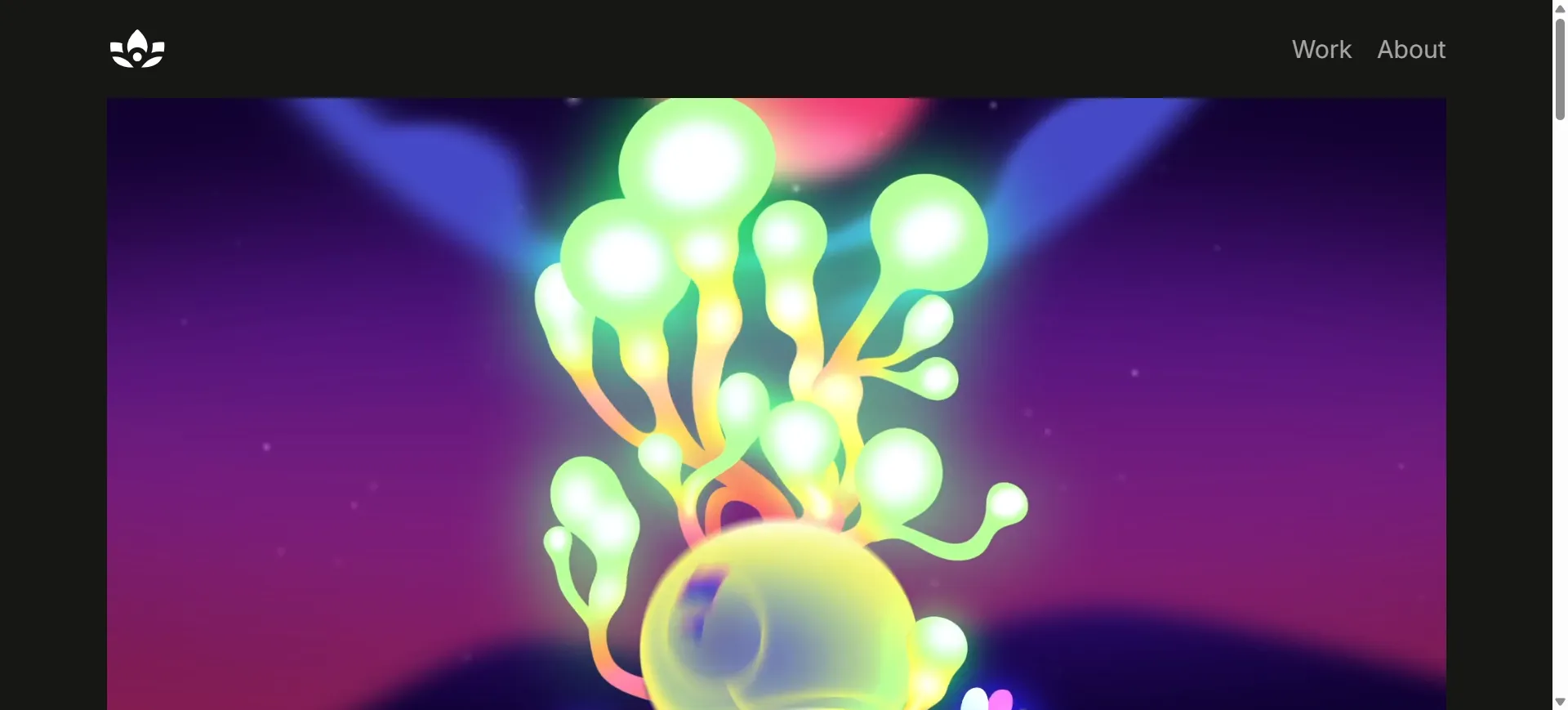
The Furrow is an animation studio that describes itself as "the animation studio that provides a foundation for creativity to thrive." The website is a masterclass in restrained, confident design.
What stands out:The above the fold section is minimalist, almost sparse, but as you scroll the content opens up with rich visuals and smooth transitions. The site rewards exploration. A small black dot reveals the menu on hover, and a dark/light mode switcher is built in. Typography does most of the heavy lifting.
Design takeaway: A quiet hero section can be more powerful than a loud one if the rest of the site delivers on the promise.
Website: discord.com/blog
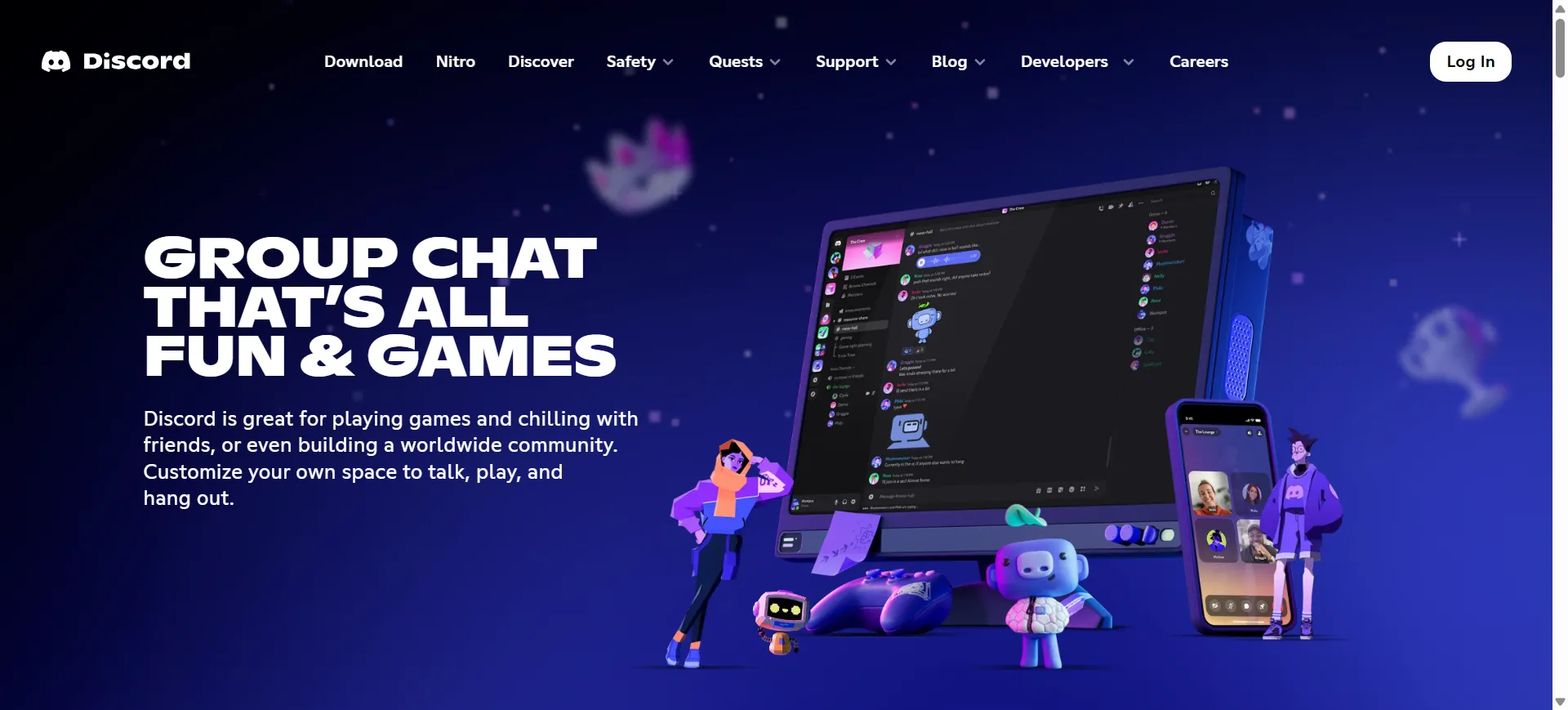
The engineering and product blog behind Discord is surprisingly one of the most recognizable Webflow sites in the wild.
What stands out:Bright colors, playful illustrations, and a clean layout make technical content feel approachable. The design leans heavily into Discord's brand personality, which could feel childish on another product but works perfectly here. Navigation is intuitive and the reading experience is genuinely enjoyable.
Design takeaway: Let your brand personality breathe, even in content heavy sections like blogs. Readers remember how a site felt, not just what it said.
The common thread across all 10 of these Webflow websites is intention. Every animation, every bit of spacing, every color choice is there for a reason. Great design is not about stuffing a page with effects, it is about removing everything that does not serve the user.
If you are planning to build or redesign your own Webflow site, study these examples. Pay attention to how they balance motion with readability, how they use white space, and how they guide the visitor through a story.
And if you want expert help bringing your own vision to life, Webflow Premium Partners like Appsrow combine strategy, design, and development under one roof so your site ends up in the next inspiration list, not just browsing one.
Webflow
Running a Webflow site is rewarding, but the small recurring chores are what eat into your week. Pulling update logs, reviewing publish dates, checking content health, and sending status summaries to clients. Each task is minor on its own, but when you multiply them across several sites, the hours add up quickly.
This is where Webflow's MCP (Model Context Protocol) server changes the picture. Instead of clicking through dashboards every Monday morning, you can hand the repeatable work to an AI assistant and let it deliver the results on a schedule you define. In this article, we will walk through how this works, why it matters, and how a simple weekly reporting task can be fully automated.
The MCP server acts as a bridge between your Webflow data and AI tools like Claude. It is not just a time saver. What makes it genuinely powerful is context. The AI gets direct access to real site information, which means it can answer questions, generate reports, audit content, and flag issues using live data rather than assumptions.
Some of the things you can do through MCP include:
The real shift happens when you combine this with scheduling. A one-time prompt is useful. A recurring workflow is transformative.
Claude Cowork expands the desktop app into a workspace where you can create scheduled tasks. You write a prompt once, pick a frequency, and let it run in the background. For Webflow site owners, agencies, and freelancers, this means your reports, audits, and checks happen on their own.
Think about a freelancer managing ten client sites. Without automation, that is ten logins, ten dashboards, ten summaries, every single week. With a scheduled MCP task, all of that becomes a single PDF sitting in a folder when work starts on Monday.
Let us walk through a real example. Imagine your client wants a simple weekly overview of all their Webflow sites. They are not asking for deep analytics. They want three pieces of information:
This is the kind of request that happens often in agency work, and it is a perfect candidate for automation.
Before scheduling anything, the prompt needs to produce good output on the first try. Here is a starting version:
Create a PDF report of my Webflow sites. The report should be a table including the Site Name, last updated, and last published values. Include the date and time the report was generated.
When this is run, the AI pulls live site data through the MCP server and builds a clean PDF. One small catch shows up immediately though. The times come back in UTC, which is not helpful if your client is in a different time zone. A quick adjustment solves this:
Create a PDF report of my Webflow sites. The report should be a table including the Site Name, last updated, and last published values. Include the date and time the report was generated. Use the CST or CDT time zone depending on which is currently active.
That last line matters. Daylight saving time can silently throw timestamps off by an hour if you do not account for it. Small details like this are what separate a polished report from one that raises questions.
Once the prompt runs cleanly, open the generated PDF and review it. Check the table formatting, confirm the dates look right, and make sure nothing is missing. At this stage, you can layer in more styling details if you want, for example specifying colors, fonts, or headers. Keep it simple at first. You can refine later once the automation is stable.
This is where Cowork takes over. Inside the Claude desktop app, switch to Cowork and open the Scheduled section. Create a new task and paste in the prompt. A good version for scheduling looks like this:
Create a PDF report of my Webflow sites. The report should be a table including the Site Name, last updated, and last published values. Include the date and time the report was generated. Use the CST or CDT time zone depending on which is currently active. Save the file using a timestamped name in the format webflow-site-report-MONTH-DAY-YEAR-HOUR-MINUTE.pdf. The date values should be generated dynamically based on the current time.
Now pick a frequency. Weekly on Monday at 7 AM works well for most client workflows. When you sit down at your desk, the report is already waiting.
There is one practical note worth remembering. If your computer goes to sleep, so does the scheduled task. Cowork does warn you about this, and there is a toggle to keep the machine awake during scheduled runs. If the report genuinely needs to land on time, enable it.
One of the best features of scheduled tasks is the ability to run them on demand. You do not have to wait seven days to see if your Monday report actually works. Click into the task, hit run, and verify the output. This is especially useful for infrequent jobs where a small prompt issue could go undetected for weeks.
A few observations from working with this setup:
Weekly reports are just the beginning. Once you understand the pattern, the same approach works for dozens of other recurring tasks:
Each of these can live as a scheduled task, quietly running in the background while you focus on design and strategy.
For anyone managing multiple Webflow sites, automation is not a luxury. It is the difference between spending Mondays on client updates and spending them on actual creative work. The MCP server combined with scheduled AI tasks gives solo operators the kind of reporting power that used to require a full operations team.
Clients get consistency. You get your time back. And the work that does need human judgment gets your full attention because the routine stuff is already handled.
If you are new to the Webflow MCP server, the best place to begin is the official developer documentation. Pick one repetitive task you do every week, write a prompt that handles it, test the output, then schedule it. Once you have one working automation, the rest follow naturally.
The broader point is this. Your Webflow sites do not need to be a constant source of small tasks. With the MCP server and a scheduling tool like Cowork, the routine work can run on its own while you focus on the parts of the job that actually need you.
At AppsRow, we specialize in helping businesses unlock the full potential of Webflow through expert design, development, and automation services. Our team brings deep experience in:
Whether you are a solo founder, a growing startup, or an established agency looking for a reliable Webflow partner, AppsRow has the expertise to ship work that looks great, loads fast, and scales with you.
Ready to put your Webflow sites on autopilot? Get in touch with AppsRow today and let us help you turn repetitive tasks into automated workflows.
Webflow
Ahmedabad's design and tech scene is about to get a lot more interesting.
On Saturday, April 25, 2026, we're throwing open the doors to the city's very first Webflow Meetup. It's a morning built for designers, developers, freelancers, founders, and anyone curious about what's happening at the intersection of visual design and no-code development.
If you've ever wondered what Webflow really is, why agencies across the world are betting big on it, or how it's quietly becoming the go-to platform for teams that want fast, beautiful, conversion-ready websites, this meetup is for you.
Here's everything you need to know.
Ahmedabad has always been a city of builders. From manufacturing to startups to design studios, something is always being made here. But when it comes to the global web design conversation, the one happening in Webflow communities across New York, London, Berlin, and Bangalore, Ahmedabad hasn't quite had its seat at the table yet.
We want to change that.
At Approw, we've spent years working as a Webflow Premium Partner, building websites for brands across the globe. We've seen firsthand how Webflow has transformed the way businesses launch, scale, and market online. We've also seen how much talent exists right here in our own backyard, often without access to the communities and conversations that could 10x their careers.
This meetup is our way of starting that conversation. Locally. In person. Over coffee.
For the uninitiated, Webflow is a visual web development platform that lets you design, build, and launch fully responsive, production-grade websites without writing traditional code. Think of it as the creative power of a designer's tool combined with the structural control of clean, professional code.
It's the reason a solo freelancer can now deliver agency-quality websites. It's the reason founders can ship landing pages in hours instead of weeks. It's the reason agencies are scaling client work faster than ever before.
And it's a skill that's quickly becoming one of the most in-demand in the digital product world.
This isn't a conference. There's no stage, no keynote, no sales pitch. It's a community-first gathering designed around the one thing that actually matters at events like these: meaningful conversations.
Here's what the morning will look like.
Real stories from real practitioners. Hear from people who are actively building on Webflow, including freelancers, agency owners, and product teams, about what's working, what's not, and where the platform is heading.
Hands-on insights. Whether you're wondering how to pitch Webflow to a client, how to structure a CMS for scale, or how to transition from Figma to Webflow without losing your mind, you'll walk away with practical takeaways.
Connections that last. The best part of any meetup isn't the content. It's the people you meet. We're keeping the group intimate so you actually get to have real conversations, not just collect business cards.
Coffee. Good coffee. Because no meetup is complete without it.
We built this meetup for a wide range of folks, because the Webflow ecosystem touches all of them.
Web designers who are curious about going no-code and want to see what's possible. Developers exploring visual development workflows and wondering if the hype is real. Freelancers looking to level up their client offerings and charge more confidently. Agency owners scaling with Webflow and wanting to compare notes with peers. Founders and marketers who want better websites, faster, without the usual engineering bottlenecks. And students or aspiring creators ready to break into the design and tech industry.
If any of that sounds like you, you belong in the room.
Date: Saturday, April 25, 2026 Time: 10:00 AM to 12:00 PM IST Venue: DevX Coworking, 2nd Floor, BINORI B SQUARE-3, Sindhu Bhavan Marg, Bodakdev, Ahmedabad 380059 Entry: Free (but seats are limited)
Parking is easy, and you'll find Approw Webflow Meetup signage on the 2nd floor to guide you in.
Sandeepsingh Sisodiya is the Co-founder of Approw and a long-time Webflow Premium Partner. Sandeep has spent years helping global brands ship high-performing websites and has been watching the Webflow ecosystem grow from a niche tool into a global movement.
Parth Parmar is our co-organizer and a Webflow Community Builder, passionate about bringing the no-code movement to Ahmedabad and creating spaces where creators can connect.
Together, they're bringing the energy of the global Webflow community to Ahmedabad for the very first time.
Is the event really free? Yes, completely. We just ask that you register so we know how many seats and cups of coffee to plan for.
Do I need to already know Webflow? Not even a little. Whether you've never opened the Webflow Designer or you're shipping client sites every week, you're welcome here.
Will there be food? Light refreshments and coffee, yes. Come hungry for conversation.
Can I bring a friend? Please do. Just have them register separately so we have an accurate headcount.
Every design community, every tech scene, every creative movement starts the same way. A few people in a room, sharing what they know, building what they care about, and choosing to show up for each other.
That's what this meetup is. A first step. A beginning.
If you've been waiting for a sign to get more involved in the Webflow world, or just want to meet other people in Ahmedabad who care about great design and smart web building, this is it.
Seats are limited and filling fast.
See you on April 25th.
Approw is a Webflow Premium Partner helping brands around the world design, build, and scale high-performing websites. Learn more about us at approw.com.
Webflow
The way teams build content-driven websites is changing fast. With AI-powered search, answer engines, and dynamic user experiences taking center stage, the demand for a smarter, more scalable CMS has never been higher. Webflow has answered that demand by rolling out its next-generation CMS to every customer, bringing enterprise-level capabilities to Starter, Business, and Ecommerce plans alike.
This update is not just another feature release. It is a complete architectural upgrade that redefines how designers, marketers, and developers can structure, connect, and display dynamic content on Webflow sites.
.webp)
For years, Webflow users who built complex, content-heavy websites had to work around certain platform limits. Whether it was nesting collection lists, handling multi-layered content relationships, or managing large datasets, there were ceilings that forced creative compromises. Those ceilings have now been lifted.
Here is what is new:
Expanded nested collections. Teams can now use up to 10 nested collection lists per page, a fivefold increase from the previous limit. Each nested list can hold up to 100 items, which is ten times the earlier cap.
Multi-level nesting up to three layers deep. Previously, designers could only go one level deep when connecting CMS data. Now, content relationships can extend through three layers, opening the door to far richer and more interconnected page structures.
Improved performance and reliability. Publish, backup, and restore operations are faster and more predictable, even for sites managing large volumes of structured data.
Better foundation for APIs and AI readiness. The underlying architecture is built to support upcoming enhancements in API access, data distribution, and AI-driven discovery.
Search is no longer just about keywords and rankings. AI-powered engines like ChatGPT, Perplexity, Google AI Mode, and Claude are actively crawling and citing websites based on how well their content is structured and interconnected.
A flat website with isolated pages tends to perform poorly in AI citations. What these engines reward is depth, context, and relationships between content pieces. When your services connect to case studies, which connect to team members, which connect to testimonials, the AI has enough context to understand and accurately represent your brand.
Webflow's next-gen CMS was engineered with this reality in mind. The expanded nesting and reference capabilities make it practical to build the kind of rich, semantically connected content architecture that AI engines favor.
The new flexibility is not theoretical. It directly translates into real-world improvements for the kinds of websites agencies and in-house teams build every day.
Content-heavy portfolio and agency sites. Linking project pages to service pages, case studies, and related work is now far more natural. Designers can build scalable templates without relying on custom workarounds.
Restaurant and hospitality brands. Menu pages with layered nutritional information, allergen tags, and ingredient details can now be structured in one clean, maintainable system.
SaaS and product marketing sites. Homepages can pull from multiple content sources such as features, integrations, testimonials, blog posts, documentation, and pricing tiers, all dynamically managed through the CMS.
Ecommerce and product catalogs. Product listings tied to categories, reviews, related items, and variant data can now be structured with less friction and more flexibility.
Multilingual and regional sites. With deeper CMS capabilities paired with locale-specific access control, regional teams can manage content-rich experiences within a single site architecture instead of maintaining multiple duplicate sites.
Early adopters have already started redesigning how they approach content architecture. Many have shared that the expanded design flexibility changes how they plan projects from the very first wireframe. Instead of designing around platform limitations, they can now design around the client's actual content needs.
For agencies, the shift means faster turnaround, more maintainable templates, and the ability to deliver complex content systems without writing custom code. For marketing teams, it means richer pages without having to wait on engineering resources.
Webflow has been clear that this release is a foundation, not a finish line. The new architecture sets the stage for further improvements in CMS scale, API performance, and AI discovery tools. As AI-driven search continues to shape how brands get found, Webflow is positioning itself as a platform built not just for today's websites but for tomorrow's content ecosystems.
For any business that cares about scale, design freedom, and visibility in an AI-first world, this upgrade is worth paying attention to.
At Appsrow, we specialize in helping brands, agencies, and product teams unlock the full potential of modern platforms like Webflow. With the rollout of the next-gen CMS, there is a real opportunity to rebuild how your site performs, scales, and gets discovered. Our team brings hands-on expertise across the following areas:
Webflow Development and Migration. We design and develop Webflow sites that take full advantage of the new CMS architecture, from multi-level nested collections to complex, content-rich templates. If you are on an older structure, we can audit your current setup and migrate you into a scalable next-gen CMS framework.
Custom CMS Architecture. We help teams plan and implement advanced content models, including interconnected collections, reference fields, and scalable page templates that are easy for non-technical teams to maintain.
AEO and AI-Ready Content Structuring. Our specialists structure your content so that it is discoverable, citable, and context-rich for AI engines like ChatGPT, Perplexity, Google AI Mode, and Claude. This includes schema planning, semantic linking, and content strategy aligned with answer engine optimization.
API Integrations and Headless Solutions. We build custom integrations between Webflow and your CRM, marketing tools, ecommerce stack, or mobile apps, giving you a true single source of truth for all your digital channels.
Performance, SEO, and Conversion Optimization. Beyond development, we focus on making sure your site loads fast, ranks well, and converts visitors into customers through thoughtful UX, analytics setup, and ongoing optimization.
Ongoing Support and Maintenance. Websites are not one-time projects. We offer continued support, new feature rollouts, and strategic guidance to keep your Webflow site aligned with your business growth.
If you are ready to explore what Webflow's next-gen CMS can do for your brand, our team at Appsrow is here to help you design, build, and scale without compromise.
Webflow
Design Inspiration
Website speed isn't just a technical metric; it's the invisible force that determines whether your visitors stay or leave within seconds. In today's digital landscape, where attention spans are measured in milliseconds, a slow-loading website is essentially turning away potential customers at your digital doorstep.
Webflow has revolutionized how designers and developers build websites, offering unprecedented creative freedom without sacrificing performance. However, even the most beautifully designed Webflow site can suffer from sluggish loading times if not properly optimized. The good news? Speed optimization doesn't require you to compromise on design aesthetics or functionality.
This comprehensive guide walks you through 25 proven techniques to supercharge your Webflow website's performance. Whether you're running an e-commerce store, a portfolio site, or a business landing page, these strategies will help you deliver lightning-fast experiences that keep visitors engaged and search engines happy.
At Appsrow, we've optimized hundreds of Webflow websites, consistently achieving load times under 2 seconds while maintaining stunning visual experiences. Our expertise in Webflow development and performance optimization has helped businesses increase conversion rates by up to 40% simply by implementing these speed enhancement techniques.
Before diving into specific optimization techniques, it's essential to understand what affects your Webflow site's loading speed. The primary factors include image sizes, custom code weight, interaction complexity, third-party integrations, and hosting configuration. Each element adds to your site's total page weight and processing time.
Google's Core Web Vitals have become critical ranking factors, making speed optimization more important than ever. These metrics measure Largest Contentful Paint (LCP), First Input Delay (FID), and Cumulative Layout Shift (CLS). Your Webflow site needs to excel in all three areas to rank well and provide excellent user experiences.
WebP images offer 25-35% smaller file sizes compared to JPEG and PNG formats without noticeable quality loss. Webflow automatically generates WebP versions of uploaded images, but you need to ensure your original uploads are already optimized. Before uploading to Webflow, compress your images using tools like TinyPNG or ImageOptim. For comprehensive guidance, check out our image optimization best practices.
Never upload images larger than they'll be displayed. If an image will be shown at 800px width maximum, don't upload a 4000px version. Use Webflow's responsive image settings to specify different sizes for different breakpoints, ensuring mobile users don't download desktop-sized images.
Webflow's native lazy loading feature defers loading images until they're about to enter the viewport. Enable this for all below-the-fold images to dramatically reduce initial page load times. This technique is particularly effective for long-scrolling pages and image-heavy portfolios.
Background images often go overlooked in optimization efforts. Export them at the exact dimensions needed, compress them aggressively, and consider using CSS gradients or solid colors where possible. For hero sections, balance visual impact with file size by finding the sweet spot between quality and compression.
Scalable Vector Graphics (SVGs) are resolution-independent and typically much smaller than raster images. Replace icon fonts and PNG icons with SVG versions. Webflow makes it easy to embed SVGs directly into your design, reducing HTTP requests and improving rendering speed.
Every line of custom CSS and JavaScript adds to your page weight. Audit your custom code regularly and remove anything unnecessary. Often, Webflow's native interactions can replace complex JavaScript, reducing dependencies and improving performance.
Move non-essential JavaScript to load after the initial page render. Use the async or defer attributes for third-party scripts that aren't needed immediately. This prevents JavaScript from blocking the rendering of your page content.
While Webflow automatically minifies your generated CSS, custom CSS should also be optimized. Remove duplicate selectors, combine similar styles, and eliminate unused CSS rules. Tools like PurgeCSS can help identify and remove dead code.
Web fonts can significantly impact loading times. Limit yourself to 2-3 font families maximum, and only load the weights and styles you actually use. Implement font-display: swap to prevent invisible text during font loading, and consider using system fonts for body text.
Interactions add JavaScript to your pages. Audit your site regularly to remove unused or redundant interactions. Complex interactions should be used sparingly and only where they genuinely enhance user experience.
Webflow automatically serves your site through a global Content Delivery Network (CDN), but you need to ensure you're using a custom domain to fully benefit from this. The CDN caches static assets and serves them from locations closest to your visitors.
Configure browser caching for static resources to reduce repeat visit load times. While Webflow handles most caching automatically, you can optimize cache headers for custom assets through Webflow's hosting settings or by using Cloudflare.
Webflow enables Gzip compression by default, but verify it's working correctly using tools like GTmetrix or Google PageSpeed Insights. Gzip can reduce HTML, CSS, and JavaScript file sizes by 70-90%, dramatically improving transfer times.
Use resource hints like preload, prefetch, and preconnect to help browsers prioritize critical resources. Preload your hero image, key fonts, and above-the-fold CSS to improve perceived performance and LCP scores.
Every analytics tool, chatbot, and tracking pixel adds weight to your pages. Conduct a quarterly audit of all third-party integrations and remove anything that's no longer essential. Consider using Google Tag Manager to load scripts more efficiently.
YouTube videos, social media feeds, and maps can dramatically slow down your pages. Implement facade loading, where a lightweight placeholder loads initially and the full embed loads only when users interact with it.
Heavy form builders can add significant overhead. If you're using third-party form solutions, ensure they're loading asynchronously. Better yet, use Webflow's native forms when possible, which are optimized for performance.
Consider switching from heavy analytics platforms to lighter alternatives. Plausible, Fathom, or Simple Analytics offer essential metrics with minimal performance impact compared to Google Analytics.
Displaying large numbers of CMS items on a single page increases load time significantly. Implement pagination or 'load more' functionality to initially display 6-12 items, then load additional content on demand. Learn more about our Webflow CMS solutions.
Create image optimization guidelines for content creators. Establish maximum file sizes and dimensions for each CMS image field, and train team members to compress images before uploading.
Client-side filtering requires loading all items before filtering, which can slow down pages with large collections. For better performance, implement server-side filtering or limit the total number of items loaded initially.
Over 60% of web traffic comes from mobile devices, yet many sites are optimized primarily for desktop. Use Webflow's responsive design features to create truly mobile-first experiences, hiding non-essential elements on smaller screens.
Mobile users often have slower connections. Use Webflow's responsive image settings to serve significantly smaller images to mobile devices. A hero image that's 1920px on desktop might only need to be 600px on mobile.
Complex animations and interactions that work well on desktop can cause performance issues on mobile devices. Test all interactions on actual mobile devices and simplify or disable resource-intensive effects for smaller screens.
Speed optimization isn't a one-time task. Use tools like Google PageSpeed Insights, GTmetrix, and WebPageTest to regularly monitor your site's performance. Set up automated monitoring to alert you when performance degrades.
Create a testing routine: measure performance before making changes, implement optimizations, then measure again. This data-driven approach helps you identify which techniques provide the most significant improvements for your specific site.
At Appsrow, we've developed a proprietary Webflow optimization framework that has helped businesses across industries achieve sub-2-second load times while maintaining gorgeous, feature-rich websites. Our team specializes in comprehensive performance audits, identifying bottlenecks that most agencies miss.
We don't just apply generic optimization techniques; we analyze your specific use case, audience, and business goals to create customized performance strategies. Our Webflow experts understand the platform's architecture at a deep level, allowing us to implement optimizations that preserve design integrity while maximizing speed.
Our typical optimization projects result in 50-70% faster load times, improved Core Web Vitals scores, and measurable increases in conversion rates. We work with businesses ranging from startups to enterprise organizations, bringing the same level of expertise and attention to detail to every project. Explore our case studies to see real results.
If you're considering migrating to Webflow from another platform, we can ensure your new site launches with optimal performance from day one. Our migration process includes comprehensive speed optimization as a standard component.
Website speed optimization is no longer optional; it's a fundamental requirement for online success. The 25 techniques outlined in this guide provide a comprehensive roadmap for transforming your Webflow site from sluggish to lightning-fast. The beauty of these strategies is that they're cumulative; each improvement builds upon the others, creating compound performance gains.
Start with the quick wins like image optimization and lazy loading, then progress to more advanced techniques like code splitting and resource prioritization. Remember that optimization is an ongoing process, not a destination. As your site grows and evolves, maintain vigilance about performance through regular monitoring and testing.
The investment you make in speed optimization pays dividends through improved search rankings, higher engagement rates, better conversion performance, and enhanced user satisfaction. In an increasingly competitive digital landscape, a fast-loading website isn't just a technical achievement; it's a strategic business advantage that sets you apart from competitors still struggling with slow, bloated pages.
Your visitors won't remember every detail of your site's design, but they'll definitely remember how quickly it loaded and how smoothly it performed. Give them that exceptional experience, and they'll reward you with their attention, trust, and business.
Ready to optimize your Webflow website? Contact our team today to discuss how we can help you achieve exceptional performance and user experience.
Webflow

From brand identity to Webflow development and marketing, we handle it all. Trusted by 50+ global startups and teams.
The Appsrow blog covers Webflow tips, design trends, development best practices, SEO strategies, and digital marketing insights. We share practical knowledge from our Webflow development and design projects, offering actionable content created by experienced professionals who understand real-world challenges and solutions.
Appsrow publishes new blog articles regularly, typically multiple times per month covering various Webflow and web development topics. Our content often relates to Webflow SEO strategies and industry trends, maintaining a consistent publishing schedule that provides fresh, valuable content for our community of readers.
Yes, you can subscribe to receive notifications when Appsrow publishes new blog content via email or RSS feed. Subscribers get early access to valuable insights about Webflow design trends, development techniques, and exclusive content. Staying subscribed ensures you never miss important updates and expert tips.
Appsrow occasionally accepts high-quality guest posts from industry experts on relevant topics. We maintain strict quality standards to ensure content provides genuine value to our readers. Guest contributors from SaaS companies or agencies must demonstrate expertise and align with our content guidelines and editorial standards.
Yes, all Appsrow blog articles are optimized following best practices including keyword research, meta optimization, and structured content. We practice what we preach about Webflow SEO, and our blog serves as both an educational resource and demonstration of our expertise in content marketing and search optimization.
Absolutely! Appsrow encourages sharing our blog content on social media platforms to help others benefit from the information. Each article includes social sharing buttons, and articles about AI industry trends or Webflow tips often perform well on platforms like LinkedIn and Twitter within professional communities.
Yes, Appsrow occasionally publishes case studies showcasing successful client projects and results achieved. These real-world examples demonstrate our capabilities including Webflow migration success stories and provide practical insights into our methodology, approach to solving specific challenges, and quantifiable business outcomes.
Yes, Appsrow welcomes content suggestions from readers and considers them for future articles. We value community input and want to address topics that matter most, whether about conversion optimization techniques or Webflow best practices. Your suggestions help us create more relevant and valuable content.
Appsrow creates content for various skill levels, from beginners to advanced users, with clear indication of difficulty. Our tutorials include step-by-step instructions for Webflow design and development, with screenshots and practical examples making complex topics accessible without oversimplifying important concepts.
The Appsrow blog provides actionable insights that help improve your website, marketing efforts, and online presence. You can learn best practices for Webflow development, stay updated on industry trends, and discover solutions to common challenges, helping businesses make informed decisions about their digital strategies.
.png)
.png)

.webp)
.webp)
.webp)
.webp)


