

Sandeep Singh Sisodiya
Webflow
May 15, 2026


Insights, ideas, and expert perspectives shared by the author on design, development, and digital growth.
If you have visited webflow.com/pricing recently, you already know the page is dense. Site plans, Workspace plans, Ecommerce plans, add-ons, seats, AI credits, and now a brand new pricing structure that rolled out on May 13, 2026. For founders, marketing leaders, and agencies trying to budget a real website, the question is not "what is Webflow's cheapest plan" but "what will my final invoice actually look like once we publish, scale, and collaborate."
This guide breaks down every layer of Webflow pricing in 2026, explains the recently announced changes, compares Webflow head to head with the other five major platforms, and helps you decide which plan fits your team. By the end, you will know exactly how Webflow charges, where the hidden costs hide, and when the platform pays for itself in saved engineering hours.
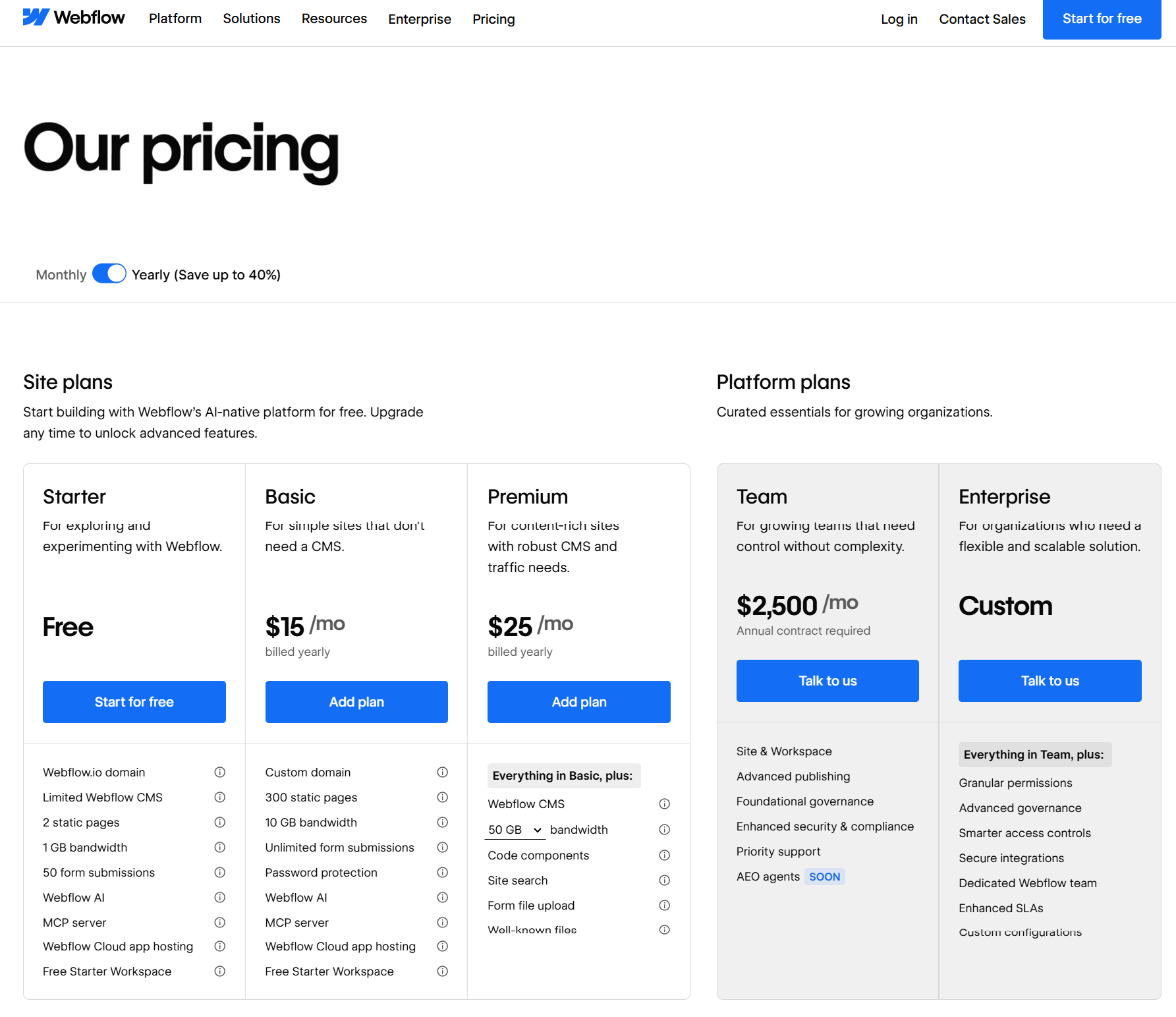
On May 13, 2026, Webflow announced its biggest pricing overhaul since the December 2024 seat restructure. The company is doing three things in one move.
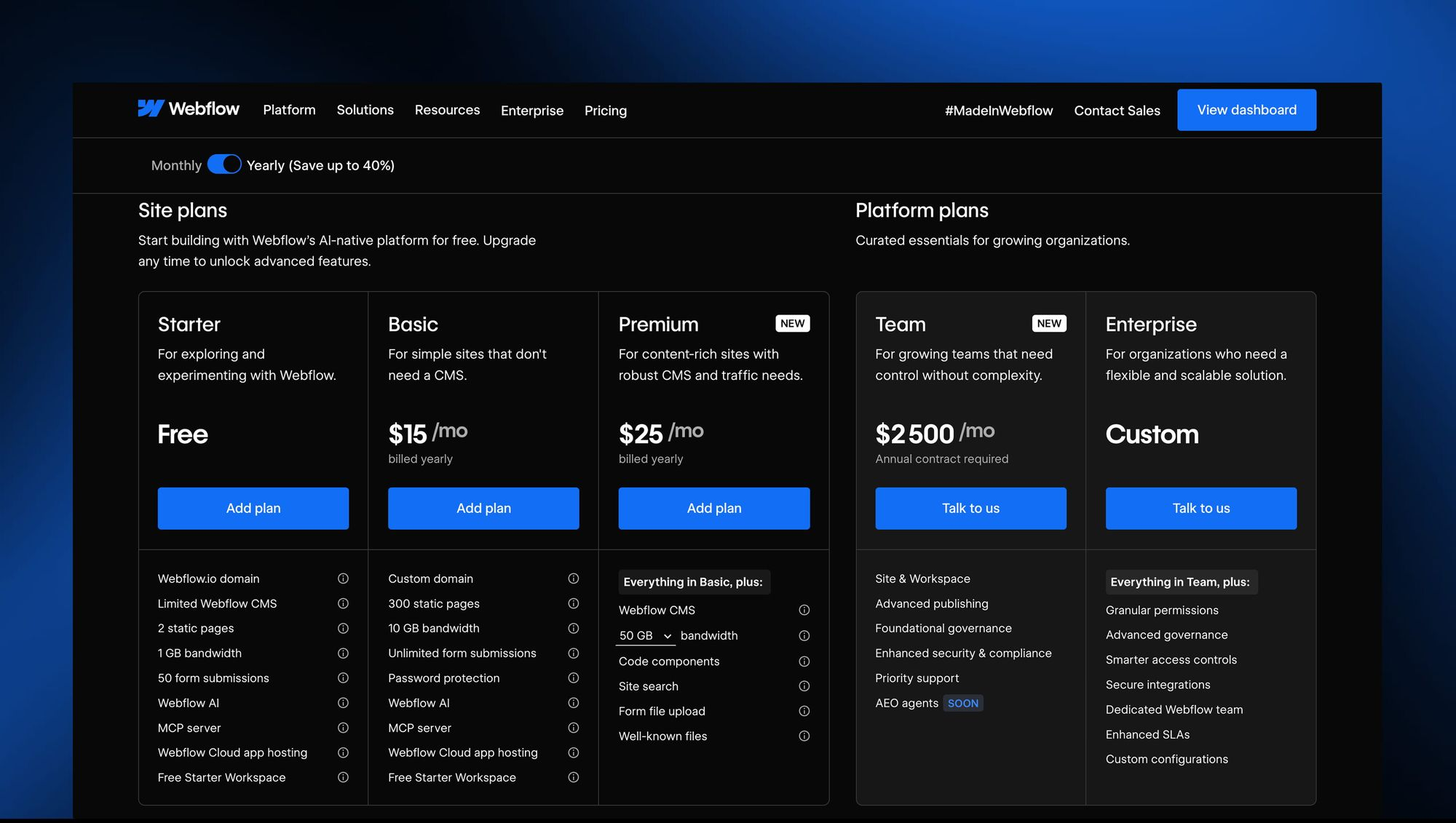
First, it is simplifying the Site plan lineup. The old CMS plan ($23/mo) and Business plan ($39/mo) are being merged into a single new tier called the Premium Site plan, priced at $25/mo billed yearly or $39/mo billed monthly. According to Webflow's official announcement, "Today, we're introducing a new Premium Site plan by combining the CMS and Business Site plans into one. This helps simplify our overall lineup so it's easier for customers to understand which plan is right for them. The Premium plan is priced at $25/month for a yearly plan or $39/month for a monthly plan."
Second, Webflow is raising the CMS ceiling and removing add-ons. The Premium plan now includes 20,000 CMS items and 40 CMS Collections by default, removing the need for separate CMS item add-ons. If you currently pay for a CMS items add-on on a Business plan, that add-on cost gets removed at your next renewal because the new limit covers it.
Third, Webflow is introducing the Team plan, an all-in-one package designed for fast-growing teams that have outgrown self-serve but are not ready for Enterprise. "The Team plan bundles all into a single all-in-one plan designed for fast-growing teams that have outgrown self-serve but aren't quite ready for Enterprise. It includes a site with 100 CMS Collections, 10 seats, Localization, and features previously not available on self-serve like our new AEO agents, page branching, single-page publishing, and so much more."
A fourth quieter change: starting May 13, 2026, AI credits are included in all Workspace plans, with paid add-ons available for teams that need more. Credit limits will not be enforced until June 29, 2026, which gives existing customers a runway to study their usage.
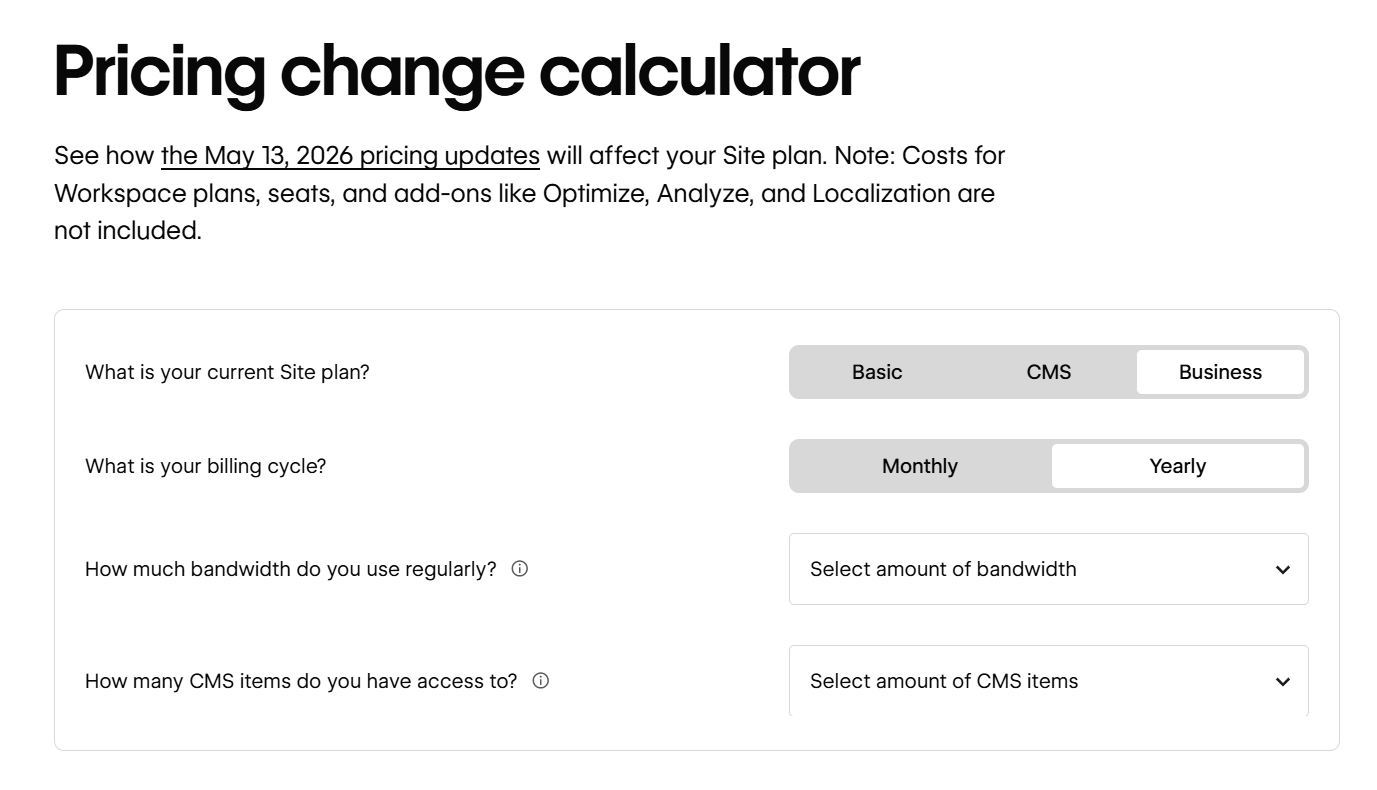
The rollout is phased. For all new Site plan purchases, changes take effect starting May 13, 2026. For all other existing sites, changes take effect on your next renewal or billable change on or after June 29, 2026. Site owners can switch to yearly billing before then to lock in their current Site plan for another year.
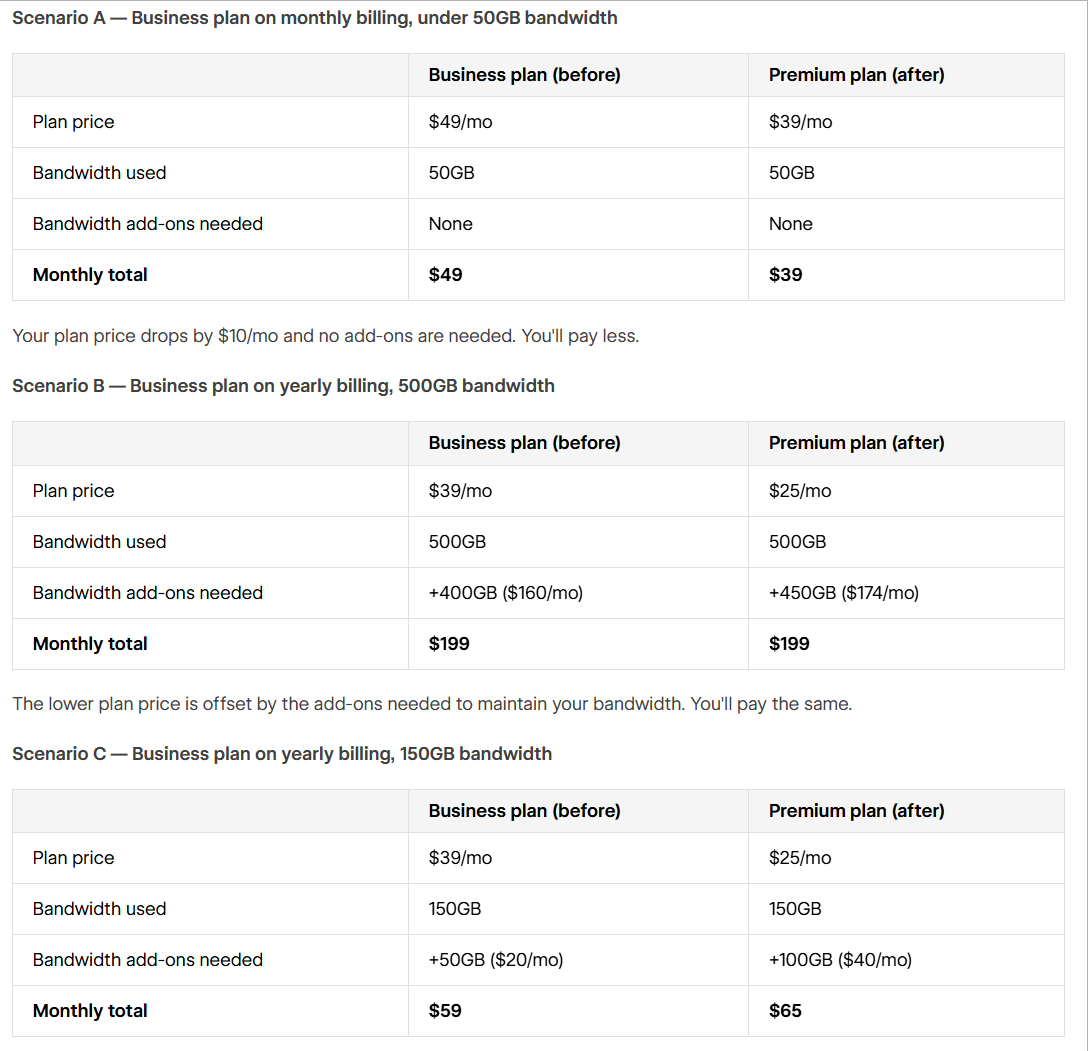
If you are already on a CMS or Business plan, your site will be automatically migrated to Premium at your next renewal or whenever you make a billable change after June 29, 2026. You do not need to take action. The community reaction, however, has been mixed: some users will pay less under the new model, some the same, and some more, depending on bandwidth usage and whether they were paying for CMS add-ons.
The single most confusing thing about Webflow's pricing is that you are almost always paying for two things at once. This trips up nearly every first-time buyer.
A Site plan is what lets your website go live on a custom domain. It covers hosting, CDN, SSL, CMS capacity, bandwidth, and site-level features like form submissions and page password protection. You pay one Site plan per published website. If you run five client sites, you pay five Site plans.
A Workspace plan is what lets you build, collaborate, and stage sites before publishing. It controls how many people can edit, how many unpublished staging sites you can run, and what advanced features your design team can access (like code export, Shared Libraries, page branching, and role-based permissions). You pay one Workspace plan per team, not per site.
Both run on independent billing cycles, and the distinction matters because solo founders building one site can often skip the paid Workspace entirely. But the moment you bring on a content writer, a marketing manager, or a freelance designer, the Workspace tier becomes non-optional.
There is also a third category, add-ons, which are usage-priced features that stack on top of any Site or Workspace plan. We will get to those after we walk through the core plans.
Let us look at each general Site plan, with both the legacy structure (for context, since many customers are still on it) and the new post-May 13 structure.
Every Webflow account begins on the free Starter plan. It is genuinely useful for learning the platform, prototyping, or wireframing client concepts, but it has hard limits that make it impractical for production.
You get a webflow.io subdomain (no custom domain), 2 pages, 20 CMS Collections, 50 CMS items, 1 GB bandwidth, and 50 lifetime form submissions. The Webflow badge stays visible in the bottom right corner. For a quick prototype or a personal landing experiment, it works. For anything you plan to publish to a real domain, you will need to upgrade.
The Basic plan is for static sites that do not need a CMS. Think single-page landing pages, simple portfolios, or brochure sites.
Under the legacy structure, Basic is $14/mo billed yearly with 150 static pages and 10 GB bandwidth. Under the May 13, 2026 update, the Basic plan moves to $15/mo billed yearly with 300 static pages (up from 150), 10 GB bandwidth, and unlimited form submissions. The trade-off some users have flagged: while the page count doubles, the price ticks up slightly.
The catch with Basic remains the same: zero CMS features. If you ever want a blog, a team page powered by structured data, or any content you will update regularly, you will need the next tier.
This is the headline change in 2026. Webflow has merged the CMS plan ($23/mo) and the Business plan ($39/mo) into one Premium Site plan at $25/mo billed yearly, or $39/mo billed monthly.
What Premium includes:
This is a significant simplification. Before the change, teams running content-heavy marketing sites had to choose between the CMS plan and the Business plan based on bandwidth and CMS limits, and they often had to layer in CMS item add-ons (priced at $25/mo for +5,000 items and $50/mo for +10,000 items billed annually). Now those add-ons are gone, included in the base price.
The community reaction has been split. As one blog put it, "The Price Jump: The new Premium plan is set at $25/mo (billed yearly) or $39/mo (billed monthly). Mandatory Migrations: Current CMS plan users are being moved directly into this higher-priced tier." Some CMS customers paying $23/mo will see their bill go up to $25/mo, while many Business customers paying $39/mo with no add-ons will see their bill drop to $25/mo. The actual financial impact depends on your bandwidth usage and previous add-ons.
Webflow Enterprise is custom-priced and built for organizations needing guaranteed SLAs, SSO, custom security headers, audit logs, advanced collaboration, design approvals, page branching, and dedicated customer success. There is no published price; you talk to sales. Customers like Dropbox, Discord, Lattice, and The New York Times sit here.
Workspace plans run on a different axis: they cover the team and staging side of the platform. Webflow splits Workspace plans into two flavors, one for in-house teams and one for service providers (freelancers and agencies).
Starter (Free): 2 webflow.io staging sites, 1 full seat, basic Webflow AI access. This is the default plan every account gets. It works for solo builders and very small teams who only need one or two staged sites.
Core ($19/mo billed yearly): 10 webflow.io staging sites, 300 pages per staged site, 1 full seat, custom code on staging, code export, and Shared Libraries (one). This is the entry tier for professionals who need to stage multiple projects or export code for handoff.
Growth ($49/mo billed yearly): Unlimited staging sites, 1 full seat, site-specific access, site-level roles, publishing permissions, code export, and Shared Libraries. This is where serious in-house teams land when they need granular role control over who can edit what.
Enterprise: Custom pricing. Includes 5 full seats by default, custom roles and permissions, page branching, design approvals, branch staging, private staging, custom staging domains, SSO, SCIM, and a guaranteed SLA.
These plans are structurally similar but tuned for client work, with client billing, free guest access to client Workspaces, and client seats baked in.
Starter (Free): 2 staging sites, 1 full seat, 1 free client seat per paid site.
Freelancer ($16/mo billed yearly): 10 staging sites, 1 full seat, 1 free client seat per site, full CMS access on staging, client payments, Shared Libraries.
Agency ($35/mo billed yearly): Unlimited staging sites, 1 full seat, 3 free client seats per site, full CMS access on staging, client payments, Shared Libraries, advanced roles and permissions.
.jpg)
This is the part of Webflow pricing that surprises buyers most. Workspace plans include exactly one full seat. Every additional collaborator costs extra:
This explains the wide gap between the headline plan price and the actual invoice. As one detailed pricing breakdown observed, "the largest pricing surprise we see at Flow Ninja is teams adding a marketing manager and a content writer to a Workspace, then realizing each one is a $15/mo Limited Seat on top of the plan base. Multiply by a 6-person team and the difference between '$19/mo plan' and 'actual invoice' is significant."
For a 5-person marketing team on Growth, expect: $49/mo (plan) + 4 additional Limited seats at $15/mo each = $109/mo, or close to $1,300/year before you even add a Site plan.
If you are selling products through Webflow, you need a dedicated Ecommerce plan layered on top of your Workspace setup. There are three tiers, and they are markedly more expensive than the general Site plans.
Standard ($29/mo billed yearly): 500 ecommerce items, 2,000 CMS items, 2% transaction fee (in addition to Stripe or PayPal processing fees), all CMS plan features included. Best for businesses just starting out.
Plus ($74/mo billed yearly): 5,000 ecommerce items, 10,000 CMS items, 0% transaction fee, all Business plan features included. This is where you stop paying the platform's percentage cut on every sale.
Advanced ($212/mo billed yearly): 15,000 ecommerce items, 10,000 CMS items, 0% transaction fee, all Business plan features. For scaling stores with large catalogs.
All plans include Stripe and PayPal integrations, Apple Pay, automatic tax calculation, custom checkout and shopping cart design, and unlimited gross sales volume. Webflow Ecommerce is genuinely strong on design control (you can theme the checkout completely), but it is notably weaker than Shopify on multi-channel selling, advanced inventory management, and the third-party app ecosystem.
Webflow has been steadily moving toward a "platform" pricing model, where the base Site plan is just the start, and the real capability is unlocked through add-ons. In 2026, four major add-ons stack on top of any Site plan.
Optimize starts at $299/mo and scales by page views (25K, 50K, 100K, 250K, 500K tiers). It is Webflow's native A/B testing, multivariate testing, and AI-driven personalization suite. The pricing is firmly enterprise-tier, which is why most teams running real conversion programs justify it through revenue impact rather than running it from day one. A useful rule of thumb: add Optimize when your top-5 page revenue is at least 10x the Optimize bill.
Analyze starts at $9/mo for 2,000 sessions and scales up to several hundred per month for 500K sessions. It is Webflow's in-platform analytics, designed as a cookieless, privacy-friendly alternative to Google Analytics 4. Lightweight, but useful if you want analytics inside the dashboard rather than a separate GA4 setup.
Localization Essential is $9/mo per locale (up to 3 locales) and includes machine-powered translation, CMS localization, static page localization, localized SEO, and style localization.
Localization Advanced is $29/mo per locale (up to 10 locales) and adds asset localization, localized URLs, automatic visitor routing, and more.
Webflow AEO (Answer Engine Optimization) is rolling out for Enterprise customers and represents Webflow's bet on AI-driven search visibility. AEO agents audit your site for visibility in tools like ChatGPT, Perplexity, and Google's AI Overviews. For now, it sits behind Enterprise pricing.
Before the May 2026 update, customers on the Business plan often paid for CMS item add-ons (e.g., +5,000 items for $25/mo annual, +10,000 items for $50/mo annual) and bandwidth add-ons (e.g., +50 GB for $20/mo annual, +100 GB for $40/mo annual). With the move to the Premium plan and its 20,000 CMS items included, the CMS add-ons are being phased out. Bandwidth add-ons remain available for teams pushing serious traffic.
Beyond the listed plan prices, three line items routinely catch buyers off guard.
Domain registration. Webflow does not include a domain. You buy it separately from a registrar like Namecheap, GoDaddy, or Cloudflare for roughly $10 to $20 per year and connect it in your site settings.
Monthly vs annual billing premium. Monthly billing costs roughly 25% to 33% more than annual. The Basic plan jumps from $15/mo annual to $25/mo monthly, and the Premium plan jumps from $25/mo annual to $39/mo monthly. For most teams committed to Webflow, the annual commitment is worth the savings.
Surge protection and forced upgrades. Webflow gives you one month of grace if you exceed your bandwidth allotment. Exceed it two months in a row, and you get auto-upgraded to the next tier at your next renewal. For sites with bursty traffic (a viral launch, a campaign spike), this can quietly bump your bill.
Seat creep. As discussed above, every collaborator beyond the first full seat is an additional line item. Teams forget to count this until invoice month one.
Pricing only matters in context. Here is how Webflow compares to the five platforms it most commonly gets evaluated against.
WordPress is technically free, and that single fact distorts every honest comparison. The CMS software itself costs nothing, but the total cost of ownership is anything but free.
A real WordPress site requires hosting (starting at $3.99/mo on shared hosting, climbing to $30 to $100/mo on managed hosts like WP Engine or Kinsta), a theme (free to $80 one-time), essential plugins (Yoast SEO, security suites, caching, backup, often $50 to $300/year combined), and ongoing maintenance.
According to one definitive industry comparison, "a WordPress site that performs well and stays secure will cost you $150 to $500+ per month in total when you add hosting, plugins, maintenance, and occasional developer fixes."
That cost gap widens when you factor in security. "Patchstack's 2025 mid-year vulnerability report found that 96% of WordPress vulnerabilities were in plugins and 4% in themes." WordPress is powerful and infinitely extensible, especially for content-heavy sites, but it is also a maintenance burden that Webflow eliminates entirely.
Verdict: WordPress wins on raw flexibility, plugin ecosystem, and content archive scale. Webflow wins on predictable cost, security, performance out of the box, and not needing a developer for routine updates.
Wix targets a fundamentally different buyer. It is built for non-technical users who want drag-and-drop simplicity and a giant template library. Pricing in 2026 starts at $17/mo (Light) and goes to $159/mo (Business Elite).
Wix bundles everything: hosting, templates, basic ecommerce, email marketing, and customer support, all in one plan. The trade-off is design ceiling. As one comparison noted, "Wix is generally considered more beginner-friendly, while Webflow offers more advanced design flexibility for those with web development experience."
For a 3-page local business site, Wix is cheaper, faster to set up, and arguably more accessible. For a B2B SaaS site that needs custom interactions, structured content, and pixel-level design control, Webflow is the better long-term investment even at a higher per-month cost.
Verdict: Wix wins on simplicity, all-in bundling, and price for non-technical users. Webflow wins on design flexibility, SEO performance, and code-quality output.
Squarespace is the polished, design-forward middle ground. Pricing ranges from $16/mo (Basic) to $99/mo (Advanced), billed annually, with hosting, SSL, templates, and basic ecommerce all included.
Where Squarespace shines is curated, beautiful templates and out-of-the-box ease. Where Webflow pulls ahead is the visual development model. With Webflow, you are essentially building with CSS classes, flexbox, and grid in a visual editor; the output is clean, semantic HTML. Squarespace abstracts more, which is why some templates feel "Squarespace-y" and harder to escape.
"Squarespace vs Webflow vs Wix website builder price comparison revealed that Squarespace has the pricing part figured out better than Wix & Webflow compared to the service quality & main features."
Verdict: Squarespace wins on simplicity and template polish. Webflow wins for teams that need full design control, custom interactions, or a real CMS.
Framer has been Webflow's most direct competitor in the visual builder space since 2023. In 2026, the pricing structures look like this:
Framer wins on price at the entry level. "Framer is consistently 20–40% cheaper for portfolios, landing pages, and small marketing sites, while Webflow justifies its premium for large-scale content operations and native e-commerce."
The honest five-person team comparison is striking. "On Framer. Pro plan at $30/mo. 5 editors are included on Pro. Total: roughly $30/mo per site. On Webflow. Business Site plan at $39/mo. Core Workspace at $19/seat × 5 seats = $95/mo."
But Framer hits limits on CMS depth (Framer Basic includes only 1 CMS collection, Pro includes 10, Scale includes 20), native ecommerce (Framer has none, only Shopify embeds), and code export (Framer does not allow it; Webflow does on paid Workspaces).
Verdict: Framer wins for design-first teams, small marketing sites, and Figma-fluent designers who want speed. Webflow wins for content-heavy operations, native ecommerce, enterprise compliance, and granular CMS architecture.
This comparison only really applies if you are running an ecommerce-first business. Shopify pricing starts at $29/mo (Basic Shopify), goes to $79/mo (Shopify), $299/mo (Advanced Shopify), and Shopify Plus at $2,000+/mo.
Shopify is purpose-built for selling. The checkout is fast, conversion-optimized, and integrated with hundreds of payment processors and shipping providers. The app marketplace dwarfs Webflow's. Multi-channel selling (Amazon, Instagram, TikTok Shop) is native.
Webflow Ecommerce is genuinely beautiful and gives you total design control over the storefront, cart, and checkout. But for a store doing serious volume, the ecosystem gap matters. Some teams now use a hybrid: Webflow for the marketing site, Shopify for the actual store, connected via headless or theme conversion.
Verdict: Shopify wins for ecommerce-first businesses, multi-channel selling, and large catalog management. Webflow wins for design-first brands where the visual experience of the store matters more than the depth of commerce features.
Screenshot suggestion 7: Side-by-side platform comparison graphic showing starting prices for Webflow, WordPress, Wix, Squarespace, Framer, and Shopify in 2026.
A practical decision framework, by use case.
You are building a single landing page or a personal portfolio: Start with Webflow Basic. $15/mo on annual, no CMS, plenty for static sites.
You are launching a SaaS marketing site with a blog and a few content collections (case studies, team members, testimonials): The new Premium plan at $25/mo is the obvious fit. The included 40 Collections and 20,000 CMS items will cover almost any growing B2B operation.
You are an agency or freelancer running 5+ client sites: Pay for the Agency Workspace plan ($35/mo) and the Freelancer plan if you are solo ($16/mo). Bill each Site plan to the client through Webflow's client billing feature.
You are a fast-growing scale-up with a 10-person marketing team running localization and A/B testing: The new Team plan is built for exactly this profile. You will need to talk to Webflow's team for pricing.
You are an enterprise with SSO, compliance, audit log requirements, and design approvals: Webflow Enterprise. Pricing is custom and negotiated.
You are an ecommerce brand doing under $100K/year in sales: Webflow Ecommerce Standard at $29/mo, accepting the 2% transaction fee in exchange for full design control.
You are an ecommerce brand doing over $500K/year: Either Webflow Ecommerce Plus or Advanced (to eliminate the transaction fee), or consider a hybrid setup with Shopify handling commerce and Webflow handling the marketing site.
Here is the part most pricing breakdowns leave out. The Webflow invoice is only half the conversation. The other half is what your team saves in engineering tickets, content velocity, and conversion lift.
According to Webflow's published customer outcomes, Dropbox Sign reported a 67% decrease in dev ticketing after moving to Webflow, NCR reported a 10x annual cost savings, DocuSign saw a 1,170% increase in traffic year over year, and Lattice saw a 20% lift in site-wide conversion. The platform fee in these cases was a rounding error compared to the engineering and growth gains.
But unlocking that ROI requires building the site right. A poorly architected Webflow CMS, a sloppy class system, a bloated bandwidth footprint, and overpaid seat counts will all turn a "cheap" platform into an expensive one. This is where partnering with a certified Webflow agency makes the difference between getting value from the platform and just paying for it.
At Appsrow, we are a Premium Certified Webflow Partner agency that has delivered 300+ Webflow projects for SaaS startups, B2B companies, agencies, and growing brands across the globe. We specialize in turning the platform's design flexibility into measurable business outcomes, not just pretty websites.
Here is how we help teams get the most out of Webflow in 2026:
Custom Webflow Design and Development: We design and build pixel-perfect, conversion-focused Webflow sites from scratch or convert your Figma designs into fully responsive Webflow builds. Every site is optimized for Core Web Vitals, SEO, and clean class architecture so it scales without technical debt.
CMS Architecture and Migrations: We design scalable CMS structures using Webflow's next-gen CMS, including multi-level nested collections, reference fields, and conditional visibility. If you are migrating from WordPress, Wix, Shopify, or a custom build, we handle the full migration with content, SEO rankings, and structure intact.
Advanced Animations and Interactions: Our team builds high-performance scroll-triggered animations with GSAP and Lottie, micro-interactions, and immersive scroll experiences that lift engagement without hurting page speed.
Custom Code and API Integrations: We extend Webflow with custom JavaScript, HubSpot integrations, Make/Zapier automation, Airtable databases, Memberstack, Wized, Stripe, and headless CMS architectures when Webflow's native limits do not fit.
Webflow Ecommerce: Custom storefronts, themed checkouts, cart optimization, and product pages built for conversion. We also help hybrid brands run Webflow for marketing and Shopify for transactions, with seamless integration between the two.
SEO and Performance Optimization: Clean semantic HTML, structured data, schema markup, fast loading times, optimized images, and AEO-ready content architecture so your site shows up in both Google search and AI-driven answer engines.
Ongoing Support and Maintenance: Monthly maintenance packages covering content updates, performance audits, security monitoring, A/B test execution, and CRO improvements so your site keeps compounding value over time.
Whether you are evaluating Webflow for the first time, migrating from another platform, or scaling an existing Webflow site that is hitting structural limits, our team can help you build it the right way from day one. We work with founders, marketing leaders, and design agencies who need a partner that understands both the Webflow platform and the business outcomes it is meant to drive.
Get a free Webflow consultation with Appsrow →
Webflow's May 2026 pricing update is a genuine simplification, even if the messaging around it has been mixed. The new Premium plan removes the awkward middle-ground decision between CMS and Business, includes far more CMS capacity by default, and aligns Webflow's offering more cleanly with how content-heavy teams actually scale.
The honest summary: Webflow remains the most powerful visual development platform for SaaS, B2B, agencies, and design-led brands that want full design control without committing to a custom-coded stack. It is not the cheapest option on paper, and the seat math does catch teams off guard. But when you factor in the engineering tickets it eliminates, the security and maintenance overhead it removes, and the conversion lift well-built Webflow sites consistently deliver, the platform fee is rarely where the real cost lives.
The right question is not "is Webflow expensive" but "is the Webflow site you build going to pay back the platform fee fifty times over." For most modern marketing and product teams, the answer is yes, provided the site is built right. And that is where the choice of build partner matters as much as the choice of platform.
If you are planning your next Webflow project or rethinking your current plan in light of the May 2026 changes, the Appsrow team is here to help you map the right path forward.
.png)
Sandeep Singh Sisodiya
May 11, 2026
AEO structured for AI answers Lottie animations are vector-based motion graphics that load 80–95% faster than GIFs and scale infinitely on any screen. This guide covers custom Lottie design, After Effects export, Webflow integration, and performance optimization by Appsrow.
Lottie is an open-source animation format created by Airbnb that renders vector animations from a lightweight JSON file. Instead of shipping a heavy MP4 or a pixelated GIF, Lottie animations are mathematical descriptions of motion - paths, shapes, transforms, and timing - rendered live by the browser or app at runtime. The result is animation that stays infinitely sharp, scales to any resolution, and weighs a fraction of equivalent video.
The format was designed to close a specific gap. Motion designers produce stunning work in After Effects, but exporting it to the web has historically meant compromising on quality (GIF), file size (video), or interactivity (image sequences). Lottie solves all three. The Bodymovin plugin exports After Effects compositions directly to JSON, and a lightweight runtime renders them in any modern environment - web, iOS, Android, React Native, Flutter, or Unity.
The gap between a static interface and one that feels genuinely crafted is almost always motion. Loading states, micro-interactions, illustration hero animations, onboarding flows, success confirmations, empty states, scroll-triggered narratives - each becomes an opportunity to communicate brand quality and reduce perceived wait time. Appsrow designs and implements those animations: custom Lottie files built for your brand, optimised for performance, and integrated cleanly into your existing codebase or website.
We have built Lottie animations across SaaS product UIs, marketing websites, mobile apps, onboarding flows, e-learning platforms, and marketing campaigns - each with a different motion language, performance budget, and integration target. The consistent finding is that Lottie unlocks animation quality and performance simultaneously, which video and GIF formats cannot do.
The result is a product or website with motion that is fast, crisp, interactive, and lightweight - rendered in real time from a single small JSON file rather than a heavy media asset.
Why Lottie
Without proper animation, interfaces feel static and dated. GIFs are blurry and heavy. Videos are bloated and inflexible. Lottie removes every one of those compromises - giving you motion that performs, scales, and adapts.
A typical Lottie file weighs 10-50KB - compared to 1-5MB for the equivalent GIF or 500KB-2MB for the equivalent compressed video. That means animations load instantly, even on slow mobile connections, and have a fraction of the impact on your site's Core Web Vitals scores.
Because Lottie animations are vector-based, they render perfectly at any size - from a 16px favicon to a full-screen 4K hero. GIFs pixelate. Videos compress. Lottie stays mathematically sharp on every device, every resolution, every screen density, with no quality loss.
Lottie animations can be controlled programmatically - paused, played, reversed, sped up, scrubbed to a specific frame, or driven by scroll position and user input. This unlocks scroll-based storytelling, hover micro-interactions, and animations that respond to application state in ways GIFs and videos cannot.
Lottie animations can have their colours changed at runtime through code, which means a single animation file can serve both light and dark modes, multiple brand variants, or user-customised colour schemes. No need to ship separate assets for every theme variation.
A single Lottie JSON file plays identically on the web, iOS, Android, React Native, and Flutter. Design once in After Effects, export once via Bodymovin, deploy everywhere. No need to recreate animations for each platform or maintain platform-specific motion assets.
Modern Lottie players leverage the browser's hardware acceleration to render animations on the GPU. This keeps your main thread free for interactivity, prevents janky scrolling, and ensures smooth 60fps playback even when multiple animations run simultaneously on the same page.
Unlike GIFs and videos, Lottie animations do not block initial page render and do not negatively impact Largest Contentful Paint scores when implemented correctly. They can also be paused for users with reduced-motion preferences enabled - making your site both faster and more accessible.
Because the same Lottie file plays everywhere, your brand's motion language stays identical across your marketing site, mobile app, product UI, and email previews. Motion becomes a consistent brand asset rather than something that looks different on every platform.
Motion designers create animations in After Effects using familiar tools and techniques. Developers receive a JSON file they can drop directly into their codebase. No back-and-forth iterations on video exports, no manual recreation in CSS, no compromise between design intent and engineering implementation.
"Lottie is the most practical path from a designed animation to a shipped animation. You keep the fidelity of After Effects and gain the performance and interactivity of native code without rebuilding the motion from scratch in every platform.The difference between an interface that feels modern and one that feels dated is rarely the visual design - it is the motion. Lottie is the fastest and most maintainable way to add high-quality animation, when it is implemented correctly from the start."
Our Services
Appsrow delivers end-to-end Lottie animation services - from a single optimised loading spinner to a complete motion system designed around your brand and integrated across web, mobile, and product UI.
Original animation design built from scratch in After Effects to match your brand and product. Covers concept, storyboarding, character and shape design, timing, easing, and final export to optimised Lottie JSON. Suitable for hero animations, onboarding sequences, illustration sets, and bespoke brand motion.
Convert existing After Effects compositions into clean, optimised Lottie files. We audit your AE project for unsupported features, rebuild incompatible elements (mesh warps, certain effects, blending modes), and export via Bodymovin with the right settings to keep file sizes minimal and rendering performance maximal.
Audit and optimise existing Lottie files for file size, render performance, and CPU/GPU efficiency. Common improvements include simplifying paths, reducing keyframe count, removing hidden layers, converting raster assets to vectors, and switching to dotLottie format - typically cutting file sizes by 40-80% with no visual change.
Embed Lottie animations into Webflow sites using Webflow's native Lottie element or custom code embeds for advanced control. Covers responsive sizing, scroll-trigger configuration, autoplay and loop settings, interactivity setup, and performance-conscious loading patterns that do not slow your site down.
Implement Lottie animations in React, Next.js, and Vue applications using lottie-react, lottie-web, or the official dotLottie React player. Covers SSR-safe loading patterns, lazy loading, animation state management, scroll-trigger hooks, and integration with state libraries and animation orchestration tools.
Embed Lottie animations into native and cross-platform mobile applications using lottie-ios, lottie-android, and the official Flutter Lottie package. Covers asset bundling, programmatic playback control, dynamic property updates, and platform-specific performance optimisation for smooth playback at 60fps.
Build animations that respond to user behaviour - playing on scroll position, reversing on hover-out, scrubbing through frames as the user moves, or transitioning between states based on application logic. Covers GSAP integration, ScrollTrigger setup, Intersection Observer patterns, and frame-perfect control.
Migrate from legacy .json Lottie files to the modern dotLottie format. Benefits include built-in compression (typically 30-50% smaller), the ability to bundle multiple animations and assets into a single file, theme support, and improved player compatibility across modern frameworks and platforms.
Implement runtime colour changes on Lottie animations so a single file serves multiple themes - light mode, dark mode, brand variants, or user-customisable schemes. Covers lottie-web property modification, dotLottie theme tokens, and integration with your application's theming system or CSS variables.
Implement prefers-reduced-motion media query handling so animations gracefully pause or skip for users with motion sensitivity. Covers ARIA labelling, fallback static assets for accessibility, and configurable playback speeds and intensity controls - making your motion both delightful and respectful.
Build a reusable Lottie animation library for your product - loading states, success and error confirmations, empty states, icon animations, and brand motion - all designed to a consistent visual language and documented for ongoing use by your design and engineering teams across new features and updates.
Monthly retainer plans that keep your animation library growing as your product grows. Includes new animations on demand, performance audits on existing assets, player SDK updates as Lottie releases new versions, and priority delivery turnaround for marketing campaigns, product launches, and seasonal updates.
Why Appsrow
We have spent years building at the intersection of motion design and frontend engineering. Our team understands both After Effects and the Lottie runtime at a technical level - and the precise constraints that govern what renders well in production.
Our team has deep, hands-on expertise across After Effects, Bodymovin, dotLottie, and every major Lottie player runtime - lottie-web, lottie-react, lottie-ios, lottie-android, and Flutter. This is not general motion design applied to Lottie; it is platform-specific expertise across the full design-to-deployment pipeline.
We integrate Lottie animations into your site or app without slowing page loads, blocking the main thread, or breaking your Core Web Vitals. Every animation is benchmarked for render cost, file size, and frame rate on real devices before delivery. Your performance budgets stay protected throughout the engagement.
File size and frame rate are not optional metrics - they are the difference between an animation that delights users and one that frustrates them on mobile. We optimise every Lottie file aggressively as a core deliverable, not an afterthought. Every layer, path, and keyframe is justified by its visual impact.
For complex hero animations, scroll narratives, or character-driven motion, we deliver a motion prototype - a low-fidelity working animation - before full production begins. You see and approve the motion, timing, and interactivity in your real environment before we invest in final polish.
Not every After Effects technique exports cleanly to Lottie. Mesh warps, certain effects, and blending modes do not survive the conversion. We design within Lottie's supported feature set from the start - not discovering compatibility issues at export time - which keeps timelines predictable and quality high.
Bloated Lottie files compound page weight and burn mobile battery. We build animations that render efficiently - simplifying paths, reducing unnecessary keyframes, removing hidden layers, and using dotLottie compression where appropriate to keep both file size and CPU cost low in production.
We choose the right player and integration pattern for each target platform - Webflow's native element, lottie-react for React apps, lottie-ios for native iOS, dotLottie for modern multi-theme setups - based on what is most reliable and maintainable for your specific stack, not what is fastest to ship.
Animations that look smooth on a developer's Mac can stutter on a three-year-old Android. We test every Lottie file on real low-powered devices, profile render cost, and recommend simplifications or alternatives if performance falls short. Your animations stay smooth on the hardware your users actually own.
You get a single point of contact, weekly progress updates, and a shared project tracker throughout every engagement. No hand-offs between teams, no waiting days for a status update, and no surprise scope changes after the project begins.
Every animation ships with clear, maintained documentation written for your team - not your developer. Includes player configuration notes, supported interaction events, themeable property references, and a maintenance guide so internal staff can swap or update animations with confidence.
We have delivered Lottie animations for SaaS products, fintech apps, e-learning platforms, marketplace websites, mobile games, and consumer brands. Proven motion patterns from each sector inform every new project rather than starting from scratch on visual language and pacing.
Fixed-fee scoping after the brief review, with no hourly billing surprises. If we discover something mid-project that changes scope - an unsupported AE feature, a new interaction requirement - we tell you immediately. You decide whether to expand the work or hold to the original plan.
Our Process
A structured, transparent process that keeps your brand intact, your performance budget protected, and your team informed at every stage - from the first brief through to post-launch monitoring.
At its core, Webflow Salesforce integration is the technical process of connecting your Webflow website with your Salesforce CRM so that data — leads, form submissions, user behavior, contact records — flows automatically between both platforms without manual intervention.
When someone fills out a contact form on your Webflow site, a properly configured integration instantly creates a Lead or Contact record in Salesforce, assigns it to the right sales rep, triggers an automated follow-up email, and logs the source campaign — all within seconds.
Speed matters: Research consistently shows that leads contacted within five minutes of submitting a form are significantly more likely to convert. When your Webflow forms sit disconnected from your CRM, that window closes before your sales team even opens their laptop.
Manual lead entry is not just slow — it's unreliable. Sales reps re-type data incorrectly. Submissions pile up over weekends. High-priority leads sit in inboxes instead of CRM pipelines. A direct integration eliminates this entirely.
Speed-to-lead is one of the highest-impact variables in B2B sales. When integration triggers an immediate Salesforce task or Slack notification for the assigned rep, your team can follow up while the prospect is still thinking about you.
Integration lets you bring Webflow behavioral data — which pages a lead visited, which resources they downloaded, how long they spent on your pricing page — directly into Salesforce. This context transforms a cold lead record into a qualified profile.
Integration creates a shared data layer: marketing sees which campaigns create Salesforce opportunities, and sales sees exactly where each lead came from on the Webflow site.
Salesforce CRM automation becomes dramatically more powerful when it starts from real-time Webflow data — assign leads based on company size, trigger drip campaigns based on landing page, or escalate enterprise leads to senior reps, all automatically.
Salesforce dashboards become meaningful when they contain complete, accurate data. Integration ensures that every web-generated lead is attributed to the right campaign, channel, and landing page, giving your revenue team full-funnel visibility.
The most common use case. A visitor fills out a "Get a Demo" form. The integration maps each field to the corresponding Salesforce Lead fields, creates the record, and triggers a lead assignment rule — the sales rep gets notified immediately.
Sync registrations from Webflow landing pages directly into Salesforce Campaigns, making attribution tracking and post-event follow-up sequences completely automatic.
Integration captures UTM parameters from Webflow page URLs and pushes them into Salesforce custom fields, giving your marketing team exact campaign-level attribution for every lead.
Qualifying questions like "What is your team size?" can automatically tag or segment Salesforce records, routing SMB leads to one queue and enterprise leads to another.
Behavioral signals from Webflow page visits, content downloads, and pricing page views can feed Salesforce's lead scoring models, ensuring your sales team focuses on the highest-intent prospects.
A Webflow form submission can simultaneously enroll that lead in a Salesforce Marketing Cloud or Pardot email sequence — starting the nurture process before a human ever touches the record.
Webflow does not have a built-in, first-party Salesforce integration. Third-party connectors marketed as "native" are often lightweight with limited field mapping and no support for custom Salesforce objects.
Pros: Quick to set up, low entry cost | Cons: Limited customization, no custom objects, poor error handling
Zapier connects Webflow form submissions to Salesforce through pre-built "Zaps." Works for simple single-step workflows accessible to non-developers.
Pros: No-code setup, fast to implement | Cons: Task-based pricing gets expensive, latency issues, not recommended for production enterprise workflows
Offers more sophisticated visual workflow automation than Zapier, with better support for conditional logic, data transformation, and multi-step scenarios.
Pros: Supports complex scenarios, better value at volume | Cons: Still middleware with inherent latency, not ideal for real-time high-volume integrations
Uses Webflow's REST API or webhook system and Salesforce's REST or SOAP APIs to build a direct, server-side connection — complete control over data mapping, error handling, retry logic, and security.
Pros: Real-time sync, full customization, handles complex business logic, production-grade reliability | Cons: Requires development expertise, higher upfront investment
Platforms like Boomi, Mulesoft, or Workato for enterprises with complex data governance requirements and multiple system integrations.
Pros: Enterprise-grade governance and monitoring | Cons: High cost, implementation complexity, often overkill
Appsrow specializes in building custom, production-grade Salesforce integration services for companies that have outgrown no-code tools or need a solution that works exactly the way their business operates.
Appsrow builds server-side integration layers that communicate directly with Webflow's API and Salesforce's REST API — no middleware bottlenecks, no third-party dependency risk. Your data moves securely between your own systems.
Every form submission, trigger event, or CMS update in Webflow is reflected in Salesforce within seconds. No polling intervals, no batch delays — critical for businesses where lead response time directly affects conversion rate.
Appsrow maps every Webflow form field to the correct Salesforce object and field type — including custom objects, picklists, multi-select fields, and relationship fields that no-code tools simply can't handle.
All integrations are built with OAuth 2.0 authentication, encrypted data transit, and proper API credential management. Appsrow never exposes Salesforce credentials in client-side Webflow code — a critical security consideration that many lightweight integrations overlook.
Salesforce and Webflow both update regularly. Appsrow provides ongoing monitoring and maintenance to ensure your integration continues to function correctly as both platforms evolve.
Webflow form fields rarely match Salesforce field labels or data types out of the box. A text field mapped to a date field in Salesforce will fail silently or create corrupted records. Proper field mapping requires careful planning and testing before go-live.
Without deduplication logic, every form submission creates a new Salesforce record — even if the same person has submitted five times. Integration must include duplicate checking logic, typically using email address as a unique identifier.
Salesforce enforces API call limits based on your edition. During high-traffic periods — product launches, webinar days, paid campaign spikes — a poorly architected integration can exhaust your API limits, causing data loss.
Client-side integrations that expose Salesforce API credentials in Webflow's front-end code are a serious security risk. All API calls to Salesforce must be made server-side through a secure backend layer — never from browser-side JavaScript.
An integration that works fine at 50 form submissions per day may break at 5,000. Zapier and Make.com-based integrations are particularly vulnerable to volume scaling issues. Production integrations need to be architected for your peak traffic scenarios from day one.
Start by mapping your lead lifecycle. What happens after a form is submitted? Who owns the lead? What qualifies it? Integration should implement your business process — not invent one for you.
Audit and clean your Salesforce structure before integration — it will make field mapping cleaner and automation more reliable. Integration is not the time to discover 200 unused custom fields and conflicting picklist values.
Every integration will encounter errors — API timeouts, validation failures, rate limit hits. Your integration should log every error, retry failed submissions with exponential backoff, and alert your team when error rates exceed normal thresholds. Invisible failures are the most dangerous kind.
Always use OAuth 2.0 for Salesforce authentication, never username/password combinations. Store credentials in a secure secrets manager, never in environment variables accessible to client-side code.
Build your integration to handle 10x your current volume. Async processing queues, database-backed retry logic, and horizontal scaling should be part of the architecture even if you don't need them immediately.
Bridges both layers via Shopify's Storefront GraphQL API
Shopify is one of the strongest commerce engines available, but its theme system can restrict design flexibility. Webflow offers complete visual control, but lacks deep commerce capabilities.
The real advantage comes from combining both. By using Shopify's Storefront API with Webflow as the frontend layer, you create a headless architecture where design and commerce operate independently, without compromise.
Shopify's default storefront uses Liquid templates. While reliable, it binds your frontend tightly to Shopify's rendering system. This makes advanced UI interactions, animations, and non-standard layouts difficult to implement.
Webflow removes those constraints. It outputs clean HTML, CSS, and JavaScript, allowing full control over layout and interaction design.
The Storefront API bridges the gap. It exposes Shopify's data layer through GraphQL, allowing Webflow to dynamically render products, collections, and carts.
Key benefit: You no longer have to choose between design freedom and commerce reliability. This architecture gives you both, without a dedicated backend in most implementations.
The system works as follows:
This removes the need for a backend in most implementations.
The Storefront API token is safe for public frontend use. It only exposes read access to products and write access to cart operations. Sensitive admin operations remain behind Shopify's protected Admin API.
Start by generating a Storefront API token from your Shopify admin under Apps > Develop apps. This token is safe for frontend use and allows access to product and cart operations.
The core of the integration is a reusable GraphQL request function:
storefront.js
const SHOPIFY_DOMAIN = 'your-store.myshopify.com';
const STOREFRONT_TOKEN = 'your-storefront-access-token';
async function storefrontQuery(query, variables = {}) {
  const res = await fetch(`https://${SHOPIFY_DOMAIN}/api/2024-04/graphql.json`, {
    method: 'POST',
    headers: {
      'Content-Type': 'application/json',
      'X-Shopify-Storefront-Access-Token': STOREFRONT_TOKEN,
    },
    body: JSON.stringify({ query, variables }),
  });
  const { data } = await res.json();
  return data;
}
This function becomes the backbone of all data interactions throughout the integration.
Instead of storing products in Webflow CMS, data is fetched directly from Shopify and injected into the page. Using custom data- attributes keeps the system stable and independent from Webflow's class naming conventions.
product-render.js
function renderProduct(product) {
  if (!product) return;
  document.querySelector('[data-product="title"]').textContent = product.title;
  document.querySelector('[data-product="description"]').textContent = product.description;
}
In your Webflow design, add custom attributes to any element. For example, set data-product="title" on a heading element and the script will populate it automatically on page load.
Always use data- attributes rather than class names to target elements. This way your JavaScript stays completely independent from any future design changes in Webflow.
The cart is created once and stored locally in the browser. This allows it to persist across page navigation without requiring a session or backend.
cart.js
async function getOrCreateCart() {
  let cartId = localStorage.getItem('cart_id');
  if (!cartId) {
    const data = await storefrontQuery(CREATE_CART, { lines: [] });
    cartId = data.cartCreate.cart.id;
    localStorage.setItem('cart_id', cartId);
  }
  return cartId;
}
Products are added to the cart using variant IDs, giving you full control over cart behavior and UI presentation.
+36%
average improvement in conversion rate reported by stores that implemented a slide-in cart drawer instead of a full page redirect to the cart.
Shopify variants are combinations of options like size and color. Instead of relying on default dropdowns, you can create fully custom UI elements such as buttons, swatches, or image selectors. Each selection maps to a specific variant ID.
variants.js
function buildVariantSelectors(variants) {
  const variantMap = {};
  variants.forEach((v) => {
    const key = v.selectedOptions
      .map((o) => `${o.name}:${o.value}`)
      .sort()
      .join('|');
    variantMap[key] = { id: v.id, available: v.availableForSale };
  });
  return variantMap;
}
When a customer selects options, you build the same key string and look up the matching variant ID from the map. This enables fully custom product interactions with zero dependency on Shopify's default UI components.
A slide-in cart drawer keeps users on the page and consistently improves conversion. The UI is built and animated entirely in Webflow, while Shopify manages the underlying cart data.
Checkout security: Never attempt to build a custom checkout. Always redirect to Shopify's checkoutUrl returned by the cart object. Shopify handles PCI compliance, fraud detection, and payment processing.
Collections can be loaded directly from Shopify instead of duplicating data in Webflow CMS. This ensures product data stays consistent and reduces maintenance overhead significantly.
Avoid syncing products into Webflow CMS. Any time a product updates in Shopify, your CMS becomes stale. Fetching live from the Storefront API means your frontend always reflects the true state of your catalog.
When implemented correctly, this headless setup is consistently faster than traditional Shopify themes. A few key practices keep it that way.
defer so they do not block the initial page renderfaster average page load compared to default Shopify Liquid themes, when the headless stack is correctly optimized with caching and deferred loading.
This architecture removes the traditional tradeoff between design and functionality. You get complete control over the frontend while relying on Shopify for a stable, scalable commerce backend.
For modern ecommerce brands that care about experience as much as performance, this is no longer an alternative approach. It is the direction the industry is moving toward.
.png)
Sandeep Singh Sisodiya
May 5, 2026
This blog explores the top 10 real-world use cases of integrating Webflow with Claude AI. It covers automation, dynamic content creation, SEO optimization, and personalized experiences, along with practical code examples to help developers and teams build scalable, AI-powered websites.
Websites are evolving rapidly. A few years ago, most websites were static marketing assets. Today, businesses expect websites to generate leads, personalize experiences, automate workflows, and continuously optimize performance.
This shift is pushing companies toward AI-powered systems, and one of the most practical combinations in 2026 is Webflow with Claude AI.
Webflow provides a modern visual development platform with a flexible CMS and clean front-end capabilities. Claude AI introduces intelligent automation, advanced content generation, workflow assistance, and decision-making support.
Instead of managing every task manually, businesses can now automate large portions of content operations and customer interaction.
The result is a scalable website ecosystem where marketing teams can move faster without significantly increasing operational costs.
In this article, we will explore ten powerful ways businesses are using Webflow and Claude AI together in 2026.
Publishing consistent content is one of the biggest challenges for growing brands. Content teams often spend hours researching, structuring, editing, formatting, and uploading articles manually.
Claude AI dramatically reduces this workload by generating structured blog drafts automatically. Once generated, the content can be pushed directly into Webflow CMS using APIs or automation tools.
This creates a scalable publishing pipeline that allows businesses to increase publishing frequency without increasing team size.
const axios = require("axios");

async function generateBlog(topic) {
  const res = await axios.post(
    "https://api.anthropic.com/v1/messages",
    {
      model: "claude-3-opus-20240229",
      max_tokens: 1200,
      messages: [
        { role: "user", content: `Write a blog on ${topic}` }
      ]
    }
  );

  return res.data.content[0].text;
}
Most teams still add a human review step before publishing, but the time savings are significant.
Creating individual landing pages for cities, campaigns, services, or audience segments manually can quickly become expensive and time-consuming.
Claude AI solves this by generating customized content variations automatically while Webflow templates maintain design consistency.
Businesses can create hundreds of targeted landing pages using a single design structure.
async function createLanding(city) {
  return await generateBlog(`Landing page for ${city}`);
}
This approach is especially valuable for local SEO campaigns, paid advertising funnels, and service-based businesses targeting multiple markets.
Content performance declines over time if it is not updated regularly. Search engines prioritize freshness, relevance, readability, and user engagement.
Claude AI can continuously analyze and optimize existing content by improving structure, keyword usage, readability, clarity, and formatting.
async function optimize(content) {
  return await generateBlog(`Improve SEO:\n${content}`);
}
Instead of manually auditing hundreds of pages, businesses can automate large-scale content optimization workflows.
Not every lead has the same intent level. Some users are ready to buy, while others are simply gathering information.
Claude AI can analyze Webflow form submissions and classify leads based on urgency, purchase intent, budget indicators, or business requirements.
async function classifyLead(msg) {
  return await generateBlog(`Classify lead:\n${msg}`);
}
This helps sales teams prioritize high-quality opportunities and respond more efficiently.
Modern users expect websites to feel relevant to their needs. Generic messaging often reduces engagement and conversions.
Claude AI enables businesses to dynamically personalize website copy for different visitor segments.
For example, startups, enterprise buyers, agencies, and developers can all see different homepage messaging based on their profile or traffic source.
async function personalize(type) {
  return await generateBlog(`Homepage for ${type}`);
}
This level of personalization creates stronger user engagement and improves conversion rates.
Managing large CMS collections manually becomes difficult as websites scale.
Claude AI can process hundreds of CMS entries and update descriptions, summaries, formatting, SEO metadata, or category structures automatically.
for (const item of items) {
  const updated = await optimize(item.content);
  await updateCMS(item.id, updated);
}
This is especially useful for directories, marketplaces, blogs, documentation websites, and enterprise CMS systems.
Customer support and lead engagement are major operational challenges for growing businesses.
Claude AI can be integrated directly into Webflow websites as an AI-powered support or sales assistant.
The chatbot can answer questions, guide users, qualify leads, and assist customers in real time.
fetch("/api/chat", {
  method: "POST",
  body: JSON.stringify({ message: userInput })
});
This reduces support workload while improving customer response speed.
Writing optimized SEO metadata for hundreds of pages manually is repetitive and time-consuming.
Claude AI can generate SEO-friendly title tags, meta descriptions, OG tags, and social snippets automatically.
generateBlog("Generate SEO metadata");This helps maintain consistency across large websites and improves search visibility.
Expanding into international markets usually requires extensive localization work.
Claude AI simplifies this process by translating and adapting content for different regions and languages.
generateBlog("Translate content into Spanish");Beyond direct translation, AI can localize tone, messaging, and formatting for regional audiences.
As websites grow, maintaining content quality becomes increasingly difficult.
Claude AI can analyze website content and identify outdated information, weak SEO structure, readability issues, and formatting inconsistencies.
generateBlog("Audit this content");This transforms content management from a reactive process into a proactive optimization system.
The combination of Webflow and Claude AI represents a major shift in how websites are built and managed.
Instead of relying entirely on manual workflows, businesses can now automate content generation, personalization, optimization, lead management, and customer interaction.
As AI technology continues to evolve, intelligent websites will become the standard rather than the exception.
Businesses that adopt AI-assisted workflows early will gain significant advantages in speed, scalability, and operational efficiency.
Webflow has become the go-to platform for designers and brands that want pixel perfect control without writing a single line of code. From SaaS startups to creative studios, the platform is powering some of the most visually striking websites on the internet right now.
In this blog, we have handpicked 10 of the best Webflow websites based on design quality, user experience, animations, and overall creativity. Every description below reflects what these sites look like today, based on live verification.
Let us dive in.
Website: appsrow.com
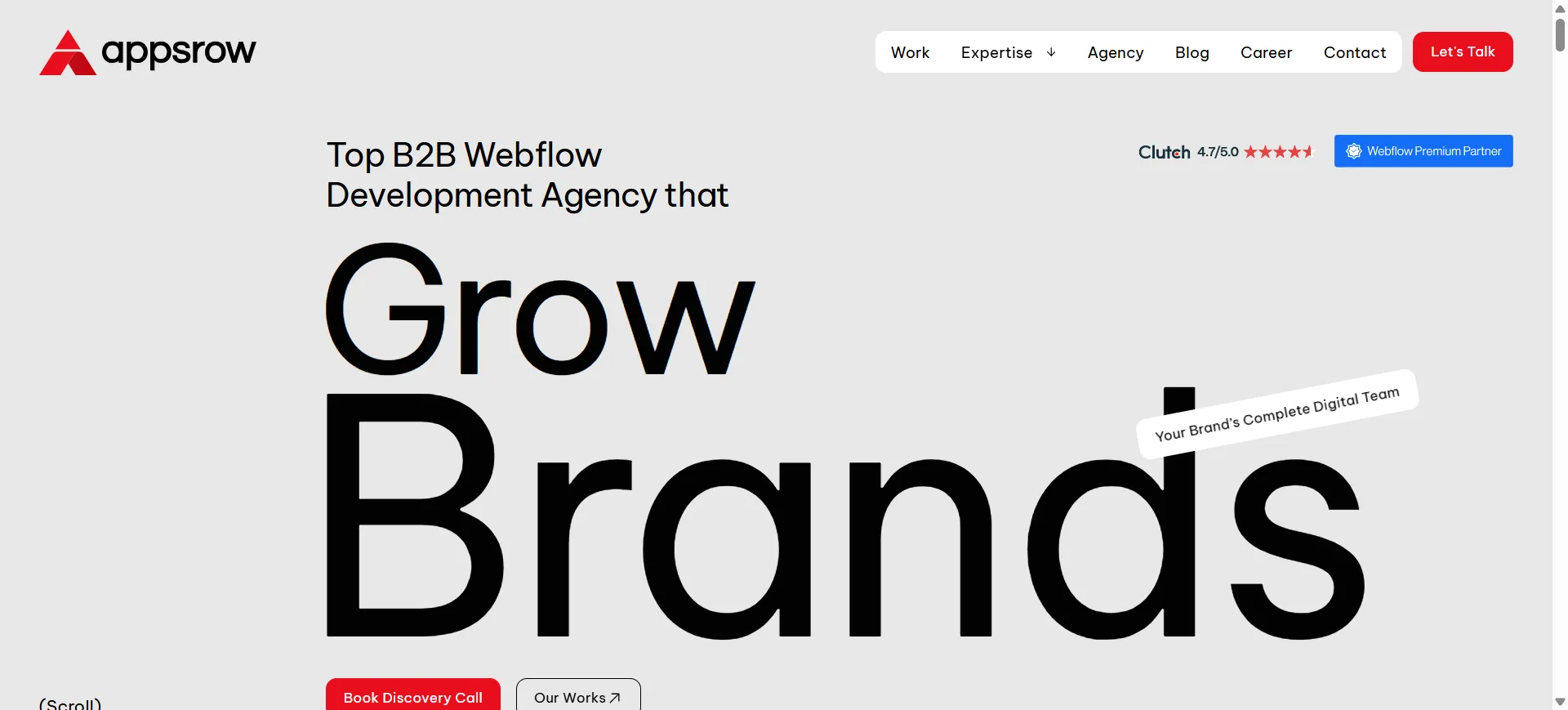
Appsrow is a Webflow Premium Certified Partner agency based in Ahmedabad, India, specializing in Webflow design and development for SaaS brands, startups, and modern businesses. Their own website is a showcase of everything they preach to clients.
What stands out:The current homepage leads with a bold headline, "Top B2B Webflow Development Agency that Grow Brands," paired with a full width hero video and strong trust badges (Clutch 4.7 rating, Webflow Premium Partner, Global Leader). The site uses scrolling rows of client logos across 28+ global brands, real project case studies with performance metrics visible (95+ speed, 100% accessibility), and testimonials from founders of actual client companies. The micro interactions and scroll based animations are restrained and purposeful, which is exactly how a Webflow agency site should feel.
Design takeaway: If you want visitors to trust your agency, your own website has to be your best work. Appsrow nails this with live proof points and zero fluff.
Website: anrok.com
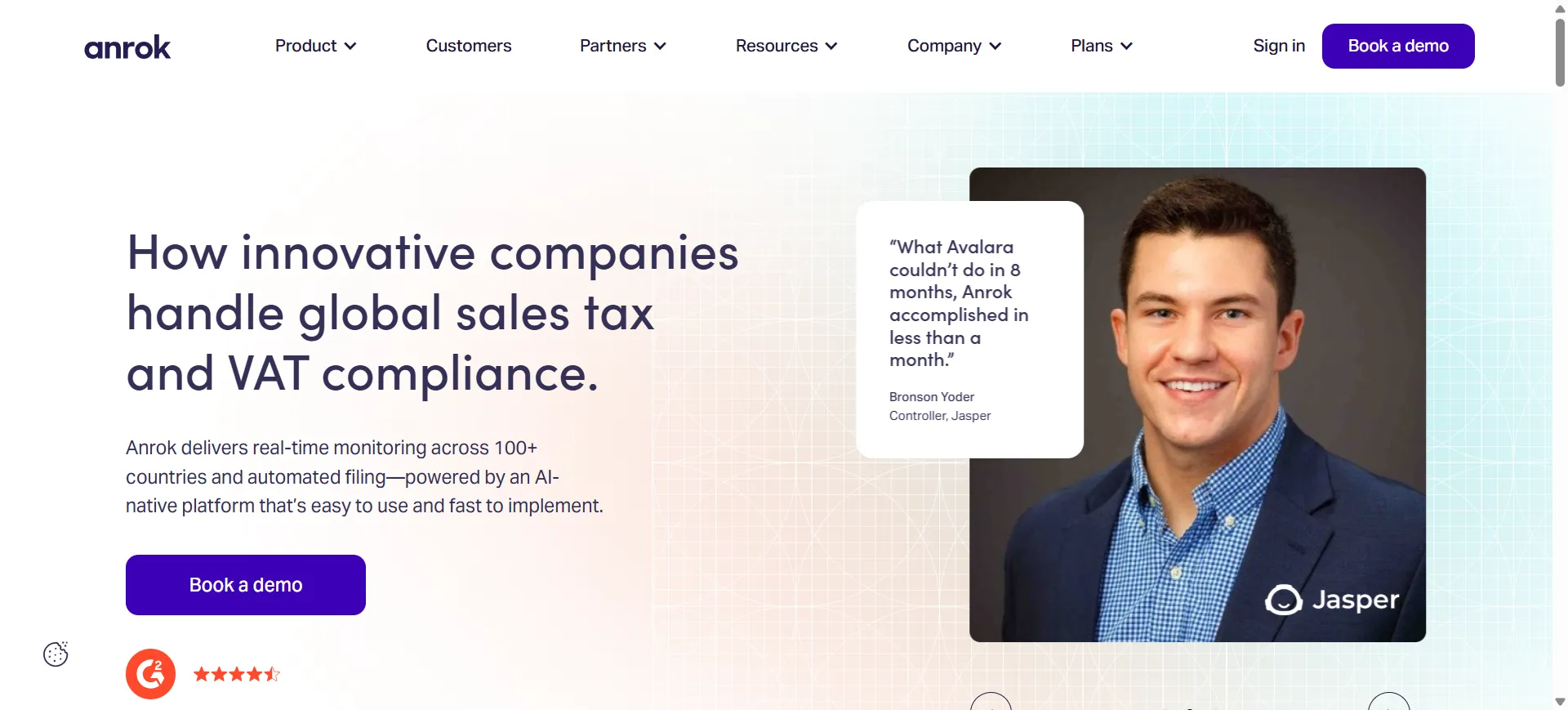
Anrok is a global sales tax and VAT compliance platform for modern SaaS companies. Their website turns a genuinely dry topic into something engaging through smart design choices.
What stands out:The current homepage opens with the headline "How innovative companies handle global sales tax and VAT compliance" and features Anrok Atlas, their new AI native tax interface, front and center. The site uses a clean type hierarchy, generous white space, and a striking scrolling strip of customer logos (Anthropic, Notion, Vanta, Cursor, Mercury, Cohere, and more). Customer quote cards with real photos build instant credibility. The restrained color palette keeps the focus on copy and product.
Design takeaway: White space plus high trust logos is a more effective combination than any animation.
Website: superlist.com
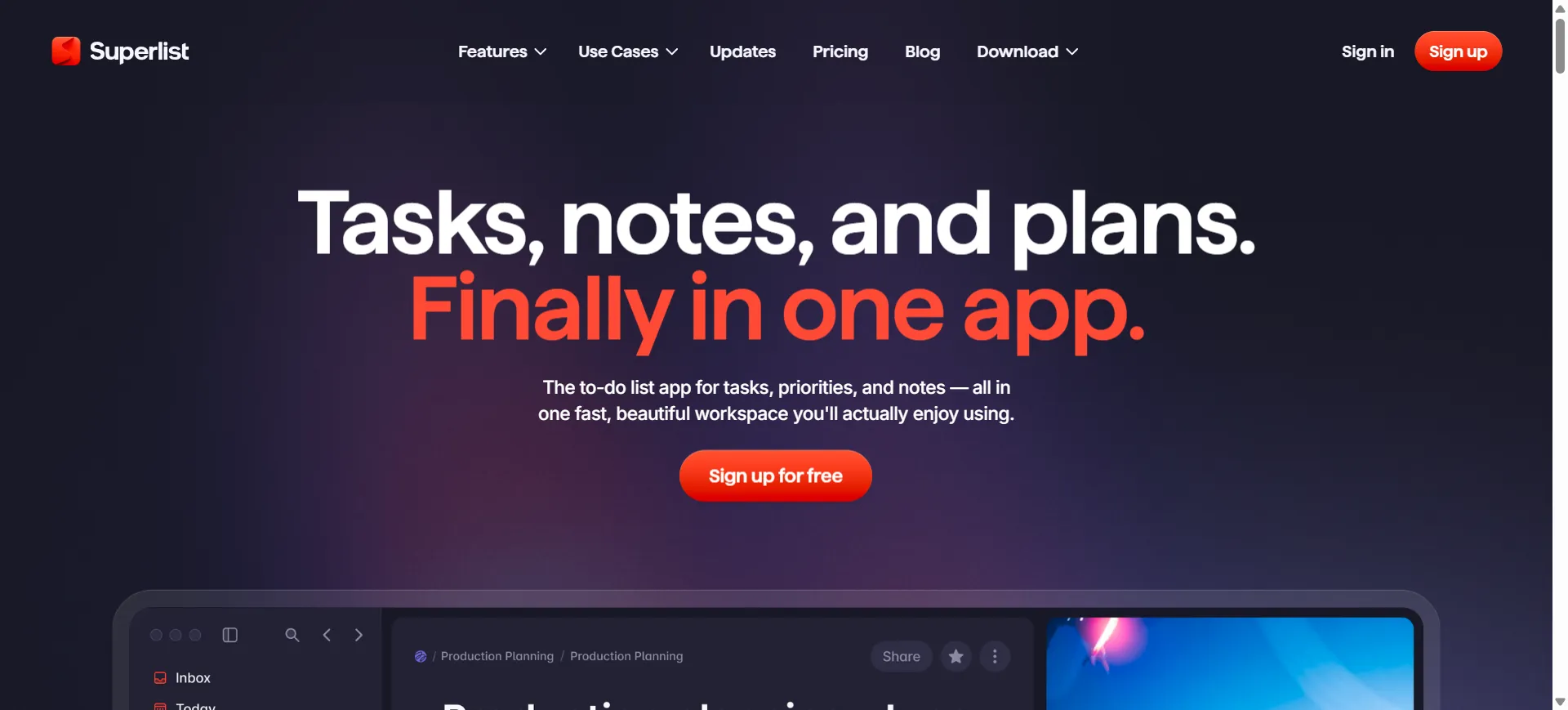
Superlist is built by the team behind Wunderlist and blends AI powered task management, meeting notes, and real time collaboration in one app.
What stands out:The homepage currently positions Superlist as the most beautifully designed task app of 2026. It uses a mix of polished product screenshots, playful color, and thoughtful micro interactions (the task completion sounds and toggle animations are famously delightful). Bold color blocks divide sections while the design system flexes between serious productivity and playful personality.
Design takeaway: You can be professional and playful at the same time if your design system is tight.
Website: rootly.com

Rootly is an AI native incident management platform that lives inside Slack. Their website is a standout example of the 2026 trend of treating product UI as gallery art.
What stands out:The product screenshots are placed against impressionist style painted backdrops, which elevates the software as something carefully crafted rather than mass produced. This contrast between modern SaaS UI and classical illustration is visually arresting and instantly memorable, and it is specifically called out in Webflow's own 2026 design trends roundup.
Design takeaway: Pair your product UI with an unexpected visual backdrop to make it feel premium and intentional.
Website: riverside.fm

Riverside is a platform for recording high quality podcasts and video remotely. The website matches the professional vibe of its target audience, creators and podcasters.
What stands out:Riverside uses a dark theme punctuated by pops of accent color, which immediately communicates professionalism. The hero section features the platform in action, and trust signals like well known podcasters and brand logos are placed right below the fold to build credibility fast.
Design takeaway: Dark mode, when done well, signals premium and professional. Use it when your audience expects polish.
Website: modash.io
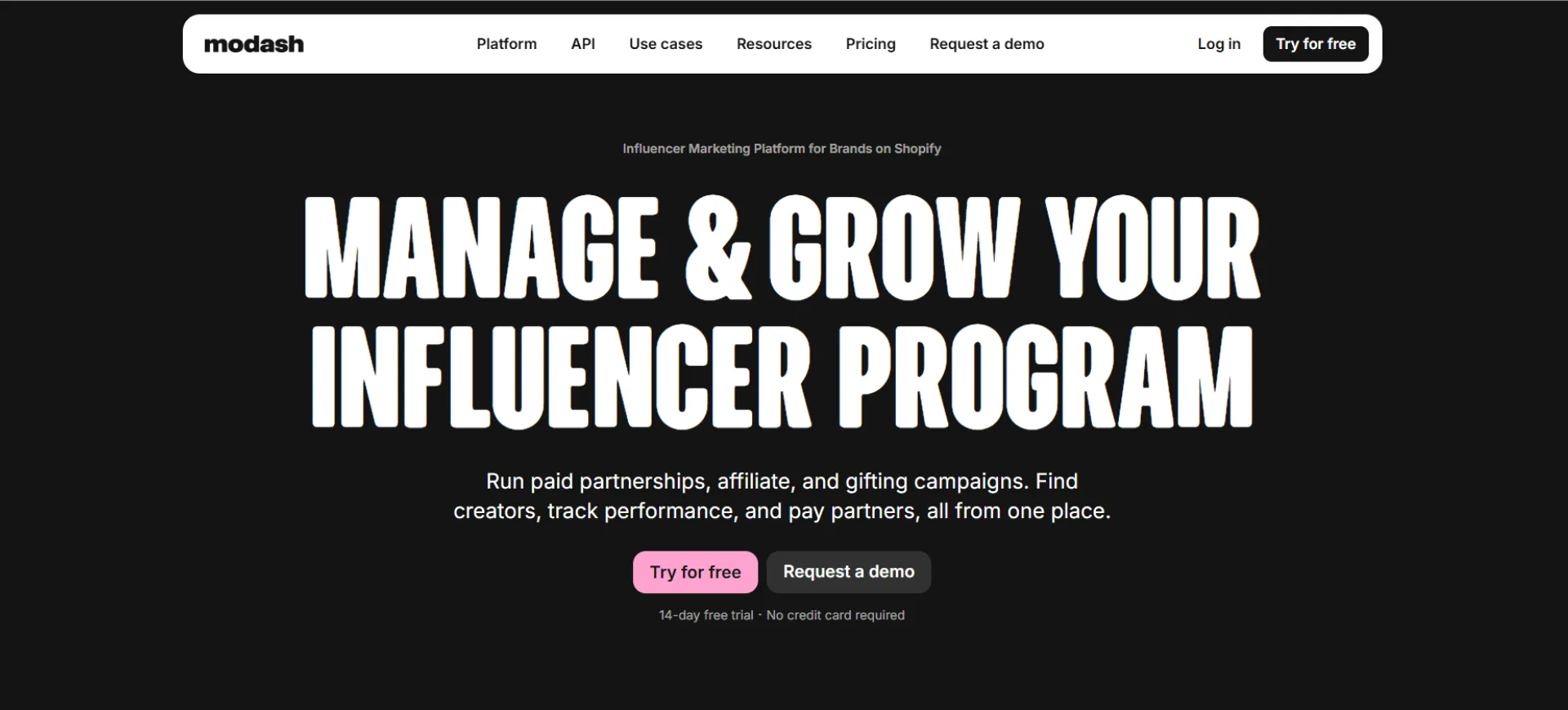
Modash helps marketing teams find and analyze influencers across Instagram, TikTok, and YouTube. With a database of 250 million plus profiles, the pressure was on to explain a complex product simply.
What stands out:The copy is direct and the visuals are informational without being cluttered. The team reportedly rewrote the hero section to be much simpler, and the click through rate doubled. The site uses clean layouts, real product screenshots, and testimonial sections that build trust without getting in the way of the main message.
Design takeaway: Simple copy beats clever copy. If users can tell what you do in three seconds, your design is working.
Website: nimbble.nl
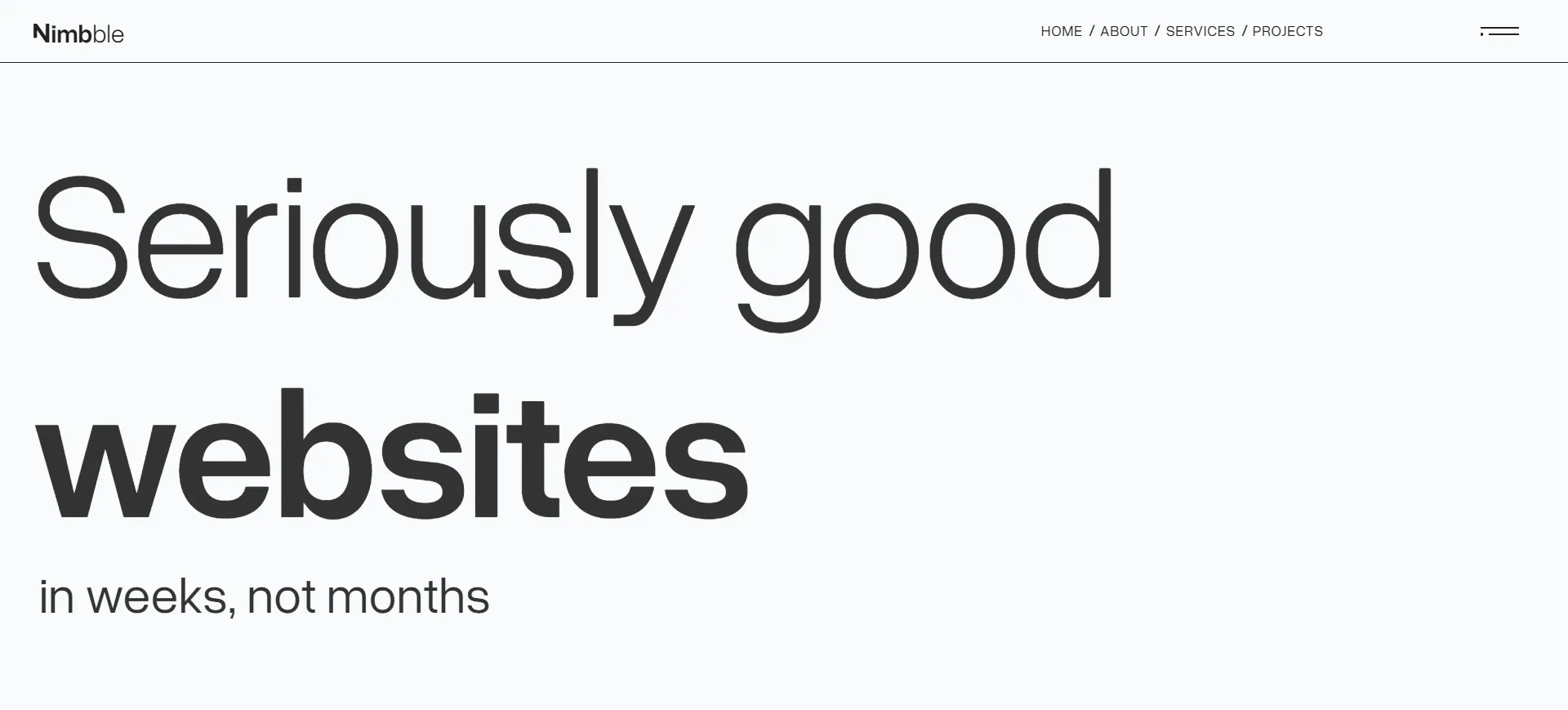
Nimbble is an Amsterdam based collective of digital designers and developers, best known for their own dark themed website that has appeared in Webflow showcases more than once.
What stands out:Their tagline, "Seriously good websites in all shapes and sizes," is delivered through bold outlined typography, scroll reveal content, and smooth animations that never get in the way of the message. The navbar transforms into a menu icon to create a cinematic viewing experience. They recently launched a revamped version of the site after it was featured in Webflow's own roundup of modern UI design, which tells you how seriously they take their own craft.
Design takeaway: When everyone else is using light mode, a bold dark design becomes a differentiator.
Website: faircraft.bio
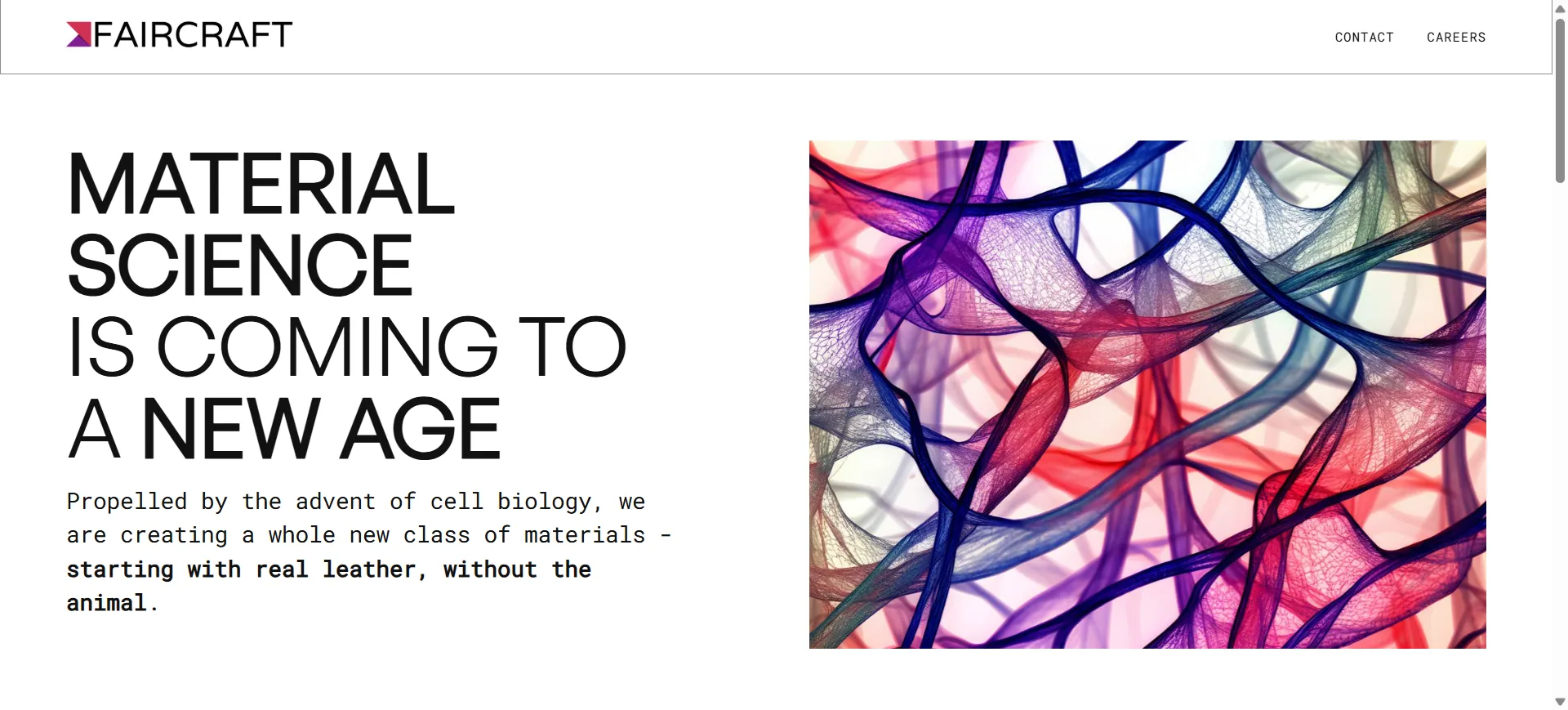
Faircraft is a Paris based biotech startup producing lab grown leather using tissue engineering. The website needs to communicate both science and luxury, which is a tough brief.
What stands out:The site leads with the line "Real leather, grown in a lab," supported by refined typography, earthy tones, and close up texture shots that almost let you feel the material through the screen. Scroll animations are subtle and never get in the way of the message. The result is a website that feels like a premium fashion brand and a research lab at once, which is perfect for a company working with Balenciaga, Loewe, and Stella McCartney.
Design takeaway: For brands in niche or technical industries, let your visuals carry the emotion while the copy handles the facts.
Website: thefurrow.webflow.io

The Furrow is an animation studio that describes itself as "the animation studio that provides a foundation for creativity to thrive." The website is a masterclass in restrained, confident design.
What stands out:The above the fold section is minimalist, almost sparse, but as you scroll the content opens up with rich visuals and smooth transitions. The site rewards exploration. A small black dot reveals the menu on hover, and a dark/light mode switcher is built in. Typography does most of the heavy lifting.
Design takeaway: A quiet hero section can be more powerful than a loud one if the rest of the site delivers on the promise.
Website: discord.com/blog

The engineering and product blog behind Discord is surprisingly one of the most recognizable Webflow sites in the wild.
What stands out:Bright colors, playful illustrations, and a clean layout make technical content feel approachable. The design leans heavily into Discord's brand personality, which could feel childish on another product but works perfectly here. Navigation is intuitive and the reading experience is genuinely enjoyable.
Design takeaway: Let your brand personality breathe, even in content heavy sections like blogs. Readers remember how a site felt, not just what it said.
The common thread across all 10 of these Webflow websites is intention. Every animation, every bit of spacing, every color choice is there for a reason. Great design is not about stuffing a page with effects, it is about removing everything that does not serve the user.
If you are planning to build or redesign your own Webflow site, study these examples. Pay attention to how they balance motion with readability, how they use white space, and how they guide the visitor through a story.
And if you want expert help bringing your own vision to life, Webflow Premium Partners like Appsrow combine strategy, design, and development under one roof so your site ends up in the next inspiration list, not just browsing one.
He is the CEO of Appsrow and a Webflow leader based in Ahmedabad, India.
He leads strategy, growth, and overall business direction.
Yes, he actively contributes to the Webflow ecosystem in India.
SaaS, AI, and enterprise businesses.
Growth strategy, digital transformation, and conversion optimization.
By aligning website strategy with business goals and improving conversions.
From brand identity to Webflow development and marketing, we handle it all. Trusted by 300+ global startups and teams.
.png)
.png)
.webp)