

September 22, 2026
12 mins read
MCP Adds Interactions, Faster CMS Access, and Webflow Cloud: What It Means for Your Site

Explore appsrow with AI
Webflow's pricing page is built like every other SaaS pricing page: a row of plan cards, a feature checklist, and a final column that just says Contact Sales. That structure works fine if you already know you need Enterprise. It is far less useful if you are trying to figure out whether you actually do, or whether you are about to sign a six-figure annual contract for governance features your team will never touch.
The question got harder to answer in May 2026, when Webflow restructured its entire pricing model. The old CMS and Business Site plans disappeared, folded into a single Premium plan. A new Platform plan category appeared above it, with Team at a fixed quote-based price and Enterprise still fully custom. For anyone evaluating Webflow at scale, the practical question changed from which Site plan do we need to do we need a Platform plan at all, and if so, which one.
This guide works through that question directly. It covers what Webflow Enterprise actually includes across security, governance, scale, and localization, how the 2026 pricing structure places it relative to Premium and Team, what genuinely drives Enterprise cost since there is no public number, and a practical framework for deciding whether your organization belongs on it. If you manage a Webflow site with real IT, security, or compliance requirements behind it, this is written for you specifically.
It is worth being upfront about who does not need most of this. A ten-person startup with a single marketing site, no compliance mandate, and a handful of editors is almost certainly well served by Premium, possibly Team once the team grows past what self-serve permissions comfortably support. Nothing in this guide is an argument for defaulting to the most expensive tier. It is a map of what each pillar of Enterprise actually solves, so that the decision to buy it, or not to, is based on a specific operational need rather than a vague sense that a bigger company should be on a bigger plan.
Webflow Enterprise is the top tier of Webflow's platform, built for organizations that need governance, security, compliance, and scale beyond what any self-serve plan offers. It is not a separate product. Enterprise extends the same visual Designer and CMS every Webflow site runs on, adding the controls large organizations need layered on top: identity management, granular permissions, dedicated infrastructure, contractual guarantees, and support that goes well beyond a standard help queue.
That distinction matters because it means an Enterprise upgrade is not a rebuild. A site already running on Webflow's Premium plan does not need to move to a different platform or re-architect its CMS to gain Enterprise capabilities. What changes is the layer of control sitting around that same site: who can log in and how, what they are allowed to publish without review, how fast the infrastructure serving that site responds under load, and what documentation exists if a security team asks for it.
Organizations typically arrive at Enterprise from one of a few directions: a regulated industry with a compliance requirement no lower tier satisfies, a security team that will not approve a tool without SSO, a marketing organization that has outgrown Team-plan permissions across multiple brands, or a company whose website has become genuinely mission-critical, where an hour of downtime has a real, calculable cost. Appsrow's glossary entry on Webflow Enterprise covers the baseline definition in more detail if you are still early in evaluating the tier.
It is worth dwelling on this distinction because it changes how a migration project actually gets scoped. Moving from Premium to Enterprise is fundamentally different work from moving off a legacy CMS onto Webflow in the first place. There is no content migration, no redesign, and no risk to existing SEO equity, since the URLs, pages, and CMS structure do not change. What changes is administrative: connecting an identity provider, defining roles, configuring page branching rules, and working through Webflow's security review process. A well-scoped Enterprise rollout on an already-solid Webflow site can typically happen in weeks, not the months a genuine platform migration would take.
Understanding Enterprise requires understanding what changed underneath it in May 2026. Webflow simplified its Site plan lineup from five tiers down to three: Starter stays free and limited to two pages on a webflow.io subdomain, Basic covers static, non-CMS sites at 15 dollars a month billed annually, and a single new Premium plan replaced the old CMS and Business tiers entirely, bundling 20,000 CMS items and 40 collections into one 25 dollar a month plan.
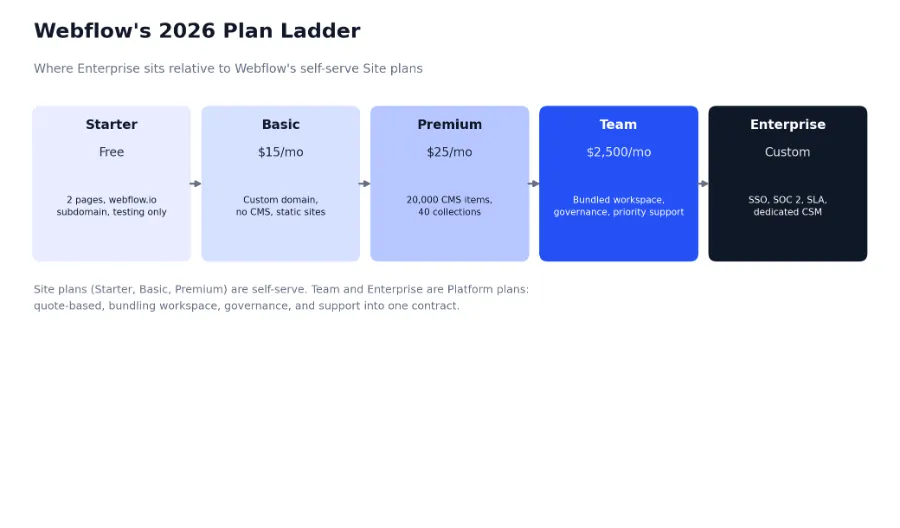
Above those self-serve Site plans sits a new category Webflow calls Platform plans, and this is where the real jump in complexity, and price, happens. Team starts at 2,500 dollars a month on an annual contract and bundles a site, a workspace, seats, add-ons, and support into a single package designed for organizations that have outgrown self-serve entirely but do not need the deepest governance and compliance tier. Enterprise sits above Team, fully custom-priced, and adds the security, compliance, and scale capabilities covered through the rest of this guide.
It helps to separate two things that get conflated constantly in Webflow pricing conversations: Site plans control hosting and CMS capacity for one project, while Workspace plans control team seats, collaboration, and, at the top end, governance. A company can be on Webflow's Premium Site plan and a Starter Workspace, or a Premium Site plan paired with an Enterprise Workspace for its governance features. Appsrow's Webflow Cloud breakdown goes deeper on how this separation plays out for teams running full-stack applications on top of Webflow, where the distinction matters even more.
For anyone who evaluated Webflow before May 2026 and is returning to it now, the practical upside of the restructure is worth naming directly. A company previously on the legacy CMS plan gets roughly ten times the CMS item ceiling under Premium for barely more money annually. A company on the old Business plan gets the same generous CMS ceiling at a meaningfully lower starting price, though it is worth checking the bandwidth allocation specifically, since Premium's base bandwidth is lower than Business offered and high-traffic sites may need a bandwidth add-on to match what they had before. Legacy plan holders keep their existing terms for now, but new evaluations should be built entirely around the current three-tier Site plan structure rather than pricing pages or old case studies referencing plans that no longer exist for new customers.
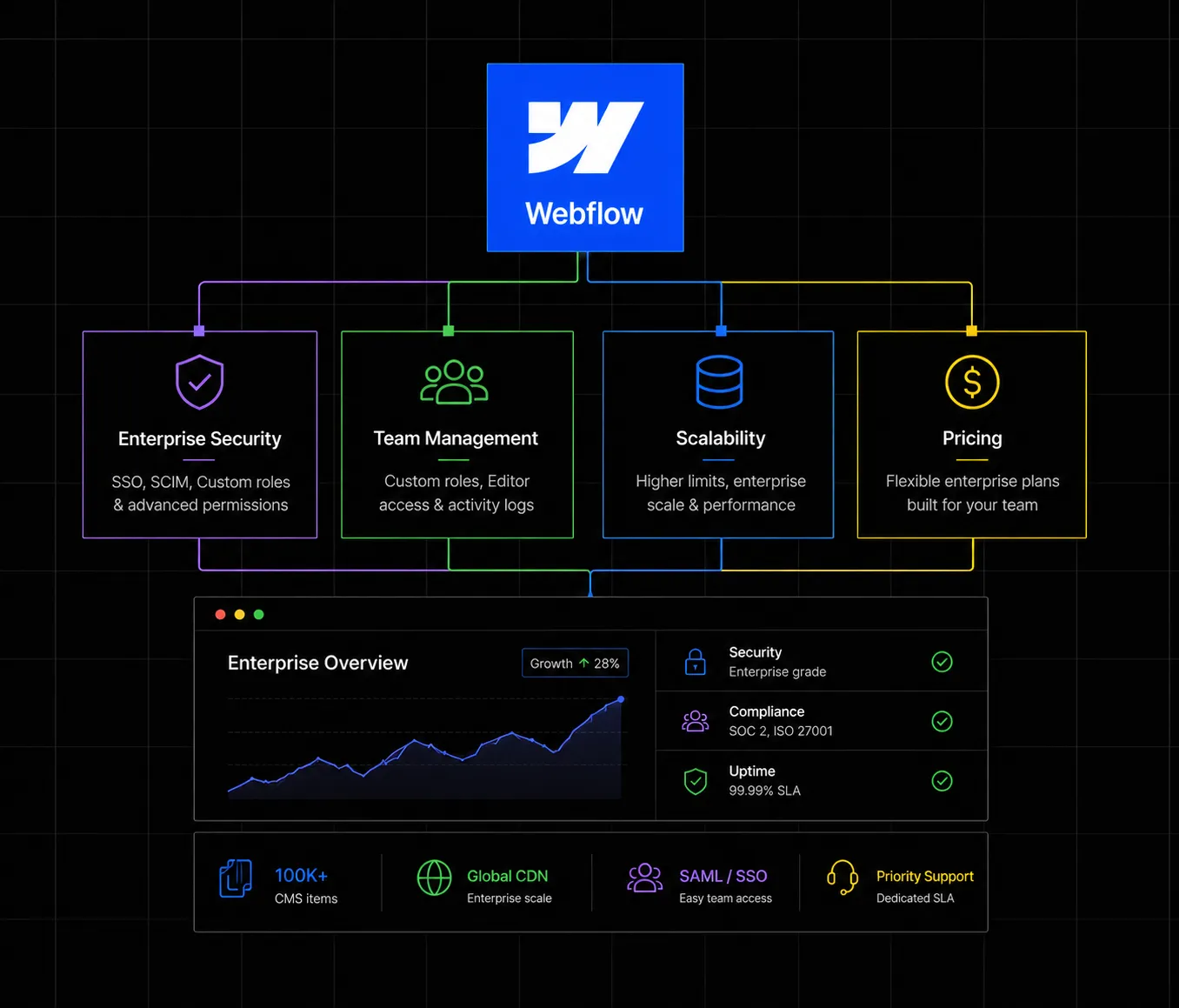
Stripped of marketing language, Webflow Enterprise's feature set breaks cleanly into four functional clusters. Each one exists to solve a specific operational problem large organizations run into that Premium and Team plans were never designed to handle.
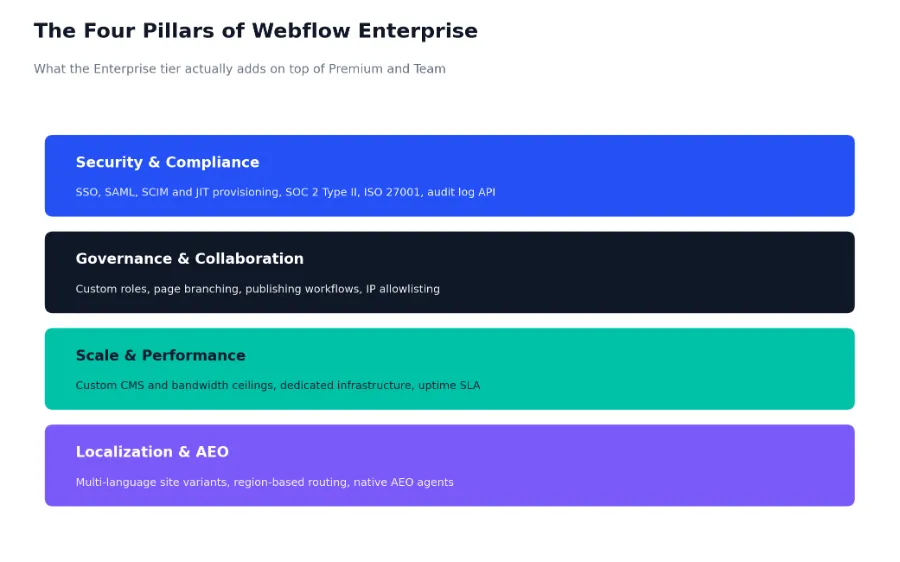
This is the pillar that gets most organizations to Enterprise in the first place. Single Sign-On lets employees authenticate through a corporate identity provider, Okta, Azure AD, or Google Workspace among them, removing separate Webflow passwords entirely and ensuring access revokes automatically the moment someone is offboarded upstream. SCIM and JIT provisioning extend that further, syncing user creation and removal bidirectionally between the identity provider and Webflow rather than requiring manual account management.
On the compliance side, Webflow maintains SOC 2 Type II certification, an ongoing audit rather than a one-time claim, alongside ISO 27001 for information security management and ISO 27017 and 27018 for cloud and personal data protection specifically. Webflow is explicit that it is not HIPAA compliant by default and is not designed to store protected health information, which matters if your organization operates in healthcare specifically. An Enterprise Workspace audit log API lets security teams monitor logins and permission changes directly, with that log data encrypted at rest using AES-256.
It is worth understanding what this compliance documentation actually buys an organization in practice. Most enterprise procurement processes, particularly at companies selling into other enterprises, require a vendor security review before any tool touches customer-facing infrastructure. A SOC 2 Type II report and an ISO 27001 certification are the specific artifacts a security team asks for during that review, and having them on hand from Webflow directly, rather than having to build a case for why a lower-tier plan is acceptable, often shortens that review from weeks to days. For companies where the website itself is customer-facing and carries real brand risk, that documentation is frequently the single highest-value item in the entire Enterprise bundle, ahead of any feature that shows up in the Designer itself.
Custom roles let an organization define exactly what different teams can see and publish, well beyond the fixed permission tiers available on lower plans. Page branching allows changes to be built and reviewed on a separate branch before merging into a live page, which matters enormously once you have more than a handful of people capable of publishing to a production site. IP allowlisting restricts Designer and CMS access to approved network ranges, a common requirement in corporate security reviews.
The practical value of this pillar tends to become obvious only after an organization has lived without it. A ten-person team can usually coordinate publishing informally, a quick message before anyone touches a shared page. That informal coordination breaks down predictably somewhere between twenty and fifty people with any kind of publishing access, particularly across multiple brands or regional teams that do not sit in the same time zone or the same Slack channel. Custom roles and page branching are not features that add capability so much as they remove the need for that informal coordination to keep working at a scale where it inevitably stops working on its own.
IP allowlisting deserves a specific mention because it is frequently the item a corporate security policy names explicitly, even when nobody on the marketing side realizes it is a factor until procurement flags it. Restricting Designer and CMS access to a defined set of corporate network ranges, rather than any authenticated login from anywhere, closes a class of risk that SSO alone does not fully address: a compromised credential is far less useful to an attacker if it can only be used from an approved network. Security teams evaluating Webflow specifically often treat this control, paired with SSO, as the two non-negotiable items in an otherwise flexible requirements list.
Where Premium caps out at fixed CMS item and bandwidth ceilings, Enterprise contracts set custom limits sized to the organization, along with dedicated infrastructure and a contractual uptime SLA rather than a best-effort target. For a site where an hour of downtime has a measurable revenue impact, that contractual guarantee, not just the higher technical ceiling, is often the actual purchase decision.
Pooled usage across teams is a related but less visible piece of this pillar. Large organizations running several sites under one Enterprise contract can typically share bandwidth and CMS allocation across those properties rather than provisioning each one separately against its own hard ceiling, which avoids the common scenario where one high-traffic property runs into limits while a quieter sister site sits well under its own allocation with no way to lend the difference. This pooling is a genuine operational advantage for multi-brand organizations specifically, and one that rarely shows up in a feature comparison chart even though it materially affects how a real Enterprise contract gets sized.
Enterprise includes native localization: multi-language site variants, structured translation workflows, and region-based routing, built into the platform rather than bolted on through a third-party tool. It also includes access to Webflow's native AEO, Answer Engine Optimization, agents, the platform's built-in tooling for AI search visibility as more discovery traffic shifts from traditional search results to AI-generated answers. Organizations for whom AEO and structured SEO are a genuine strategic priority, rather than a nice-to-have, tend to weigh this pillar more heavily than the checklist below might otherwise suggest.
It is worth noting that standard Webflow plans can technically support multi-language sites through workarounds, separate collections, manually maintained page duplicates, or third-party localization tools bolted on after the fact. What Enterprise adds is native support: locale-aware CMS fields, structured translation workflows that keep source and translated content linked rather than drifting apart silently, and region-based routing handled at the platform level rather than through DNS or redirect workarounds a development team has to maintain by hand. For a company running two or three language variants, the workaround approach is often tolerable. Past that, the maintenance burden of keeping manually managed translations in sync tends to grow faster than most teams expect, which is usually the point at which native localization stops being a nice-to-have and starts being the actual justification for the upgrade.
Setting up SSO on an Enterprise Workspace is a configuration exercise between Webflow and your identity provider, not custom development. A simplified SAML metadata exchange, illustrative of the shape this configuration takes, looks like this:
<!-- Simplified SAML SSO configuration (illustrative structure) -->

<EntityDescriptor entityID="https://webflow.com/sso/your-workspace">

  <SPSSODescriptor>

    <AssertionConsumerService

      Binding="urn:oasis:names:tc:SAML:2.0:bindings:HTTP-POST"

      Location="https://webflow.com/sso/acs"

      index="0" />

    <NameIDFormat>

      urn:oasis:names:tc:SAML:1.1:nameid-format:emailAddress

    </NameIDFormat>

  </SPSSODescriptor>

</EntityDescriptor>

// Once connected, provisioning typically follows SCIM,
// syncing user create/update/deactivate events from the
// identity provider directly into the Webflow Workspace.
Webflow does not publish Enterprise pricing, and every credible source covering it in 2026 says the same thing: it is negotiated directly with Webflow's sales team based on your specific requirements. That is not evasiveness so much as a reasonable reflection of how differently two Enterprise contracts can look depending on what an organization actually needs.
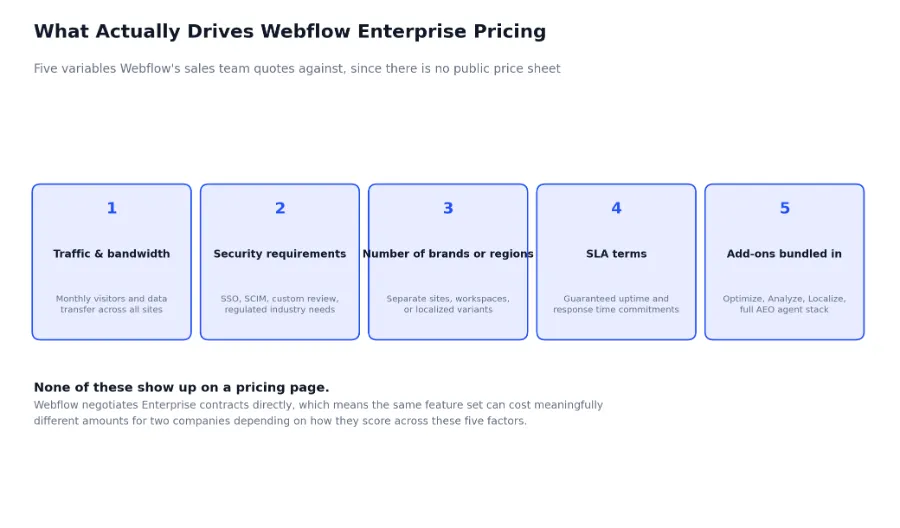
As a general anchor, Enterprise pricing typically starts in the range of several hundred dollars per month for mid-market organizations and scales substantially from there for large enterprises running multiple sites at high traffic volumes. That range is wide enough to be almost unhelpful on its own, which is exactly why the five factors above matter more than any single number: a mid-market SaaS company with one brand, moderate traffic, and a straightforward SSO requirement will land in a very different place than a multi-brand retailer operating across a dozen regional sites with a strict SLA and the full AEO agent stack bundled in.
Because the contract is negotiated rather than published, going in with a clear, prioritized list of what your organization actually needs, rather than a vague sense that Enterprise sounds like the safe choice, tends to produce a meaningfully better outcome than accepting whatever configuration a sales conversation defaults to first.
There is also a timing lever worth knowing about, common across most enterprise SaaS negotiations and not unique to Webflow. Annual contracts negotiated at renewal, with real usage data from the year prior in hand, tend to land on more favorable terms than a first-time signup, since both sides now have concrete numbers instead of estimates. Organizations evaluating Enterprise for the first time sometimes get more value out of starting on Team, gathering a genuine usage baseline for two or three quarters, and then negotiating an Enterprise contract from that position, rather than signing an Enterprise deal upfront based on projected rather than actual need. This is slower, but it consistently produces a tighter, better-justified contract on the other side.
Beyond the base Enterprise contract, Webflow sells several add-ons separately: Optimize for A/B testing and personalization, Analyze for native analytics, and Localize for multi-language support beyond what ships natively, along with additional AI credit packs once a workspace's pooled monthly allocation runs out. These are usage-priced and genuinely optional, but they are also the layer most budgets forget during initial planning, only to discover them on the first real invoice. If personalization, native analytics, or heavy AI-assisted content production are part of the actual use case driving the Enterprise decision, it is worth pricing those add-ons into the initial conversation rather than treating them as a surprise to negotiate separately after the base contract is already signed.
The most expensive mistake in this evaluation runs in both directions. Under-buying leaves a security review blocked indefinitely on a missing SSO integration. Over-buying means paying Enterprise-tier pricing for governance capabilities a ten-person marketing team will never configure, let alone need.
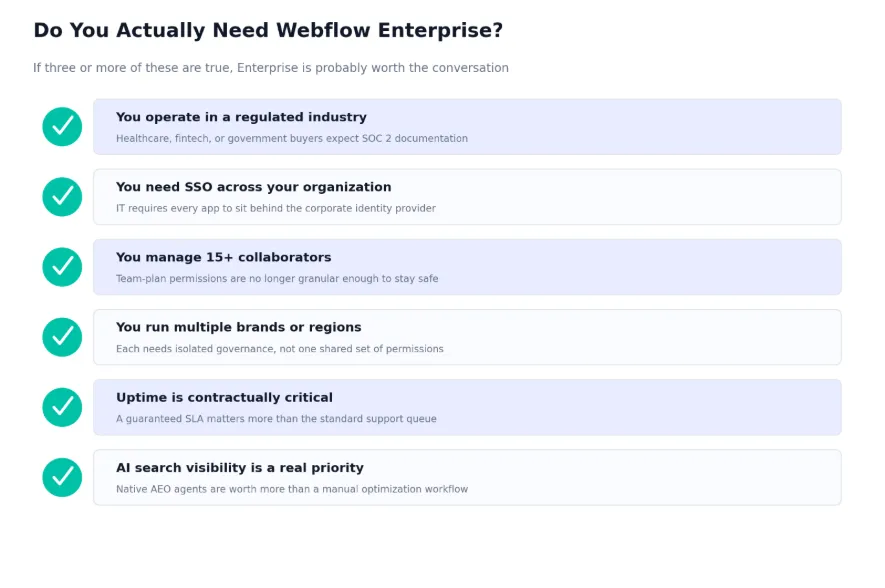
A useful rule several experienced Webflow partners apply consistently: if an organization can check three or more of these boxes, an Enterprise conversation is worth having. Checking one or two usually means the Team plan, or even a well-configured Premium site with strong internal process, covers the actual need. The specific combination matters more than the count, since a single hard requirement, a HIPAA-adjacent compliance mandate, for instance, can justify Enterprise on its own regardless of how many other boxes go unchecked.
It is worth running this checklist as an actual exercise with the relevant stakeholders in the room, rather than one person guessing at answers on behalf of security, IT, and marketing simultaneously. A marketing lead often overestimates how urgently AEO agents are needed while underestimating how binding an IT-mandated SSO policy actually is, and the reverse happens just as often in the other direction. Getting security, IT, and the team that owns the website itself to independently score the checklist, then comparing notes, surfaces disagreements worth resolving before the negotiation starts rather than midway through it.
Consider a mid-market company running four distinct consumer brands, each with its own Webflow site, managed by a combined marketing and IT team of around twenty people across three countries. Working through the checklist makes the decision concrete rather than abstract.
The company checks multiple boxes clearly: more than fifteen collaborators across brands, genuine need for isolated governance between brand teams so one marketer cannot accidentally publish to another brand's site, and a corporate IT policy requiring SSO for any tool touching customer-facing infrastructure. It does not operate in a regulated industry and has no HIPAA or hard compliance mandate, and its traffic, while meaningful, does not yet justify a contractual uptime SLA over Webflow's standard reliability.
That profile, three clear yeses out of six, is a reasonable Enterprise case, but a narrow one. The negotiation should center specifically on SSO, custom roles for brand isolation, and the collaborator ceiling, while resisting a bundled package that adds a full SLA and the complete AEO agent stack by default, since neither is the actual driver here. This is the kind of scoping conversation Appsrow helps clients work through before an Enterprise contract gets signed, translating a checklist into the specific line items worth negotiating for.
Worth noting: this same company revisited the decision eighteen months later after acquiring a fifth brand and expanding into two additional countries. At that point, the localization and AEO pillars that were reasonably excluded in the original negotiation became genuinely relevant, and the SLA question resurfaced as traffic across the combined portfolio grew past the threshold where downtime carried real, calculable cost. The checklist is not a one-time gate. Re-running it at meaningful growth milestones, an acquisition, a new region, a traffic threshold crossed, catches the moments when a previously narrow Enterprise scope needs to expand, or when a company that correctly stayed on Team the first time around has genuinely outgrown it.
The jump from Premium to Team is mostly about workspace bundling and priority support. The jump from Team to Enterprise is a different kind of change entirely: it is where identity management, compliance documentation, and contractual guarantees enter the picture, which is also why the price step between those two tiers is far less predictable than the step below it.
Reading this table by row rather than by column is often more useful than it first appears. An organization that only needs one row, SSO, for instance, and is otherwise well served by Team's bundled workspace and priority support, is a reasonable candidate for staying on Team while pushing hard in negotiation for whether that single capability can be added without the full Enterprise jump. Webflow's custom quoting model exists specifically because not every organization needs every row checked, and a comparison table like this one is most useful as a scoping tool, not as a simple upgrade recommendation.
Signing the contract is the easy part. These practices are what determine whether an Enterprise rollout actually delivers the governance and security value it was purchased for, or quietly becomes an expensive version of the same site with a few unused settings turned on.
Teams sometimes upgrade to full Enterprise because they need one specific capability, most often SSO, without realizing how much of the rest of the bundle they are paying for and will not use. It is worth asking directly in the sales conversation whether a narrower configuration exists before accepting the full package.
Custom roles and page branching only deliver value if someone has actually designed the role structure and review process before rollout. Organizations that sign an Enterprise contract and then improvise governance afterward tend to end up with permissions that are either too loose to matter or too rigid to work with, neither of which reflects a genuine limitation of the platform.
A dedicated Customer Success Manager is one of the more concretely valuable, and more consistently underused, parts of the Enterprise bundle. Organizations that treat the CSM relationship as a quarterly check-in call get a fraction of its value compared to teams that use it as an ongoing channel: flagging upcoming traffic spikes ahead of a product launch, escalating platform questions that would otherwise sit in a standard support queue, or getting early visibility into new Enterprise features before general availability. The support tier is part of what the contract is paying for, and treating it as optional rather than active is one of the more common, and most easily fixed, ways Enterprise value goes unrealized after signing.
A contractual uptime guarantee protects against Webflow's own infrastructure failing. It does not protect against a bloated page weighed down by unoptimized assets and third-party scripts loading synchronously. Enterprise-grade hosting and a genuinely well-built site are separate investments, and skipping the second one undercuts the value of the first.
Enterprise contracts are typically signed for a year at a time, but the organization signing them rarely stays the same shape for that entire year. A company that added two new brand sites, doubled its collaborator count, or dropped a compliance requirement it originally negotiated for is usually still paying against the original scope until someone actively revisits it. Calendaring a formal usage review a few months before each renewal, comparing actual traffic, seat count, and feature usage against what was negotiated, catches both kinds of drift: paying for capacity that has gone unused, and quietly outgrowing limits nobody flagged until a real incident forced the conversation.
Most of the technical work in an Enterprise rollout is configuration rather than construction, which is exactly why it is easy to underestimate how much planning it still requires. A typical engagement breaks into three phases, and skipping straight to the middle one is the most common way rollouts run into avoidable friction.
Before any contract terms get finalized, the checklist covered earlier in this guide gets run properly, with security, IT, and the team that owns the website itself all weighing in independently. The output of this phase is not a yes or no on Enterprise. It is a specific, prioritized list: which pillars are hard requirements, which are genuinely useful but negotiable, and which do not apply to this organization at all. That list becomes the actual negotiating document in conversations with Webflow's sales team, rather than a general sense that the company should probably be on the top tier.
With the contract scoped, the technical setup starts with identity: connecting the corporate identity provider, configuring SCIM or JIT provisioning, and testing the full login and deprovisioning flow before rolling it out to the whole team. Custom roles get mapped against the organization's actual publishing structure, not a generic template, and page branching rules get defined for the specific categories of content that need review versus the categories that can publish directly. This phase is where most of the real work happens, and it benefits enormously from being done by someone who has configured this exact stack before, since small missteps in SCIM mapping or role scoping tend to surface as confusing access problems weeks later rather than immediately.
Before the rollout is considered complete, the full access model gets tested end to end: a new hire provisioned automatically through SCIM, an offboarded employee's access confirmed revoked, a page branch pushed through the full review and publish cycle, and the audit log checked to confirm it is actually capturing the events a security team would expect to see during a real review. Documentation gets handed off to whichever internal team will own the ongoing relationship, since a CSM relationship and an Enterprise contract are only as useful as the internal team actually using them.
This is the structure Appsrow applies across Webflow development engagements that involve an Enterprise component, whether that means rolling out Enterprise on an existing Webflow site or building a new one with Enterprise governance in mind from the first page. Teams that follow this sequence tend to avoid the two failure modes covered earlier in this guide, an under-scoped contract missing a hard requirement, and an over-scoped one paying for capability nobody configured, since both get caught during the scoping phase rather than discovered months into a live rollout.
Webflow Enterprise is not a bigger version of Premium. It is a different kind of purchase entirely, one built around identity, compliance, governance, and contractual guarantees rather than higher CMS ceilings alone. The 2026 pricing restructure made that distinction sharper by folding the old mid-tier plans into a single Premium option and placing Team as a genuine middle ground, which means the decision most organizations now face is not which Site plan fits, but whether they need a Platform plan at all.
The checklist and framework in this guide will not replace an actual conversation with Webflow's sales team or an experienced Webflow partner, but it should make that conversation sharper. Walking in with a clear, honest read on which of the four pillars your organization genuinely needs is the difference between negotiating a contract that fits and accepting whatever configuration gets offered first.
Webflow's 2026 pricing changes made the self-serve side of the platform simpler and more generous. They did not make the Enterprise decision itself any simpler, because that decision was never really about the pricing page in the first place. It is about whether your organization's security, governance, and scale requirements have outgrown what a self-serve plan can support, and that is a question worth answering with a checklist and a clear conversation, not a guess.
Appsrow is a Webflow Premium Partner agency that has delivered 300+ Webflow projects for B2B, SaaS, and enterprise brands since 2018, including multilingual and multi-brand builds for enterprise security and real estate clients across regions. The team supports the full Enterprise journey, from Webflow development and Webflow design through to Webflow migration for teams moving onto Enterprise from another platform, and Webflow and Claude AI integrations for organizations extending Enterprise governance into agentic CMS workflows.
If you are evaluating whether Webflow Enterprise fits your organization, Appsrow helps scope the negotiation around what you actually need, from SSO and custom roles to localization and AEO. Read more in Appsrow's Webflow pricing guide, explore Webflow integrations and CRO services for teams scaling past launch, or browse recent enterprise projects to see the work firsthand.
If your website isn't easy to understand, you're giving away opportunities
before the conversation even starts.
Get a free review of how your website appears to AI-powered search and discovery tools.
GOT QUESTIONS ?
How much does Webflow Enterprise actually cost?
There is no public number. Industry estimates place typical Enterprise contracts starting in the low hundreds of dollars per month for mid-market organizations, scaling substantially higher for large enterprises with multiple high-traffic sites, SLA requirements, and a full add-on bundle. The only reliable way to get an accurate figure is a direct conversation with Webflow's sales team, ideally after you have scoped your actual requirements against the checklist in this guide.
Is Webflow Enterprise HIPAA compliant?
No. Webflow is explicit that it is not HIPAA compliant by default and is not designed to store or process protected health information, even on the Enterprise tier. Healthcare organizations handling PHI need a different architecture, typically keeping sensitive data off the Webflow-hosted site entirely and routing it through a HIPAA-compliant backend.
Can I get SSO without upgrading to full Enterprise?
As of 2026, SSO is exclusively available on Enterprise Workspace plans; standard Workspace plans do not support it. If SSO is genuinely the only blocker, it is worth raising that directly in the sales conversation, since Webflow's custom quoting model means the final contract does not have to include every Enterprise feature by default.
Does upgrading to Enterprise require rebuilding our existing Webflow site?
No. Enterprise adds a governance and infrastructure layer around your existing Webflow project rather than requiring a new build. The Designer, CMS, and published site stay the same platform; what changes is who can access it, how, and under what guarantees.
Can we downgrade from Enterprise if our needs shrink?
Enterprise contracts are typically annual commitments, so a downgrade usually takes effect at renewal rather than immediately. This is another reason the annual usage review mentioned earlier in this guide is worth doing on a fixed schedule rather than only when someone happens to notice unused capacity. Raising a scope reduction with Webflow's account team well before renewal, backed by actual usage data, tends to go smoother than raising it at the last minute.

Sandeepsingh Sisodiya is the CEO of Appsrow and a Webflow leader in Ahmedabad, India. He focuses on SaaS growth, digital transformation, and building high-converting website strategies.
CURATED READING