

.png)
October 16, 2026
12 mins read
Source by Webflow: How AI Agents Are Changing Website Development and Marketing Operations

Explore appsrow with AI
A few years ago, ranking on page one of Google was the whole game. Today there is a quieter battle happening one layer up. When someone asks ChatGPT how to choose a VoIP provider, or asks Perplexity which Webflow agency handles enterprise builds, an answer appears in seconds. That answer was assembled from a handful of sources the model decided to trust. The question that should keep every marketing team awake is simple: was your site one of them?
We build and optimize Webflow sites for a living, and over the last year the single most common request we hear has shifted. It used to be "help us rank." Now it is "help us get cited." Those are related goals, but they are not the same goal, and the audit you run for one is not the audit you run for the other. This guide walks through exactly how we audit a Webflow site for AI-citation readiness, the checklist we work through page by page, and the 100-point scoring system we use to turn a vague feeling of "are we visible in AI" into a number you can act on and track over time.
Nothing here requires a developer to sit beside you. If you can edit pages in the Webflow Designer and read your own site critically, you can run this audit on a small site in an afternoon. Larger sites take longer, but the framework stays the same.
AI-citation readiness is the degree to which large language models and answer engines can find your content, understand it, trust it, and quote it as a source. It sits next to traditional SEO but pulls in a few extra concerns. A page can rank perfectly well in classic search yet never get pulled into an AI answer, because the model could not extract a clean, self-contained claim from it, or could not verify who wrote it, or could not parse the page at all.
Answer engines such as ChatGPT Search, Perplexity, Google AI Overviews, and Gemini do not read pages the way a human visitor does. They favor content that states a claim plainly, supports it with evidence, and is wrapped in signals that vouch for its credibility. Readiness, then, is less about keyword density and more about clarity, structure, and trust. The audit below measures all three.
It helps to separate two ideas. Visibility is whether an engine can technically access and read your page. Citability is whether, having read it, the engine considers your page worth quoting over the dozens of alternatives it also read. A complete audit grades both, because a flawless trust profile means nothing if a crawler cannot reach the page, and perfect crawlability means nothing if the content is too vague to lift.
Webflow gives you an unusual amount of control over the exact HTML that ships to a crawler, which is a genuine advantage for AI citation. You can set clean semantic headings, add custom meta and schema in page settings, control your sitemap, and publish a tidy URL structure without fighting a plugin ecosystem. Teams that use Webflow well tend to produce lean, fast, well-structured pages, which is precisely what answer engines reward.
The flip side is that the same flexibility lets problems hide in plain sight. Rich Webflow interactions can bury text inside elements that render awkwardly for extraction. Designers sometimes style a visual heading with a plain div instead of a real heading tag, so the document outline a model reads does not match what a human sees. CMS collection pages can ship without per-item schema. None of this is unique to Webflow, but it surfaces in a recognisable pattern, which is why a generic checklist tends to miss it. If you would rather hand the fixes to a specialist team, our Webflow development services cover the technical work this audit uncovers.
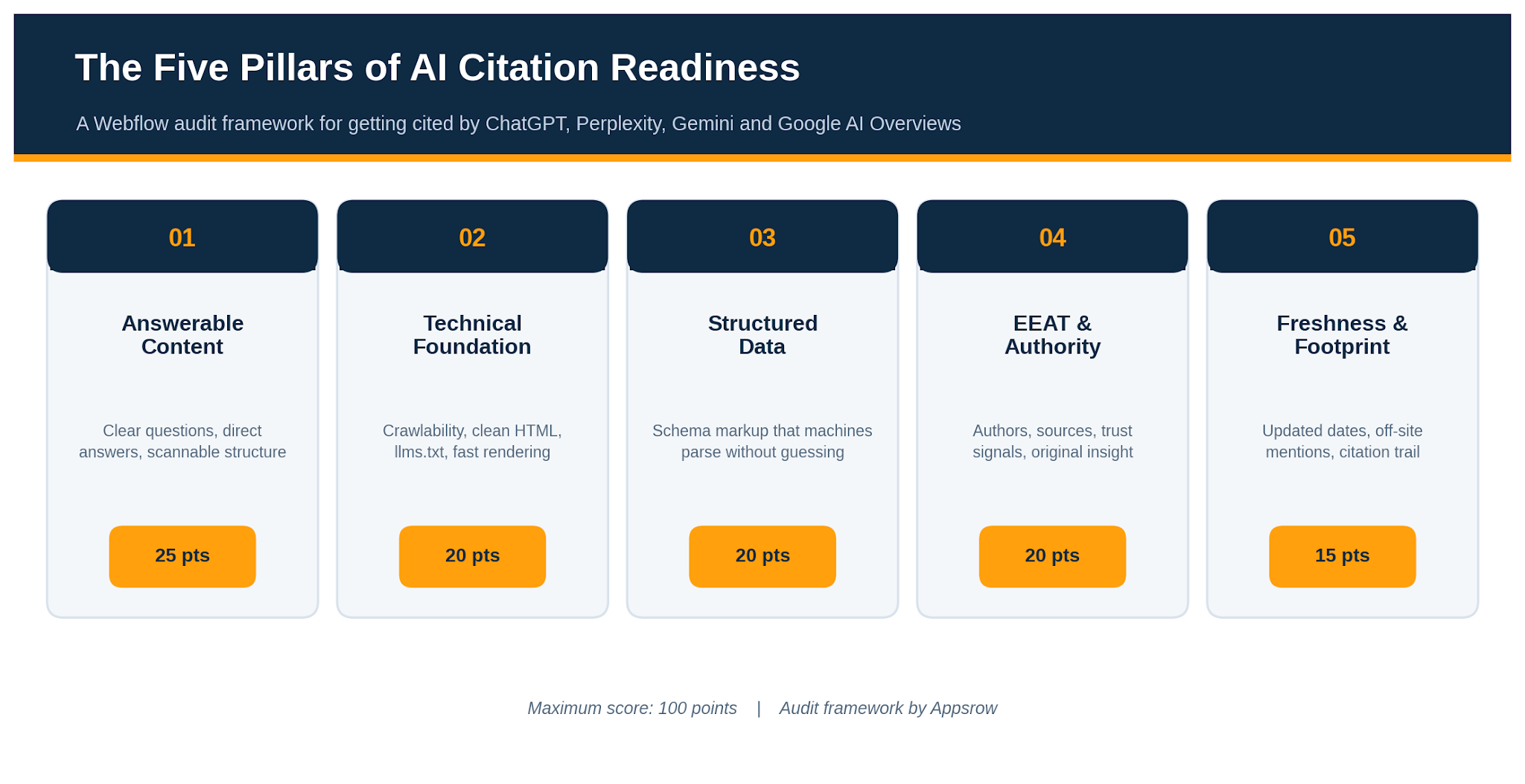
We grade every page, and the site as a whole, across five pillars. Each pillar carries a fixed weight, and the weights reflect how much each factor moves the needle on getting cited rather than merely indexed. The result is a single score out of 100 that tells you where you stand and, just as usefully, where to spend your next hour of effort.
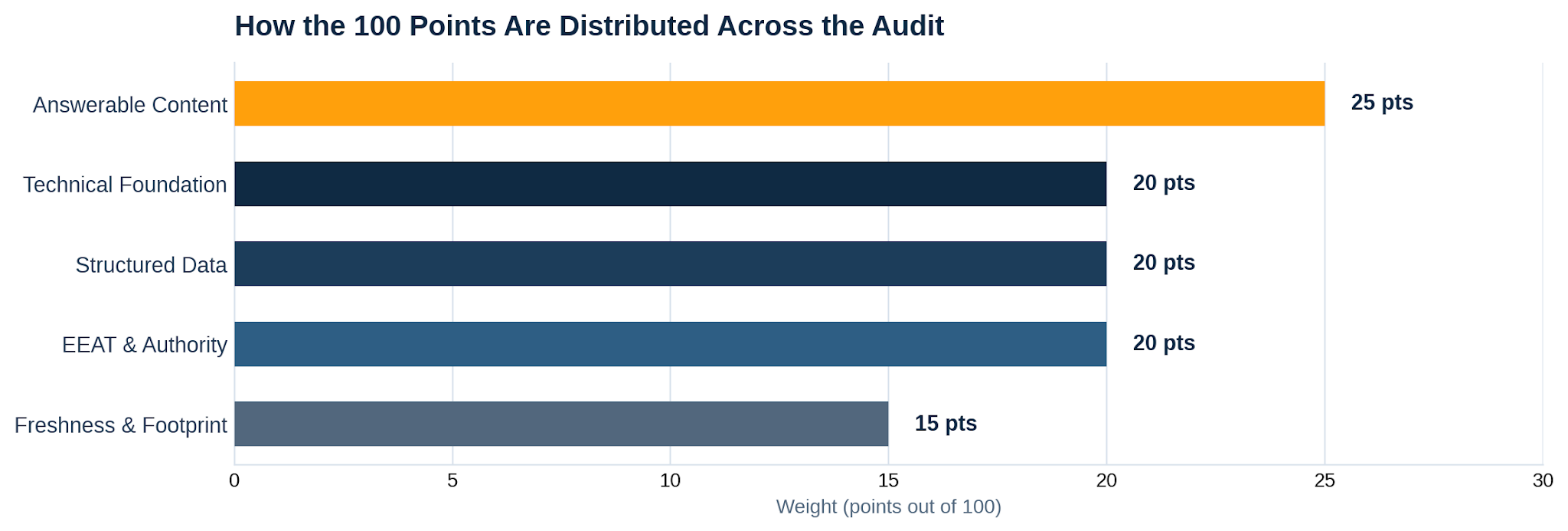
This is the heaviest pillar because it is the one most teams get wrong. Answer engines lift self-contained statements. If your page makes a reader assemble the answer from three scattered paragraphs, a model will usually skip it in favor of a competitor who said the same thing in one clean sentence. The goal is to write so that any single passage, read in isolation, still makes sense and still answers a real question.
Practically, that means leading with the answer and then supporting it, rather than building up to it. It means phrasing subheadings as the questions people actually ask. It means short, declarative claims with concrete numbers, names, and dates that a model can quote without ambiguity. Walls of qualifier-heavy prose are hard to extract, so trim them.
Work through this scored checklist for your most important pages:
If a crawler cannot reach or render your content, nothing else matters. This pillar checks that your Webflow site is open, fast, and legible to the bots that feed answer engines. Most of these checks take minutes, and most failures are quick fixes once you find them.
Start with access. Confirm your robots settings are not accidentally blocking AI crawlers, that your sitemap is published and current, and that important pages return a clean status without redirect chains. Then check legibility: real heading tags in the right order, descriptive alt text, and text that lives in the HTML rather than locked inside an image or a script-dependent interaction.
A newer signal worth adding is an llms.txt file, a plain-text map that points models to your most important content. It is easy to publish on Webflow and we treat it as a low-effort, high-clarity win. For the broader picture of how these technical signals fit together, our guide to answer engine optimization walks through the full stack.
Schema markup is how you tell a machine what your content is without making it guess. A model that can read explicit Article, FAQPage, Organization, and Author markup spends less effort interpreting your page and more confidence trusting it. On Webflow you can add JSON-LD in the page settings of static pages and bind dynamic fields on CMS templates, so even a large blog or product catalogue can carry per-item schema.
The common failure is partial coverage: a homepage with Organization schema but blog posts with nothing, or an FAQ section on the page with no matching FAQPage markup behind it. Aim for consistency. Every content page should declare what it is, who published it, and when.
If hand-writing JSON-LD across a CMS feels fragile, automating it is worth the setup. We cover that in our Webflow schema markup service, which keeps structured data in sync as content changes.
Experience, Expertise, Authoritativeness, and Trust are not abstract virtues here. They are the signals an answer engine uses to decide whether your claim is safe to repeat. A model is far more likely to cite a page that names a real author with relevant credentials, links to primary sources, and is published by an organization with a verifiable identity than an anonymous page making the same assertion.
Experience shows up as first-hand detail: original data, real screenshots, lessons from actual projects rather than recycled summaries. Expertise shows up in author bios and the depth of the writing. Authoritativeness comes from how others reference you. Trust comes from the boring but essential things: a clear about page, contact details, accurate citations, and honest, current information.
This is also where original assets matter. Custom diagrams, data, and even tasteful Lottie animations signal a page made by people who invested in it, not a thin reproduction. To learn how we operationalise these trust signals as a service, see our Webflow technical SEO page.
Answer engines lean toward recent, corroborated information. A page that was accurate in 2023 and never touched since reads as stale, and a claim that appears only on your own site is harder for a model to trust than one echoed across several reputable places. This pillar grades both how current your content looks and how widely your name travels.
Freshness is partly real and partly signalled. Genuinely update pages when facts change, and make sure the update is visible through dated content and accurate schema timestamps. Footprint is the harder, slower work: getting mentioned, linked, and quoted on sites the models already trust, so that when they assemble an answer your name keeps appearing from more than one direction.
Add the five subtotals for a single page, or average them across a representative sample of pages for a site-level view. The result lands in one of four bands. The bands are deliberately blunt, because the point is to trigger action, not to admire a decimal.
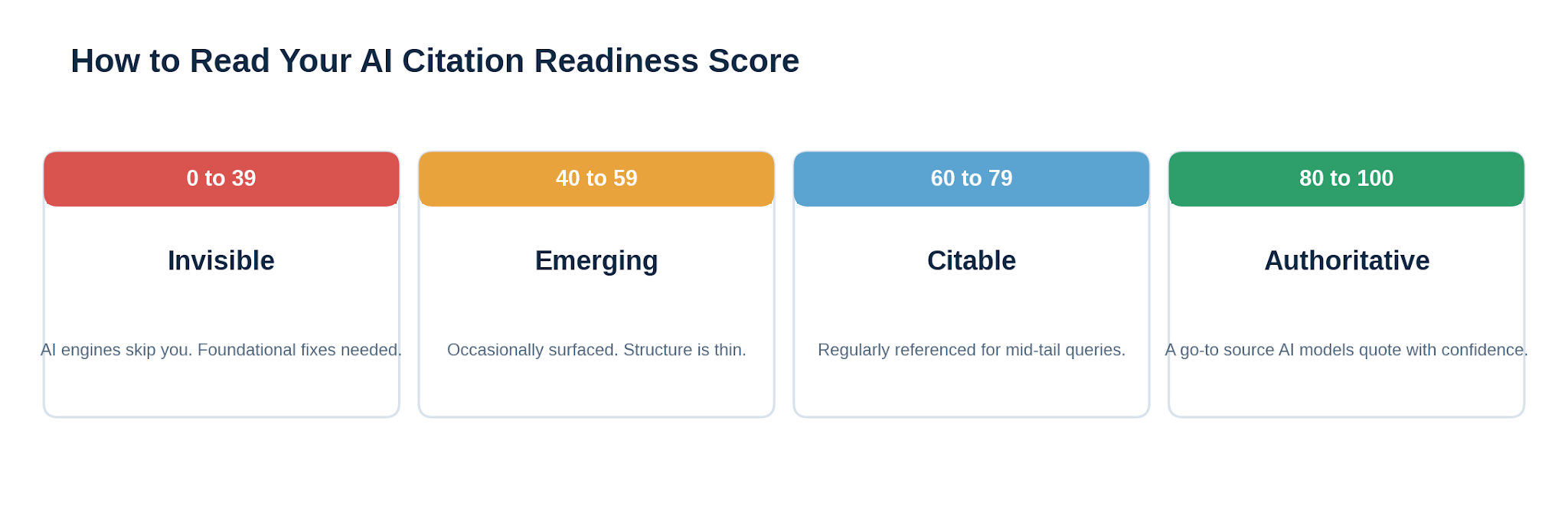
Most sites we audit for the first time land in the 40 to 59 band. They have solid content and decent SEO, but their claims are not quite quotable, their schema is patchy, and their authorship is thin. The encouraging part is that moving from Emerging to Citable rarely requires new content. It usually means sharpening what already exists: tightening answers, adding author bios, and filling schema gaps. The audit shows you exactly which of those moves earns the most points for the least effort.
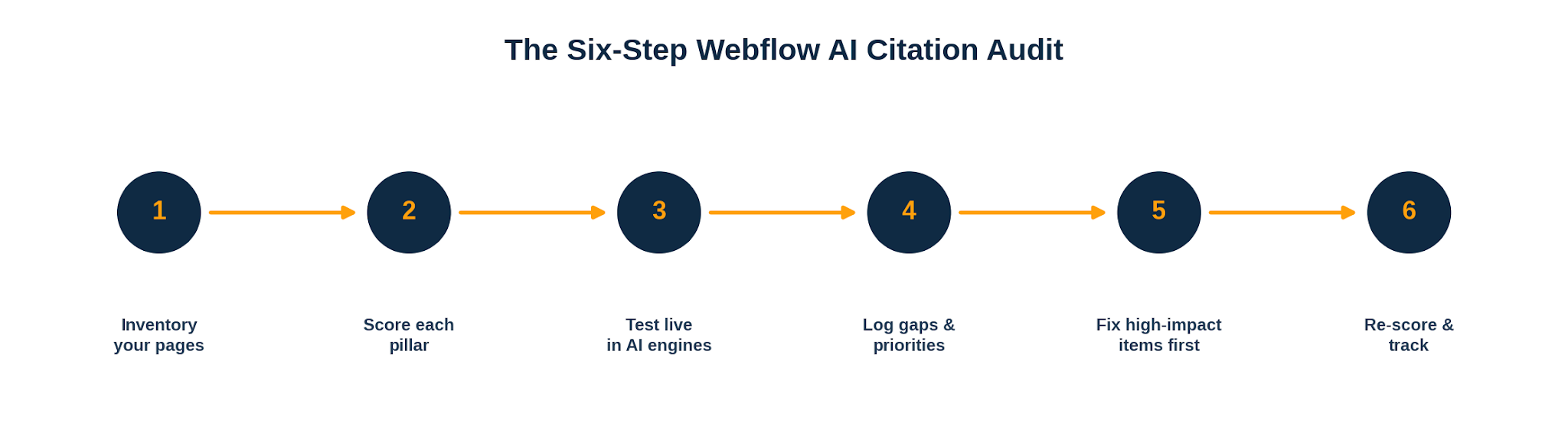
A handful of issues come up again and again, and knowing them in advance saves you a full audit cycle.
A score is only useful if it changes what you do next. Treat the number as a baseline, fix the highest-weighted gaps first, and re-measure in ninety days. If you would rather not run this manually across a large site, that is squarely the kind of work we take on, from the technical fixes to the content sharpening to the schema automation. The framework stays the same whether you run it yourself or hand it over.
If your website isn't easy to understand, you're giving away opportunities
before the conversation even starts.
Get a free review of how your website appears to AI-powered search and discovery tools.
GOT QUESTIONS ?
What is the difference between SEO and AI-citation readiness?
Traditional SEO optimizes for ranking in a list of blue links. AI-citation readiness optimizes for being quoted inside a generated answer. They overlap on fundamentals like crawlability and quality content, but citation readiness adds extra weight on quotable phrasing, explicit authorship, and structured data. Our guide to answer engine optimization explains how the two disciplines work together.
How long does a Webflow AI-citation audit take?
For a small site of ten to twenty key pages, a focused afternoon is usually enough once you know the framework. Larger sites with big CMS collections take longer, mostly because of schema coverage and per-page content checks. If you would prefer it handled end to end, our Webflow development services include audit and remediation as a package.
Do I really need an llms.txt file on Webflow?
It is not mandatory, but it is a low-effort signal that helps models find your priority content quickly, so we recommend it. Publishing one on Webflow is straightforward, and we cover the setup and maintenance in our llms.txt service. Think of it as a small win that costs almost nothing.
Which schema types matter most for getting cited?
Article or BlogPosting with author and date, Organization, and FAQPage are the highest-value types for editorial sites. Service and Product schema matter for commercial pages. Coverage and accuracy matter more than volume. Our Webflow schema markup service keeps these in sync across a CMS so they do not drift as content changes.
How do I know if AI engines are already citing my site?
Ask the engines directly. Pose the real questions your pages should answer to ChatGPT, Perplexity, and Gemini, and see whether you appear and who is cited instead. Pair that with referral data and brand-mention tracking. This live testing is step three of the audit workflow above.
Does page speed affect AI citation?
Indirectly but meaningfully. Slow or render-blocked pages are harder to crawl and parse, which lowers the odds your content is read at all. Fast, lean pages are part of why well-built Webflow sites do well. Performance is graded under the technical foundation pillar, and our Webflow technical SEO work treats it as a baseline, not an afterthought.
Can I improve EEAT without hiring a famous expert?
Yes. EEAT is mostly about making real expertise visible. Add genuine author bios, show first-hand experience through original data and examples, link to primary sources, and keep clear ownership and contact information. Most sites have the expertise already and simply fail to signal it on the page.
How often should I re-run the audit?
Quarterly is a sensible default for active sites, with a lighter monthly check on your most important pages. Answer engines and competitors both move quickly, so a static score from six months ago tells you little about where you stand today.
Do original visuals and animations actually help?
They help in two ways. They improve comprehension for human readers, and they signal a page that real people invested effort in, which supports the experience and trust signals models look for. Custom diagrams, data, and Lottie animations all count, provided they support the content rather than slow the page down.
Should I do this in-house or hire help?
If you have one site and time to learn the framework, the checklist in this article is enough to run it yourself. If you manage a large or fast-moving Webflow property, or you want the fixes implemented rather than just identified, it is usually faster to bring in a specialist. You are welcome to get in touch with Appsrow to talk through your specific site.

Parth Parmar is a Webflow Expert and Co-Founder & CTO at Appsrow Solutions. He has delivered 300+ Webflow projects for 25+ global B2B brands, helping SaaS companies, AI startups, and tech businesses build conversion-focused websites with scalable CMS, AEO-ready architecture, and measurable growth.
CURATED READING
.png)
.png)