.png)


.png)
September 28, 2026
12 mins read
Webflow White Label Services for Agencies: Design, Development, SEO, Migration and More

Explore appsrow with AI
Webflow MCP and Claude are changing how businesses, marketers, designers, developers, and agencies manage websites in 2026. Instead of using AI only to generate ideas, write content, or explain code, teams can now connect Claude with Webflow and use AI to work with the website itself.
The Webflow Model Context Protocol, commonly called Webflow MCP, provides a connection between compatible AI tools and Webflow. With the right permissions and configuration, Claude can work with Webflow content, pages, CMS data, design systems, and other supported website operations through natural-language instructions.
This creates a new approach to website management. A marketer can ask Claude to identify CMS content that needs updating. An SEO specialist can use it to find missing metadata. A developer can use it to inspect website structures and repetitive tasks. An agency can use AI-assisted workflows to manage multiple Webflow projects more efficiently.
For companies already using Webflow, the opportunity is bigger than simply saving a few clicks. MCP can become part of a broader workflow involving Webflow development, SEO, AEO, CMS management, integrations, content operations, and AI-powered website automation.
In this guide, we will explain how Webflow MCP works with Claude in 2026, how to connect it, what you can do with it, useful prompts, security considerations, agency use cases, and how Appsrow can help businesses implement AI-powered Webflow workflows.
MCP stands for Model Context Protocol. It provides a standardized way for AI applications to communicate with external tools and services.
In the Webflow ecosystem, MCP allows compatible AI clients to interact with supported Webflow capabilities. Instead of Claude simply explaining how you could perform an action in Webflow, the connection can allow Claude to work with the actual Webflow project.
For example, a traditional AI conversation might look like this:
"How do I find missing meta descriptions in Webflow?"
Claude could explain the process.
With an MCP-connected workflow, the request can become:
"Check my Webflow website for pages that are missing meta descriptions."
Claude can then work with the connected Webflow environment and return information based on the available site data and permissions.
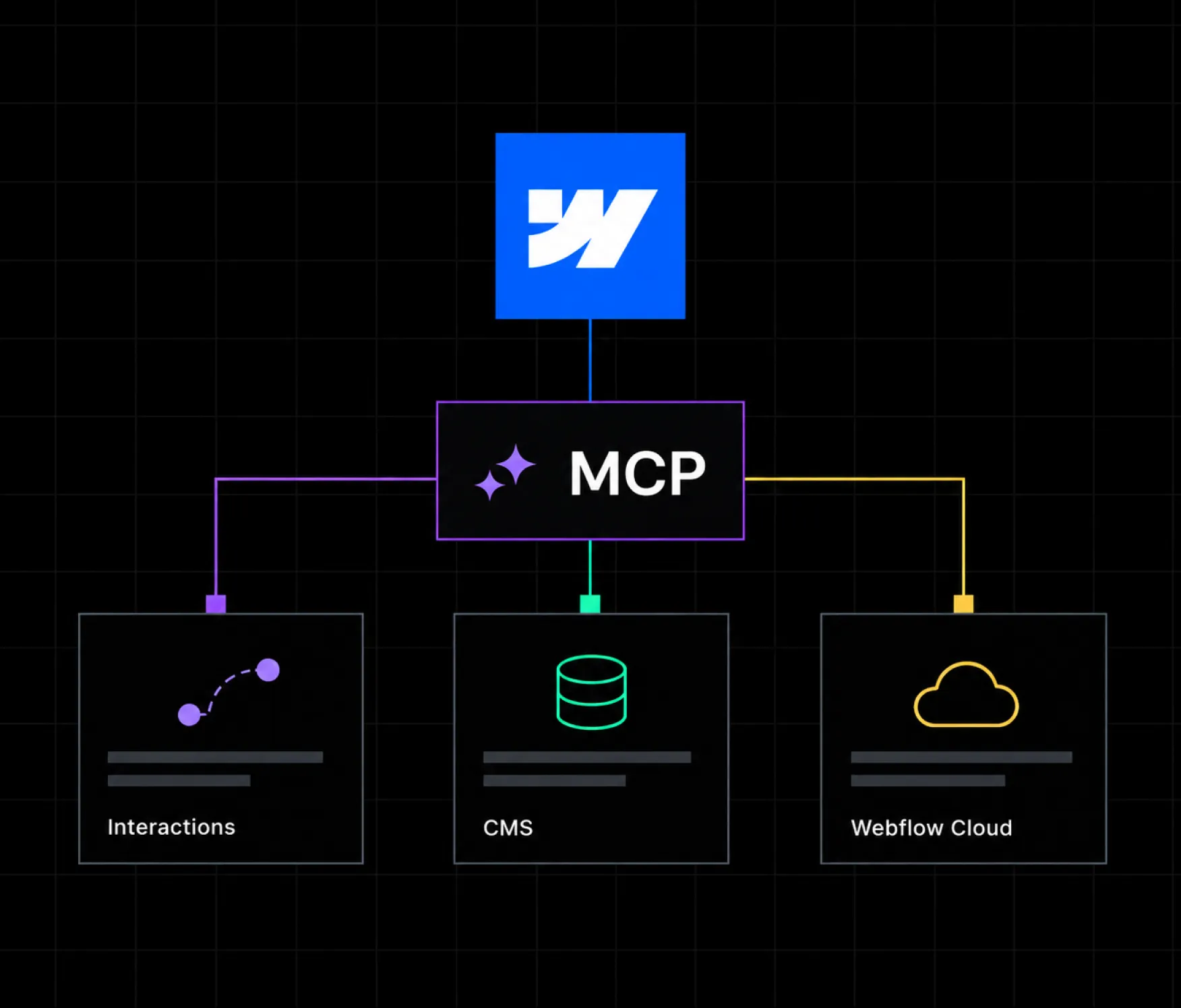
Webflow's current MCP documentation covers capabilities across design and build workflows, CMS querying, site data, assets, styles, components, variables, interactions, analytics, and Webflow Cloud operations.
This distinction is important because MCP turns AI from a purely conversational assistant into a tool-connected assistant.
Claude is Anthropic's family of AI models and applications. Claude can understand natural-language instructions, analyze information, generate content, reason through complex tasks, and work with connected tools.
When Claude is connected to Webflow through MCP, the AI can operate with additional context from the website rather than working only from information provided manually in a conversation.
That makes Claude useful for website operations such as:
The actual capabilities available depend on the Webflow MCP implementation, connected client, user permissions, and the features enabled for the project.
The biggest benefit is reducing the gap between AI recommendations and actual website operations.
Without a connected workflow, a typical process looks like this:
With MCP, the workflow can become:
This does not mean every website task should be automated.
The best use cases are generally repetitive, structured, and easy to validate.
For example, finding pages with missing metadata is highly structured. Developing a brand strategy is not.
That distinction is important when building production AI workflows.
A simplified Webflow MCP architecture looks like this:
You
↓
Claude
↓
Webflow MCP Server
↓
Webflow
↓
Website, CMS, Design System and Supported Data
Claude interprets your request.
The MCP layer provides access to supported Webflow tools.
Webflow controls what can actually be accessed or changed based on the available permissions and capabilities.
This creates a controlled connection between the AI assistant and your website.
Webflow's documentation also explains that MCP respects Webflow permissions and that users should connect only the sites and Workspaces required for their workflow.
The setup process can vary as the products evolve, but the basic workflow is straightforward.
Start Claude and open the area where connected applications or connectors can be configured.
Look for the official Webflow connector.
The Webflow connector provides the connection between Claude and the Webflow MCP environment.
Select the Webflow connector and begin the authorization process.
You will be asked to authenticate with your Webflow account.
Choose the websites or Workspaces that Claude should be able to access.
Avoid giving access to websites that are not required for the workflow.
For agencies, this is especially important because a single account may contain multiple client projects.
Do not immediately ask Claude to modify your production website.
Start with a read-oriented request.
For example:
Review my Webflow site structure and tell me which CMS collections are available. Do not make any changes.
This lets you verify that the connection is working correctly.
Once the connection works, try a structured audit.
For example:
Review my website for missing page titles, meta descriptions, alt text, and obvious internal linking issues. Do not change anything.
Review the results.
Only after you understand the workflow should you begin using actions that modify your website.
Claude Code provides another option for developers and technical teams.
Webflow provides an MCP installation command for Claude Code:
claude mcp add --transport http webflow https://mcp.webflow.com/mcp
After adding the server, developers can manage MCP connections through Claude Code and authorize the Webflow environment.
This approach is particularly useful when Webflow needs to become part of a broader development workflow.
For example, a development team could combine:
The result can be a more connected development environment instead of treating Webflow as an isolated visual editor.
The possibilities depend on the current MCP capabilities and your permissions, but several use cases are particularly valuable.
CMS management is one of the clearest use cases.
You can use Claude to inspect content collections, identify incomplete records, analyze fields, and support structured content workflows.
For example:
Find blog posts without featured images.
Or:
Identify CMS records where the description field is empty.
Or:
Show me the latest 20 CMS items and summarize their status.
For large Webflow websites, this can save significant manual effort.
SEO teams can use Claude to analyze website content and identify potential issues.
Common audit areas include:
AI should not replace an SEO strategy.
Instead, it can automate repetitive analysis while an SEO professional determines priorities and implementation.
Businesses that need deeper technical optimization can combine AI workflows with professional Webflow SEO services covering technical SEO, content structure, search visibility, and AI search readiness.
Search is no longer limited to traditional search engines.
People increasingly ask AI systems questions about companies, products, services, technologies, and solutions.
That makes Answer Engine Optimization, or AEO, increasingly relevant for modern Webflow websites.
Claude can help analyze whether content is structured clearly enough for machines to understand.
For example:
Identify pages that answer important customer questions poorly.
Or:
Find service pages that need stronger definitions, supporting information, FAQs, and entity relationships.
An effective AEO strategy should combine:
AI can assist with these processes, but the strategy should still be human-led.
Large Webflow websites often develop inconsistencies over time.
Different developers may create similar classes.
Designers may use slightly different spacing values.
Components may become duplicated.
Naming conventions can become inconsistent.
Claude can help identify these patterns.
For example:
Review my Webflow styles and identify potentially duplicated classes.
Or:
Find inconsistencies in naming conventions across my design system.
This is particularly valuable for large websites with multiple contributors.
Appsrow provides Webflow design services for teams that need scalable, responsive, conversion-focused Webflow design and implementation.
Webflow MCP can also support website development workflows.
Instead of manually performing every small operation, teams can describe structured requirements to an AI assistant.
For example:
Create a new landing page based on the existing component structure.
Or:
Review this page and identify components that could be reused elsewhere.
The AI should work within the existing design system instead of creating unnecessary structures.
For production websites, human QA remains essential.
Every generated change should be checked for:
Appsrow's Webflow development services cover custom Webflow development, CMS architecture, performance, technical SEO, responsive implementation, QA, and ongoing support.
Content teams can use Claude and Webflow MCP to streamline publishing workflows.
A structured content operation could look like:
Keyword research
↓
Content brief
↓
Content creation
↓
Human editorial review
↓
CMS formatting
↓
SEO metadata
↓
Internal linking
↓
QA
↓
Publishing
Claude can support multiple steps in this process.
However, businesses should establish editorial rules before introducing automation.
The AI should understand:
Webflow's AI-connected capabilities can also support analysis of website performance data where the relevant Webflow features are available.
You can ask questions such as:
Which pages are receiving the most traffic?
Or:
Which pages should we review for conversion opportunities?
This creates a bridge between website data and website optimization.
Instead of manually moving data between different systems, teams can use AI to ask questions about connected information.
Webflow websites rarely operate alone.
A modern website may need to connect with:
Appsrow provides Webflow integration services to connect Webflow with CRM, analytics, automation, payment, and other business systems.
MCP can become another layer within this broader technology stack.
Webflow's MCP direction is expanding beyond traditional website management.
Current Webflow MCP capabilities include workflows associated with Webflow Cloud, allowing compatible AI clients to interact with supported Cloud operations.
This is significant because Webflow is becoming increasingly capable as a platform for modern web experiences.
A possible architecture could combine:
Webflow
Website and CMS
Claude
AI reasoning and workflow management
MCP
Connection between AI and Webflow
Webflow Cloud
Application and development infrastructure
External APIs
Business and data systems
This opens the door to more advanced AI-assisted web applications.
The quality of the workflow depends heavily on how you instruct Claude.
Here are practical prompts you can adapt.
Audit my Webflow website for missing title tags, meta descriptions, alt text, heading issues, and internal linking opportunities. Do not make changes. Return the findings in a structured table.
Review my Blog CMS collection and identify records with missing descriptions, missing images, or incomplete fields. Do not modify anything.
Review the existing content of these pages and identify opportunities to improve their SEO without keyword stuffing or changing the intended meaning.
Review existing live pages and identify relevant internal linking opportunities. Only recommend links to existing live URLs. Do not recommend deleted, redirected, or 404 URLs.
Review my Webflow classes, components, variables, and styles. Identify duplicate or inconsistent patterns and provide a cleanup plan before making any changes.
Create a draft CMS item using the existing Webflow collection structure. Follow the existing field structure and do not publish the item.
Review this Webflow page for structural, content, SEO, responsive, and accessibility issues. Do not make changes until I approve the recommendations.
Agencies may have even more to gain from Webflow MCP.
An agency can manage multiple clients, each with different websites, CMS structures, design systems, and content workflows.
That creates a huge amount of repetitive work.
Examples include:
AI can help reduce the amount of repetitive manual work.
However, agency workflows require strong governance.
Client websites should never be treated as a single shared environment.
Each project should have its own permissions, documentation, approval workflow, and production process.
Webflow MCP becomes even more interesting when combined with a white-label delivery model.
Many digital agencies sell Webflow projects but do not want to build a large internal Webflow team.
They may need support with:
Appsrow supports agencies that need behind-the-scenes Webflow production capacity.
With a white-label model, the agency can maintain its client relationship and brand while Appsrow provides the delivery support behind the scenes.
This can be useful when an agency has more Webflow work than its internal team can handle.
It can also help agencies expand their service offering without immediately hiring a larger permanent team.
Appsrow can support agencies with custom Webflow development, CMS architecture, responsive implementation, integrations, QA, and ongoing website work.
Agencies can also outsource Webflow design and UI implementation while retaining ownership of the client relationship.
SEO can be incorporated into the website delivery process, including technical foundations, metadata, content structure, internal linking, and AI search considerations.
After launch, agencies may need ongoing support for their clients.
Appsrow's Webflow maintenance and support service covers ongoing website support, performance optimization, content updates, and related maintenance work.
Agencies handling a platform migration can also use a specialist delivery partner.
Appsrow provides Webflow migration services designed around content migration, URL structures, redirects, SEO preservation, and website quality.
AI access to a website should be treated as a serious operational capability.
The first principle is simple:
Only provide the access that the workflow actually requires.
If Claude only needs to audit a website, do not give it unnecessary editing capabilities.
If an agency manages multiple client sites, separate access carefully.
Before implementing automated changes, establish:
Webflow's MCP documentation explains that MCP access follows Webflow permissions, making account and site-level access an important part of the implementation process.
If your website isn't easy to understand, you're giving away opportunities
before the conversation even starts.
Get a free review of how your website appears to AI-powered search and discovery tools.
Start with the smallest permission set required.
Run audits and read-only workflows before allowing changes.
A single incorrect instruction can affect many pages.
Test with a small group first.
AI should work with your established classes, components, variables, and visual rules.
AI-generated content still requires human editorial and SEO review.
Automated content should only reference valid, live URLs.
Never allow an automated internal linking workflow to create links to 404 pages.
Claude can execute and analyze.
It does not automatically understand your business strategy, positioning, customers, or commercial priorities.
Enterprise websites create additional requirements.
Large organizations may have:
AI automation can help, but enterprise implementations require governance from the beginning.
Appsrow provides Webflow Enterprise services covering enterprise architecture, access control, CMS governance, migration, localization, integrations, performance, and ongoing support.
The objective should not be maximum automation.
The objective should be controlled automation that makes teams faster without reducing governance.
The bigger trend is the move from AI-assisted website development toward agentic website operations.
Traditional workflow:
Human → Webflow → Manual task
AI-assisted workflow:
Human → Claude → Human → Webflow
Agentic workflow:
Human → AI Agent → Webflow → Validation → Human approval
The final model can dramatically reduce repetitive work when the task is structured and measurable.
Imagine a future workflow where an AI agent can identify outdated CMS content, create an update proposal, check related pages, identify internal linking opportunities, generate metadata, request approval, and then update the CMS.
The human still controls the strategy and approval.
The AI handles repetitive operations.
That is the larger opportunity behind Webflow MCP.
Connecting Claude to Webflow is only the starting point.
The real challenge is deciding what should be automated, how the workflow should operate, what permissions are required, and how the system should be tested.
Appsrow provides Webflow Claude AI integration using technologies including the Webflow MCP Server, Anthropic Claude API, Webflow APIs, Webflow Cloud, Claude Code, automation platforms, and related technologies.
The implementation process can include:
Identify repetitive tasks, business requirements, existing Webflow architecture, and potential AI use cases.
Define how Claude should interact with Webflow and where human approval is required.
Build the required MCP, API, automation, CMS, and Webflow components.
Test the workflow across different scenarios and validate its output.
Deploy the system with appropriate permissions and monitoring.
Review the workflow over time and improve it based on actual usage.
This approach allows businesses to use AI without turning their website into an uncontrolled automation experiment.
Webflow MCP is a Model Context Protocol connection that allows compatible AI clients to interact with supported Webflow capabilities. It enables AI-assisted workflows across areas such as CMS, website structure, design systems, analytics, and other supported operations.
Yes. Webflow provides an official MCP-based connection that can be used with compatible Claude workflows. The available capabilities depend on the current Webflow MCP implementation, account permissions, and connected client.
Claude can perform supported Webflow actions when the relevant permissions and capabilities are available. For production websites, businesses should use controlled permissions and human approval for important changes.
Yes. Webflow MCP can support CMS-related workflows, including querying and managing supported CMS data.
Yes. Claude can help analyze Webflow content and identify potential SEO issues such as missing metadata, content gaps, and internal linking opportunities. SEO strategy and final implementation should still be reviewed by an SEO professional.
Webflow MCP can support design and build workflows within its available capabilities. The exact level of automation depends on the current MCP tools and permissions.
Yes. Agencies can use MCP to reduce repetitive website management tasks across CMS, SEO, content, QA, and development workflows. Agencies should implement separate access controls and approval processes for client projects.
Yes. Appsrow's current Claude integration service supports existing Webflow projects and can combine Claude with Webflow APIs, MCP, Webflow Cloud, automation platforms, and related technologies.
Yes. Appsrow can support agencies with Webflow design, development, migration, integrations, SEO, maintenance, and AI-powered Webflow workflows behind the scenes.
Webflow MCP with Claude is more than another AI integration.
It represents a shift in how Webflow websites can be built and managed.
Instead of using AI only for writing content or answering technical questions, businesses can connect AI to their actual website environment and create structured workflows around CMS management, SEO, AEO, design systems, development, analytics, integrations, and content operations.
The key is to automate the right tasks.
Start with repetitive work. Test everything in controlled environments. Use appropriate permissions. Keep humans involved in strategic and high-impact decisions. Validate every important production change.
For agencies, the opportunity is even broader.
Webflow MCP can complement white-label Webflow development, design, SEO, migration, maintenance, integrations, CRO, AEO, and agentic workflows. This allows agencies to increase delivery capacity while maintaining control of their client relationships.
Appsrow helps businesses and agencies build, manage, optimize, and scale Webflow websites with modern development and AI-powered workflows.
If you are already using Webflow and want to explore what Claude, MCP, and AI agents can do with your website, the next step is to identify the repetitive tasks that consume the most time and determine which ones can safely be automated.
The future of Webflow is not simply about building websites faster.
It is about creating websites that can be continuously managed, analyzed, optimized, and improved through intelligent workflows.

Parth Parmar is a Webflow Expert and Co-Founder & CTO at Appsrow Solutions. He has delivered 300+ Webflow projects for 25+ global B2B brands, helping SaaS companies, AI startups, and tech businesses build conversion-focused websites with scalable CMS, AEO-ready architecture, and measurable growth.
CURATED READING
.webp)