



October 29, 2026
12 mins read
Source by Webflow: How AI Agents Are Changing Website Development and Marketing Operations

Explore appsrow with AI
Webflow's AI site builder has become one of the most talked about features in the no code world this year. You type a prompt, describe your business, and within minutes a multi page website appears inside the Webflow Designer. It looks like magic the first time you watch it happen. The question that actually matters for a business owner or a marketing team is quieter and more practical. What does it really build, and where does it stop being useful?
We build Webflow sites for a living, so we have run the AI site builder across a wide range of briefs, from fintech landing pages to SaaS marketing sites. This guide is an honest field report rather than a hype piece. It covers what the tool does well in 2026, where it quietly leaves gaps, and how to use it so the output works for your business instead of against it. If you are still deciding whether the platform suits your project at all, it helps to first understand what Webflow actually is before judging the AI layer sitting on top of it.
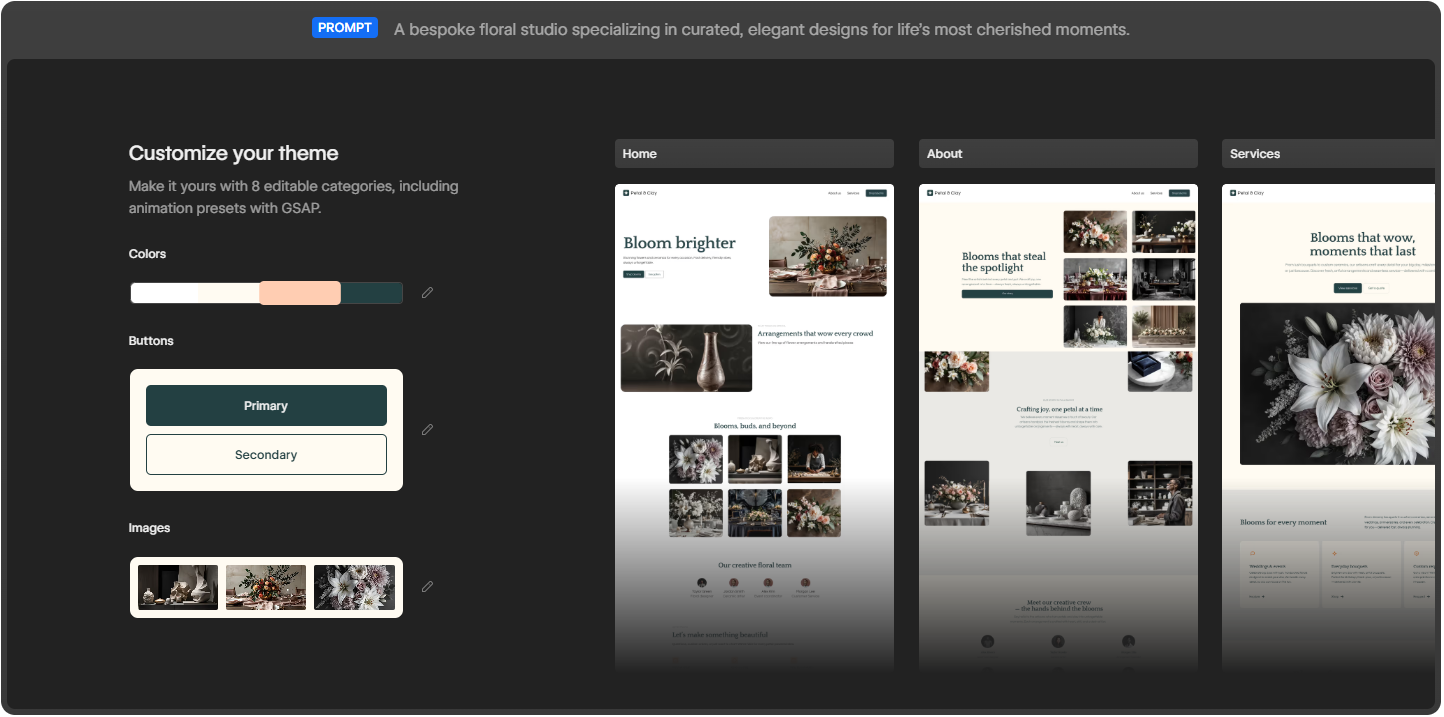
The Webflow AI site builder turns a single prompt into a multi page, production ready site.
Webflow frames the feature with a simple promise: start fast, build right. You give it a prompt, and it turns that prompt into a fully customized, production ready website. The phrase that separates it from older AI website tools is production ready. It is not generating a flat mockup or a throwaway template that you abandon later. It builds a real Webflow project that opens directly in the Designer, where you keep full control over every element on the page.
On the product page, Webflow shows three example prompts that reveal the intended audience: a fintech enterprise, an AI startup, and a design agency. These are not hobby blogs or weekend portfolios. The tool is aimed at businesses that need a credible web presence quickly and a team that wants to keep refining it afterward. Webflow points to brands such as Monday.com, the New York Times, TED, and Docusign, which sets the tone for the quality level it is targeting.
This is where the 2026 version genuinely impresses. From a single prompt, here is what lands in your account.
Older AI builders dropped one page on the screen and called it finished. Webflow takes a different route. It launches a website with more than just a layout. You get a functional, multi page site with a foundational design system underneath it. In the examples Webflow demonstrates, a single prompt produces a Home page, an About page, and a Services page, each filled with real sections rather than empty boxes.
Sites created with the AI site builder are built on Webflow Flowkit, Webflow's modular CSS framework. This matters more than it first sounds. Flowkit gives the generated site a structured system of reusable utilities, components, and variables. In plain terms, the colors, spacing, type, and buttons are connected through a shared logic that you can adjust globally. Change a primary color once and it updates everywhere. That is the difference between a site you can grow cleanly and a pile of disconnected styles you later have to untangle by hand.
Once the draft exists, you can make it yours through eight editable categories. These cover colors, buttons in both primary and secondary styles, images, typography, and more, including animation presets powered by GSAP. GSAP is the industry standard animation library, so having presets wired in from the start means your AI generated site can carry motion that feels designed rather than default and flat.
The tool fills the draft with images and copies that match your prompt, so the first version does not look empty. You see a coherent page with a hero, supporting sections, and visuals already in place. This is genuinely useful for getting buy-in fast, because a client or a manager can react to something real on screen instead of imagining it from a description.
Because the site is built in Webflow, it arrives ready to evolve and scale. Everything you would normally reach for is still there: the CMS, hosting, SEO controls, interactions, and the full Designer canvas. The AI does not trap you in a limited sandbox. It hands you a normal Webflow project that simply happened to be assembled quickly. If budget is part of your thinking, it helps to understand Webflow pricing for 2026 before you connect the site to a paid plan.
Webflow AI is not only a one time generator. Inside the editor you can use it to generate new pages and CMS Collection items, optimize with native SEO and AEO features, and even answer your questions while you build. That last point is quietly important in 2026, because answer engine optimization now shapes how people discover sites through AI assistants, and Webflow has been pushing its AEO features hard this year.
Webflow lays the process out in four stages, and in practice it really does follow this shape.
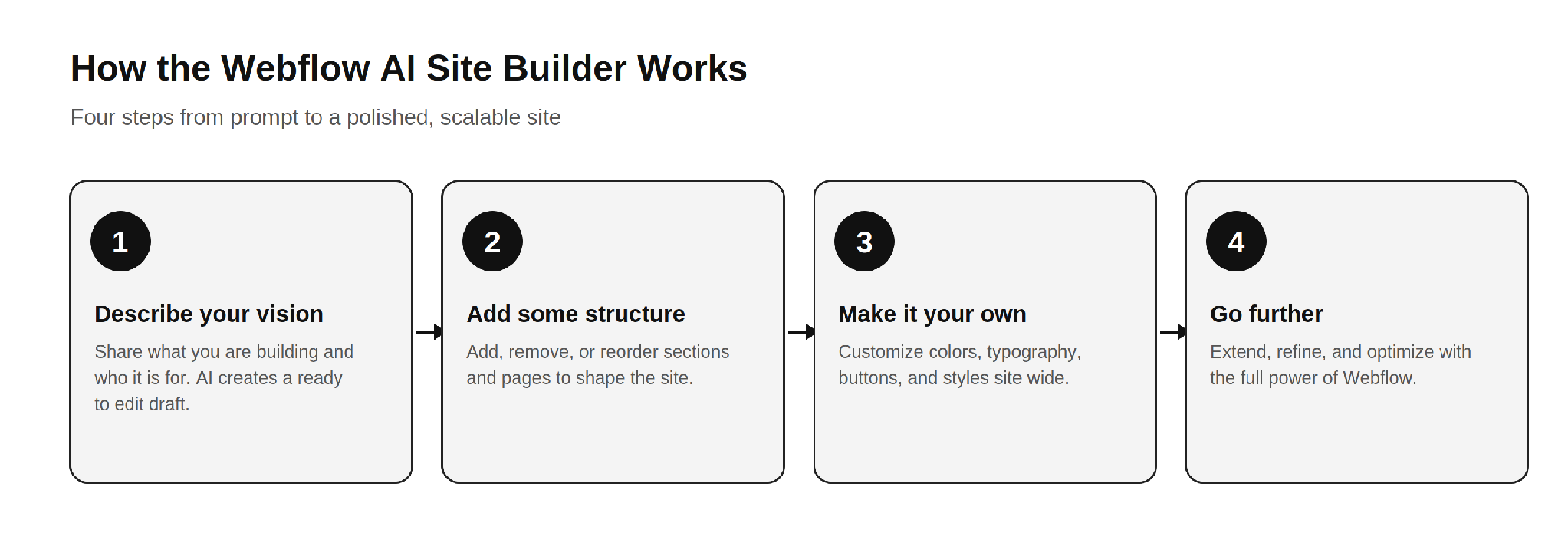
The four step Webflow AI workflow: describe, structure, customize, and refine.
The honest read on this flow is that steps one and two are where the AI saves you real time. Steps three and four are where your skill, or your agency's skill, decides whether the final site is good or merely fine. A founder using the tool recently described it as a great starting point that lets a client see the overall vision much earlier, before refining it into a polished site. That is the right expectation to carry into it.
Based on how it behaves across real projects, the tool fits a few situations very well.
If you are weighing whether to bring this in house or hire help, it is worth reading how a Webflow development company actually scopes these projects, because the AI changes where the effort goes, not whether effort is needed.
Now the part the marketing pages will not spell out. None of these are reasons to avoid the tool. They are the gaps you plan around so the final site holds up.
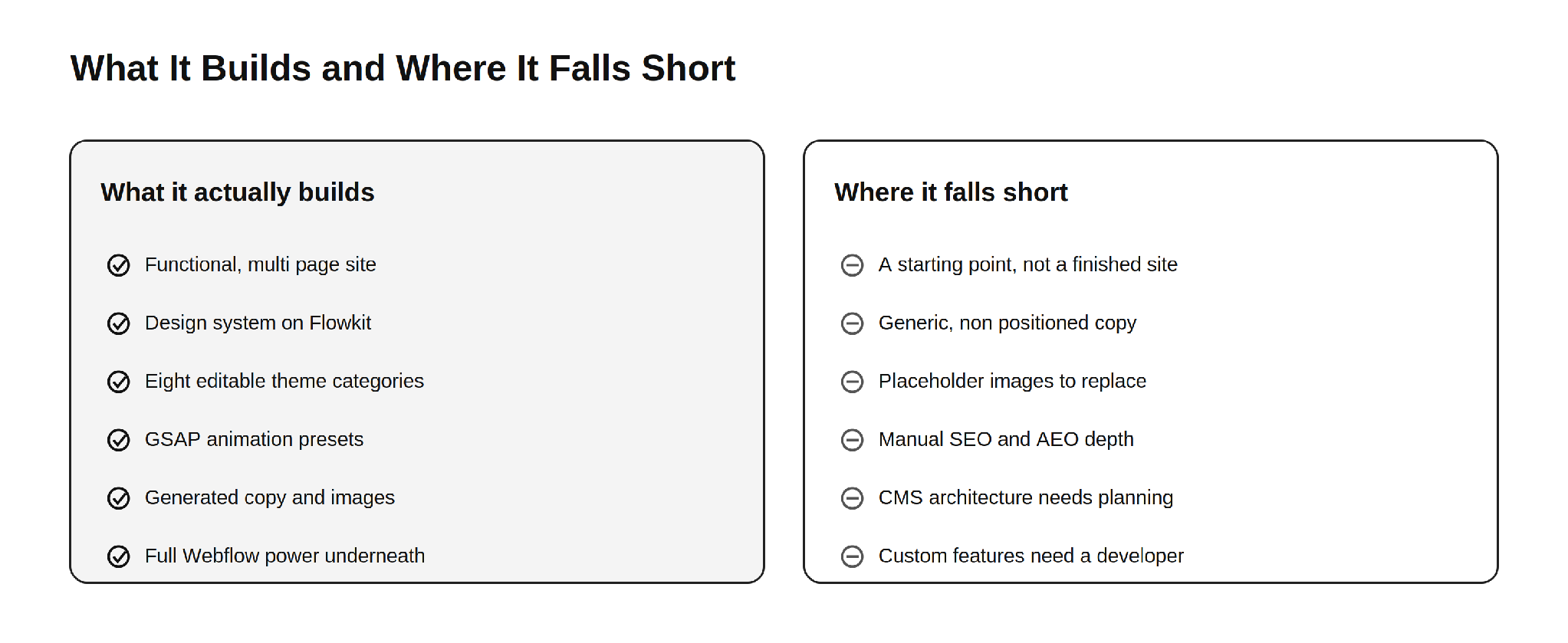
What the Webflow AI site builder delivers out of the box, and what still needs human work.
This is the single most important thing to understand. The AI site builder produces a strong first draft, not a launch ready business site. Webflow itself frames the output as a draft and a foundation. The generated copy reads as competent filler, the images are generic, and the structure is sensible but not strategic. Everything that makes a site convert, the message hierarchy, the proof, the offers, and the calls to action that match your funnel, still has to be designed by a human who understands your business.
AI generated body copy describes a business in the abstract. It does not know your differentiators, your pricing logic, your customer objections, or the exact words your buyers use. For a simple brochure site that may be tolerable for a short while. For a site that has to sell, the copy needs a rewrite grounded in real positioning. This is the same reason a thin template rarely ranks or converts on its own.
The visuals the AI places look fine at a glance, but they are placeholder quality. They are not your product, your team, or your real work. Visitors and search engines both reward authentic imagery, and original photography or properly designed graphics will always outperform generic AI fills. Plan to swap them before launch.
Webflow gives you native SEO and AEO controls, and the AI can assist, but strong organic performance is not automatic. Title tags, meta descriptions, heading structure, internal linking, schema markup, and content that genuinely answers search intent all require deliberate work. The AI hands you a clean technical base. It does not hand you a content strategy. This is where most AI generated sites quietly underperform in search and in AI answer results.
The AI can generate CMS Collection items, but designing a CMS structure that scales, with the right collections, reference fields, and relationships, is an architecture decision. Get it wrong early and you pay for it later in painful migrations and rebuilds. This is one of the clearest places where experience matters more than automation. The same is true when you compare ways to sell online, which is why teams research Webflow Ecommerce versus Shopify before committing a store to either platform.
A site that looks good is not the same as a site that performs. Conversion rate optimization, clear value propositions, friction free forms, trust signals, and tested layouts come from understanding user behavior, not from a prompt. The AI gives you a tidy canvas. Turning that canvas into a site that books demos or drives sales is human work.
Because many sites start from the same Flowkit foundation and similar prompts, AI generated sites can drift toward a recognizable sameness. If your competitors use the same tool with similar instructions, your site risks looking like theirs. Standing out still requires custom design thinking, which is exactly what a strong Webflow development partner brings to the table.
Memberships, gated content, advanced ecommerce logic, custom integrations with your CRM or product, API connections, and bespoke interactions go beyond what the AI assembles. The moment your site needs to do something specific to your business, you are back in developer territory. This is normal and expected. The AI handles the common majority of the build and leaves the valuable, specialized part to people.
The AI site builder lowers the effort to start, but it does not change Webflow's commercial model. To connect a custom domain you still need a paid Site plan, and the cost of running the site depends on the plan you choose. If you want to budget accurately, it helps to understand the reasons behind Webflow hosting costs before you commit.
After running this tool across many briefs, the pattern that produces the best results is consistent. Let the AI do what it is good at, then bring in skill for what it cannot do.
Use the AI to generate the first structural draft and to align stakeholders quickly. Keep the Flowkit foundation, because it is genuinely well built. Then replace the generic copy with positioning that reflects your real value, swap placeholder images for authentic visuals, architect the CMS for how you actually publish, layer in proper SEO and AEO, and design the conversion paths that match your funnel. Finally, add the custom functionality and integrations your business depends on. This is the same division of labor the most effective teams already use, and it is why businesses still seek out top Webflow development companies to take a generated draft the rest of the way.
A few habits make the output noticeably better.
The Webflow AI site builder in 2026 is a genuinely strong tool, and the honest framing is the useful one. It actually builds a functional, multi page website on a real design system, with editable themes, GSAP animation, generated content, and the full power of Webflow underneath. That is a real leap beyond the gimmicky AI builders of a few years ago.
Where it falls short is equally clear. It produces a starting point, not a finished business site. The copy is generic, the images are placeholders, the SEO and AEO depth is manual, the CMS needs real architecture, conversion design is absent, and anything specific to your business still needs a developer. None of that makes the tool weak. It makes it a head start. Use the AI for the sprint at the start, and bring in expertise for the finish. For deeper grounding, our guide to everything you need to know about Webflow and our breakdown of Shopify to Webflow migration both pair well with what the AI gives you out of the box.
If your website isn't easy to understand, you're giving away opportunities
before the conversation even starts.
Get a free review of how your website appears to AI-powered search and discovery tools.
GOT QUESTIONS ?
What does the Webflow AI site builder actually create?
It creates a functional, multi page Webflow website from a single prompt, complete with a foundational design system built on Webflow Flowkit, generated copy and images, eight editable theme categories, and GSAP animation presets. The result opens directly in the Webflow Designer as a production ready draft you can refine.
Is a site built with Webflow AI ready to launch as is?
Not for most businesses. It is an excellent starting point, but the generated copy is generic, the images are placeholders, and the SEO, AEO, and conversion elements need human work. Treat it as a strong first draft rather than a finished site.
What framework are AI site builder sites built on?
They are built on Webflow Flowkit, Webflow's modular CSS framework. Flowkit provides reusable utilities, components, and variables, which keeps the design consistent, customizable, and scalable well beyond the initial AI generated build.
Can I use my own domain with a site built by Webflow AI?
Yes. You can connect a custom domain to any Webflow site, including one built with AI, but you need a paid Site plan to do it. You can buy a domain inside Webflow or use one from any domain provider.
Does the AI site builder help with SEO and AEO?
It gives you a clean technical base plus native SEO and AEO controls, and the AI can assist. However, ranking in search and getting cited by AI assistants still require deliberate work on content, structure, schema, and internal linking. The tool does not replace an SEO strategy.
How many pages does the Webflow AI site builder generate?
It generates a multi page site rather than a single landing page. In Webflow's examples a prompt produces pages such as Home, About, and Services, and you can add, remove, or reorder pages and sections afterward.
Can I edit everything the AI generates?
Yes. Because the output is a normal Webflow project, you have full control in the Designer. You can change styles, colors, typography, structure, content, and interactions, and you can extend the site with the CMS, custom code, and integrations.
Who should use the Webflow AI site builder?
It works best for founders who want a fast first draft, agencies and freelancers compressing their kickoff phase, and marketing teams that need a quick page and have Webflow skill to finish it. It is a head start tool, not a full replacement for design and development.
What can the AI site builder not do?
It does not write positioning driven copy, supply authentic images, architect a scalable CMS, design conversion paths, or build custom functionality like memberships, advanced ecommerce logic, or CRM integrations. Those still require a designer or developer.
Should I still hire a Webflow agency if I use the AI site builder?
For a serious business site, usually yes. The AI handles the fast, repetitive part of the build, while an agency handles strategy, custom design, SEO and AEO, CMS architecture, and the functionality your business depends on. The combination is faster and stronger than either alone.

Parth Parmar is a Webflow Expert and Co-Founder & CTO at Appsrow Solutions. He has delivered 300+ Webflow projects for 25+ global B2B brands, helping SaaS companies, AI startups, and tech businesses build conversion-focused websites with scalable CMS, AEO-ready architecture, and measurable growth.
CURATED READING
.png)
.png)