

.webp)
September 15, 2026
12 mins read
Webflow AI UX Evaluation Tools: Complete 2026 Guide

Explore appsrow with AI
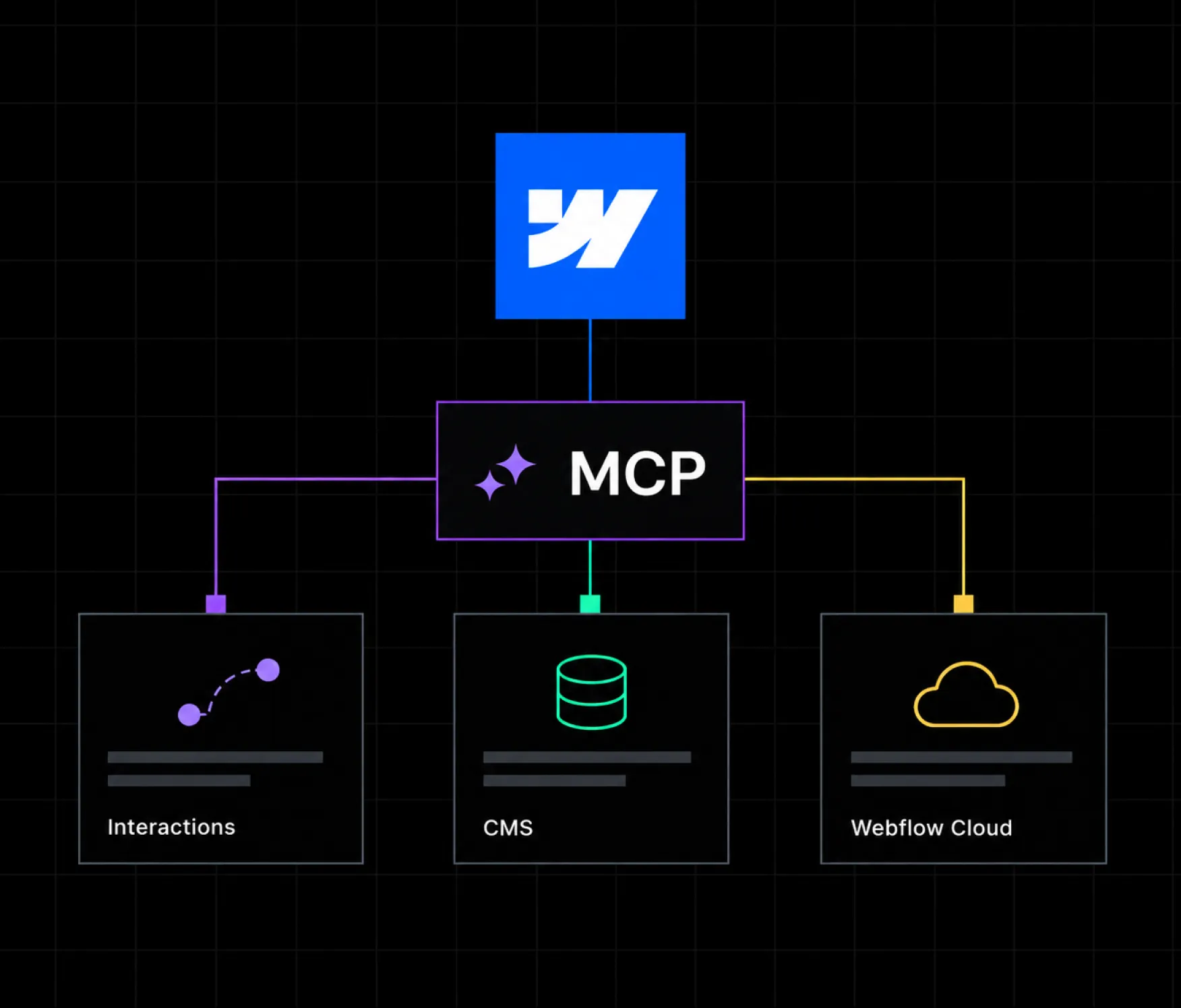
On September 21, 2026, Webflow rolled out a significant update to its Model Context Protocol server. The update lets AI agents build interactions directly on a page, query CMS content faster and more precisely, deploy and debug Webflow Cloud apps, and manage the full branch lifecycle of a project, all without switching tools or waiting on another team member to make a change. This is not a small patch. It extends MCP from a tool that mostly handled content and basic build tasks into something that touches nearly every layer of a Webflow project, from motion design to backend app deployment.
This article breaks down exactly what changed, how each new capability works, why it builds on the earlier MCP 2.0 release from July 2026, and what it practically means for teams and agencies building on Webflow. It also looks at where this fits into the bigger shift toward agentic workflows in web design, and how to actually start using it.
The Model Context Protocol, or MCP, is an open standard that lets AI tools like Claude, ChatGPT, and Cursor connect directly to external systems and act on them through natural language instructions instead of manual clicks or custom API code. Webflow's MCP server exposes its Designer and Data APIs as tools an AI agent can call, so instead of writing a script to update a CMS field or manually building a page section, a person can simply describe what they want and the agent carries out the task inside the actual Webflow project.
For agencies managing dozens of client sites, this changes the shape of day to day work. Tasks that used to require opening the Designer, finding the right element, and manually adjusting settings can now be handled through a conversation with an AI assistant, provided the assistant has the right permissions and instructions to work safely inside the account. Teams offering ongoing support through services like Webflow maintenance are watching this shift closely, since it directly affects how much manual work is needed to keep a live site updated and performing well.
The new release adds four major capabilities to the MCP server. Each one targets a different part of the Webflow workflow that previously required manual intervention or a separate tool entirely.
Before this update, MCP could help with layout, content, and structure, but motion design was mostly out of reach for AI agents. Interactions had to be built manually on the canvas. That gap is now closed. Agents can create and edit interactions built on IX3 and GSAP, the same animation engine and interaction system used natively inside the Webflow Designer, using the same trigger types a designer would choose manually: scroll, hover, load, and click.
This means a prompt like "add a fade in on scroll to each card in this collection list" can now be executed directly by an agent, rather than requiring someone to open the Interactions panel and configure the trigger, timeline, and easing curve by hand. For teams focused on Webflow design work, this is one of the more meaningful additions in the update, since interaction polish is often one of the more time consuming parts of building a page that feels finished rather than static.
The second major change addresses a common pain point for anyone working with CMS heavy Webflow sites. Agents can now sort, filter, and page through CMS content, including custom and reference fields, all within a single request. Previously, working with large or complex collections through MCP could require multiple back and forth calls, particularly when a task needed to reference fields connected across collections.
This matters most for content heavy sites, such as blogs, resource libraries, job boards, or product catalogs, where a single collection might hold hundreds or thousands of items. Faster, more precise querying means an agent can pull exactly the records it needs, filtered by the right criteria, in one pass, rather than pulling large batches of data and filtering manually afterward. For agencies running large scale Webflow development projects with extensive CMS structures, this reduces both the time and the token overhead involved in AI assisted content work.
Webflow Cloud lets teams deploy full stack web apps, built with frameworks like Next.js or Astro, alongside their main Webflow site, giving technical teams a way to add custom logic, connect third party APIs, or build dynamic experiences without leaving the Webflow ecosystem. Until this update, deploying and troubleshooting these apps required working directly inside the Webflow dashboard or a separate development environment.
Now, an agent connected through MCP can deploy a Webflow Cloud app, check its deployment status, and help debug issues directly from an MCP client such as Claude or Cursor. This is a meaningful step toward treating Webflow Cloud as a fully agent accessible part of the stack, rather than a separate system that sits outside the conversational workflow. Teams exploring more advanced, code connected builds through agentic Webflow development now have a more direct path from prompt to deployed app, with fewer manual steps in between.
The fourth addition is aimed squarely at larger teams working with Webflow's branching feature. Agents can now pull the main branch into a working branch, merge changes back, publish a preview to staging, and check for conflicts before merging, all without a human manually stepping through each stage. This capability is currently limited to Enterprise plans, which reflects how closely it touches production environments and governance controls.
For agencies managing client sites with multiple collaborators, this reduces the friction of coordinating changes across a team. An agent can prepare a branch, apply a batch of updates, and flag it as ready for review, while a human still makes the final call on publishing to the live site. This lines up with the emphasis Webflow has placed on governance throughout its recent MCP updates, discussed in more detail below.
To understand why this update matters, it helps to look at what came before it. Webflow introduced MCP 2.0 in July 2026, and that release laid the foundation this new update builds on directly. MCP 2.0 focused on four areas: expanded design and build support, agent instructions, site performance analysis, and governance.
The design and build improvements in MCP 2.0 gave agents the ability to work with Webflow's full design system, including styles, elements, components, props, slots, and variants, so AI generated work stayed on brand and structured for long term maintenance rather than producing one off, inconsistent output. That release also eliminated the bridge app requirement for most use cases, which had previously added friction to multi page and multi site workflows.
Agent Instructions, also introduced in MCP 2.0, let teams point agents at specific resources, such as a design system, CMS content, brand guidelines, or voice and tone documentation, and define rules for how agents should complete tasks. This is what makes the September update's new capabilities genuinely usable at scale. An agent building interactions or querying CMS data does so more reliably when it already has context about how a particular site's design system and content structure are meant to work.
The governance features from MCP 2.0, including branch based iteration, strict enforcement of account roles and permissions, and activity logging for every MCP triggered change, are also what make the new branch lifecycle management feature possible. Without that governance layer already in place, giving agents the ability to merge changes into a live site would carry far more risk. Teams building on Claude specifically, through Webflow's official Claude connector, can read more about how that integration fits into a broader Webflow workflow through Webflow Claude integration services.
The practical impact of this update depends heavily on how a team already works. For teams that have been slow to adopt AI assisted workflows, the update is a signal that MCP is quickly becoming a core part of how production Webflow work gets done, not a novelty layered on top of it. For teams already using MCP regularly, the new capabilities close several of the more common gaps that previously required switching back to manual work.
A few concrete shifts are worth calling out directly.
Motion design becomes accessible earlier in a project. Interactions have historically been one of the last things added to a page, often because they require more manual setup time than content or layout work. With agents now able to build IX3 based interactions from a prompt, motion design can be prototyped and iterated on much earlier in a build, which tends to produce a more cohesive final result.
Large CMS driven sites become faster to manage through AI tools. Sites with extensive blogs, resource centers, or product catalogs previously hit practical limits when working through MCP, since complex filtering across custom and reference fields required multiple steps. The improved CMS querying removes a lot of that friction, particularly for teams running content operations at scale.
Webflow Cloud becomes part of the conversational workflow. Full stack apps deployed through Webflow Cloud were previously somewhat separate from the AI assisted parts of a project. Bringing deployment and debugging into MCP means technical and non technical team members can now work from the same conversational interface for more of the stack, rather than switching between a chat based agent and a separate deployment dashboard.
Enterprise teams get a safer path to agent driven publishing. Branch based workflows, combined with the governance controls introduced in MCP 2.0, give larger organizations a way to let agents do more of the routine work of preparing and testing changes, while keeping a human firmly in control of what actually goes live.
A few examples help make these capabilities concrete rather than abstract.
A marketing team preparing a new landing page can now ask an agent to build the page structure, connect it to CMS driven testimonial and case study content, add scroll triggered fade ins to each section, and pull real time analytics on similar past pages, all within the same MCP session, rather than juggling separate tools for design, content, and analysis.
A development team maintaining a Webflow Cloud powered internal tool can ask an agent to check the current deployment status, review recent error logs, and push a fix, without leaving their MCP client to open a separate dashboard. This is particularly useful for smaller technical teams that do not have a dedicated DevOps resource dedicated to Webflow Cloud specifically.
An agency managing a large client site with hundreds of blog posts can ask an agent to find every post published in the last quarter that is missing a featured image or has a specific CMS tag, then batch update those records in one pass, a task that would have required significant manual filtering before this update.
An enterprise team preparing a coordinated site update across multiple pages can have an agent create a branch, apply the full set of planned changes, publish a staging preview for stakeholder review, and flag any merge conflicts, compressing what used to be a multi day coordination process into a single reviewed workflow.
Teams already using Webflow's MCP server do not need to install anything new to access most of these features, since MCP 2.0 and its follow up updates are available to all users at no additional cost, with the branch lifecycle management feature reserved for Enterprise plans. The practical starting point is reviewing Webflow's official developer documentation to understand the exact tool calls available for interactions, CMS querying, and Webflow Cloud deployment, then testing them in a lower stakes project before applying them to a live client site.
For teams without an existing MCP setup, the first step is connecting an MCP client, such as Claude Desktop or Cursor, to a Webflow account through the OAuth authorization flow, then setting up Agent Instructions so the agent understands the site's design system, content structure, and any brand specific rules before it starts making changes. Agencies supporting multiple client accounts often find it worthwhile to build a standard set of instructions once, then reuse and adjust them across projects rather than starting from scratch each time.
It is worth pausing on why an update focused on interactions, CMS access, and app deployment also matters to teams whose primary focus is search performance or conversion rate, rather than development speed.
Faster, more precise CMS access has a direct line to search performance. Sites with large content libraries often struggle to keep metadata, internal linking, and structured data consistent across hundreds of pages, simply because manually auditing that much content is impractical. An agent that can filter and update CMS records in a single pass makes it realistic to run these kinds of audits regularly rather than once a year during a larger site overhaul. This is part of why Appsrow's Webflow AEO and SEO service increasingly treats AI assisted CMS management as a practical tool for ongoing search maintenance, not just a novelty for building new pages faster.
Interactions matter for conversion in a more direct way. Subtle motion, such as a call to action button that responds to hover or a section that fades in as a visitor scrolls toward it, can meaningfully affect how a page feels and how confidently a visitor moves toward converting. Being able to prototype and adjust these details through an agent rather than manual canvas work means conversion rate optimization testing can iterate faster, since a new interaction variant no longer requires a full manual rebuild to test.
These are not separate concerns from the core MCP update. They are downstream effects of the same underlying shift, where more of the day to day work of running a site becomes something an agent can meaningfully assist with, provided the site's structure and design system are clear enough for the agent to work with reliably.
This update is part of a broader pattern in how Webflow has been developing its platform throughout 2026. Alongside MCP, Webflow has been investing heavily in Answer Engine Optimization, or AEO, reflecting the same underlying shift this MCP update represents: AI systems are becoming active participants in how sites get built, maintained, and even discovered. A site with a well structured CMS and clean interaction patterns is not just easier for a human visitor to use, it is also easier for both AI agents to maintain and AI search engines to read and cite.
Appsrow's own AEO Analyzer reflects this same underlying idea from a different angle, checking how readable a site's structure is for AI systems rather than focusing purely on traditional SEO signals. Teams that keep both angles in mind, AI assisted building through tools like MCP and AI readable output through structured, well organized content, tend to get more long term value out of platform updates like this one than teams treating each new feature as an isolated tool.
Case studies across Appsrow's portfolio of Webflow projects show a consistent pattern worth noting here as well. Sites built with clean, well organized CMS structures and consistent design systems are the ones that benefit most quickly from new AI tooling, since agents work more reliably against a site that already follows clear, predictable patterns. Sites with inconsistent structure tend to see far more friction when AI agents try to work with them, regardless of how capable the underlying MCP tools become. This pattern shows up across industries, from SaaS platforms to teams working in AI focused sectors, where the pace of change makes fast, agent assisted site updates especially valuable.
This update moves Webflow's MCP server further from a helpful assistant for isolated tasks toward something closer to a full production tool that spans design, content, and deployment. Interactions, faster CMS access, and Webflow Cloud support close three of the more significant gaps that previously sent teams back to manual work, and the addition of full branch lifecycle management for Enterprise accounts signals that Webflow is building toward AI agents playing a larger, more trusted role in day to day site management.
For teams already building on Webflow, the practical next step is testing these new capabilities on a real but low risk project, reviewing how they perform against an existing design system and CMS structure, and deciding where they genuinely save time versus where human judgment still matters most.
If your website isn't easy to understand, you're giving away opportunities
before the conversation even starts.
Get a free review of how your website appears to AI-powered search and discovery tools.
GOT QUESTIONS ?
Do I need a paid Webflow plan to use the new MCP capabilities?
Most of the new capabilities, including interactions, faster CMS access, and Webflow Cloud deploy and debug support, are available to all users at no additional cost. The full branch lifecycle management feature is currently limited to Enterprise plans.
Which AI tools work with Webflow's MCP server?
Webflow's MCP server is built on the open MCP standard, so it works with any compatible client, including Claude, ChatGPT, and Cursor. Claude has an official Webflow connector, which is often the most straightforward starting point for teams new to MCP.
Can agents publish changes directly to a live site without review?
Governance controls introduced in MCP 2.0 mean agents operate within a team's existing account roles and permissions. For most workflows, agents prepare and stage changes, such as branch based updates, while a human still makes the final publishing decision, particularly on Enterprise plans using the new branch lifecycle features.
Does this update replace the need for manual design work?
No. Agents can now build interactions and manage CMS content faster, but they still work best within a design system and set of instructions a human has already established. Judgment calls around brand fit, unconventional layout decisions, and overall creative direction still benefit from human oversight.
How does this connect to AI search visibility?
While this MCP update is primarily about build and maintenance workflows, the underlying theme, cleaner structure and more consistent content organization, also supports better performance in AI driven search. A well structured CMS is easier for both AI agents to work with and AI search engines to read and cite accurately.

Parth Parmar is a Webflow Expert and Co-Founder & CTO at Appsrow Solutions. He has delivered 300+ Webflow projects for 25+ global B2B brands, helping SaaS companies, AI startups, and tech businesses build conversion-focused websites with scalable CMS, AEO-ready architecture, and measurable growth.
CURATED READING