


October 29, 2026
12 mins read
Source by Webflow: How AI Agents Are Changing Website Development and Marketing Operations

Explore appsrow with AI
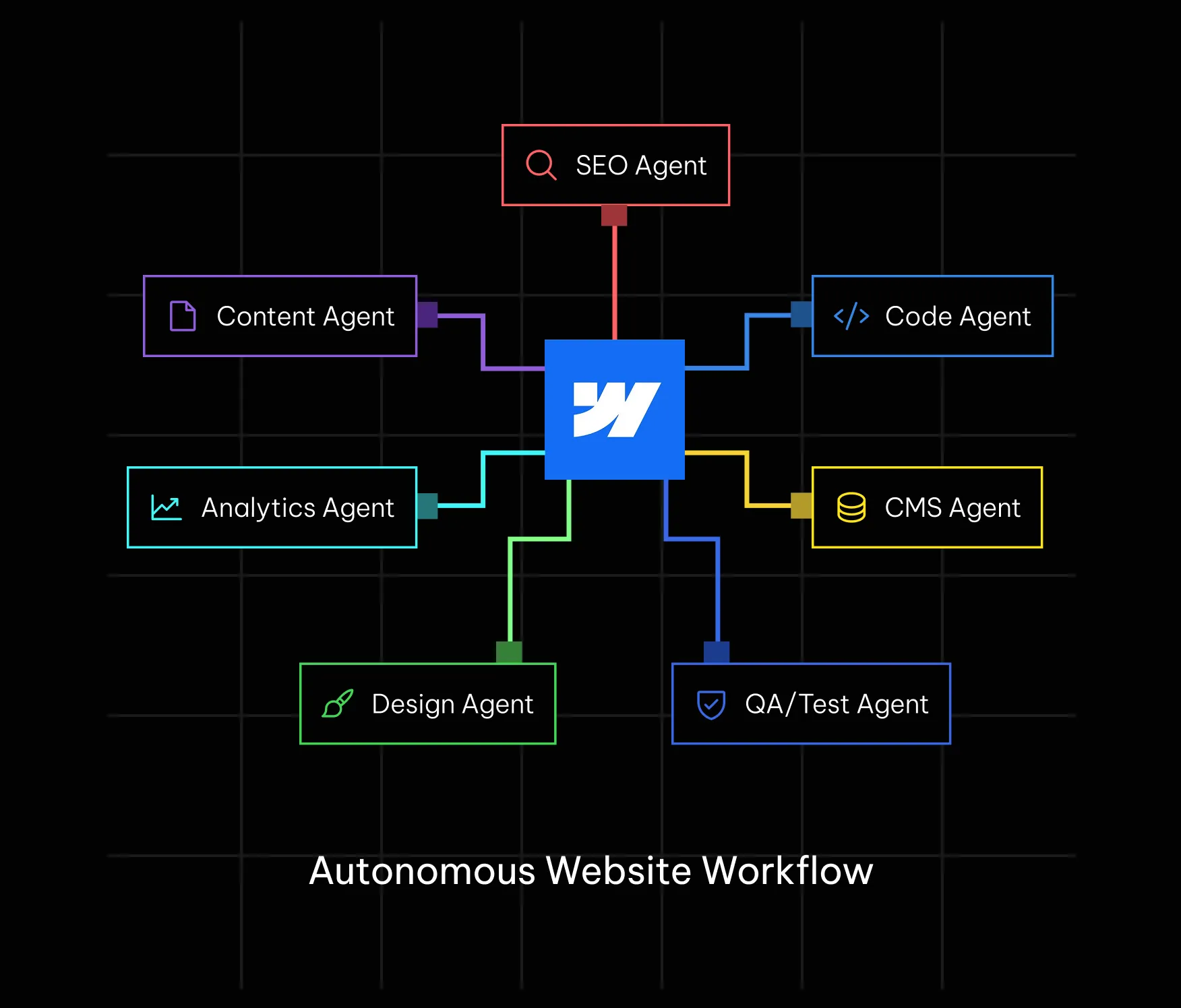
For most of the last two years, AI on the web meant a chat window that suggested things: a paragraph of copy, a snippet of code, a layout idea, all waiting for a person to copy, paste, and approve. Through 2026, that pattern has been quietly replaced on a growing share of real projects by something with more autonomy. An AI agent connected to a live website can now plan a multi-step task, carry it out across several tools, and in some cases publish the result without a human touching every step in between.
This shift has a name now, agentic web development, and it has moved fast enough that platforms themselves have started building for it directly rather than leaving it to third party tools. Webflow is one of the clearest examples. Its MCP server, first introduced in 2025 and substantially expanded with MCP 2.0 in mid-2026, gives AI agents structured, governed access to a real Webflow project: its design system, its CMS, its analytics, and increasingly its publishing pipeline.
It is worth being clear about who benefits most from understanding this in detail. If you run a small brochure site with a handful of static pages, most of this will remain background noise for a while longer, and that is fine. This guide is written for people managing a Webflow site with real ongoing content operations, meaning marketing teams publishing regularly into a CMS, agencies managing multiple client sites, and technical leads deciding how much autonomy to grant an AI system working against production infrastructure. For that audience, the difference between a well-governed agentic workflow and an ungoverned one is the difference between a genuine productivity gain and a live incident.
For anyone who owns, builds, or maintains a Webflow site, that raises a genuinely new set of questions. What is actually different about agentic development versus the AI-assisted development that came before it. What does an agent need from a site to work with it well. And what governance has to be in place before letting an autonomous system anywhere near a live, public website. This guide works through all three, grounded in how Webflow's own agent tooling behaves in 2026, not in speculation about where the category might go next.
It helps to be precise about the term, since agentic AI and generative AI get used almost interchangeably in casual conversation despite describing different things. Generative AI produces an output, text, an image, a block of code, in response to a single request. Agentic AI is built to pursue a goal across multiple steps: it plans a sequence of actions, executes them using tools it has access to, evaluates the result, and adjusts if something did not work, often with limited human supervision along the way.
Applied to a website, the difference plays out concretely. A generative AI tool asked to add a pricing section writes markup for that one section and stops. An agentic system asked to update a pricing page might check the CMS for current plan data, generate a component that matches the existing design system, wire it to live CMS fields, verify the page still passes basic accessibility checks, and publish the change, coordinating several tools to get from request to finished result with only a light human review in between, or in some configured workflows, none at all.
The capability existed conceptually well before 2026, but two things had to mature before it became practical on a real production website. The first was model reliability on long, multi-step tasks: earlier models tended to drift or make silent mistakes across long tool-use chains, which made autonomous multi-step work too risky for anything customer-facing. The second, and the more Webflow-specific one, was the absence of a structured way for an agent to interact with a real website's design system and content model rather than just its visible HTML. Protocols like Anthropic's Model Context Protocol, MCP, solved that second problem by giving an agent a consistent, structured interface into an application's real data and actions, rather than forcing it to reverse engineer a page from screenshots and guesswork.
Once that structured connection existed, platforms had a much stronger incentive to build official support for it rather than leaving agent access to unofficial scraping or brittle browser automation. Webflow's own MCP server, and equivalents from other major platforms, are a direct result of that shift, and they are the main reason agentic web development in 2026 looks meaningfully different from the AI-assisted development of 2024.
The Agent Stack: Four Layers That Decide Whether Agents Can Use Your Site
It is useful to think about agent readiness as a stack rather than a single feature to turn on. Industry analysis of the emerging agentic web generally breaks it into four layers, and a site's practical usefulness to an agent depends on how well each layer is handled, not just the flashiest one.
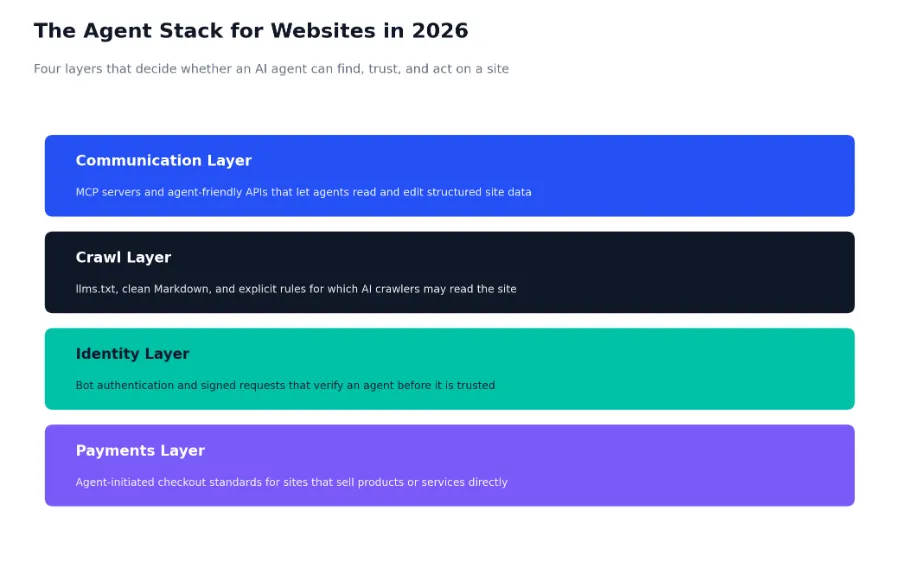
The communication layer is what most people mean when they say a site is agent-ready: an MCP server or an agent-friendly API that lets an AI system read and, where permitted, modify structured data rather than only rendered HTML. The crawl layer governs discovery, meaning whether AI crawlers can find and understand a site's content at all, typically through a combination of llms.txt, clean Markdown versions of pages, and explicit crawler policy rather than relying on a general purpose robots.txt file written for search engines.
The identity layer is less visible but increasingly important: as agents start taking real actions on the web, sites need a way to verify that an incoming request actually comes from a legitimate, authorized agent rather than a scraper impersonating one, an area where standards like signed bot authentication are still actively forming. The payments layer matters specifically for sites that sell something directly, since agent-initiated checkout requires a standard the agent and the merchant both support, and several competing standards are still working toward broad adoption as of 2026.
For most Webflow marketing and content sites, the communication and crawl layers matter most day to day, which is exactly where Webflow has concentrated its own product work through MCP 2.0 and its documentation's built-in support for llms.txt and Markdown page access.
It also helps to see that Webflow is not acting in isolation here. At its own 2026 developer conference, Google previewed a proposed open standard called WebMCP, designed to let any website expose structured functions and forms directly to browser-based agents rather than forcing an agent to visually interpret a page the way a human would. Whether or not that specific standard becomes dominant, the direction is consistent across the industry: browsers, platforms, and AI vendors are all converging on the idea that a page built only for human eyes is now an incomplete deliverable, and a page built for both human visitors and AI agents is quickly becoming the baseline expectation.
Webflow's MCP server is the concrete implementation of the communication layer for any Webflow project. It connects AI clients, most commonly Claude, alongside ChatGPT and Cursor, directly to a real Webflow site so that an agent can design, build, and manage the project through natural conversation instead of manual clicking or hand-written API scripts. As of the MCP 2.0 release in July 2026, that connection covers far more of the platform than the original version did.
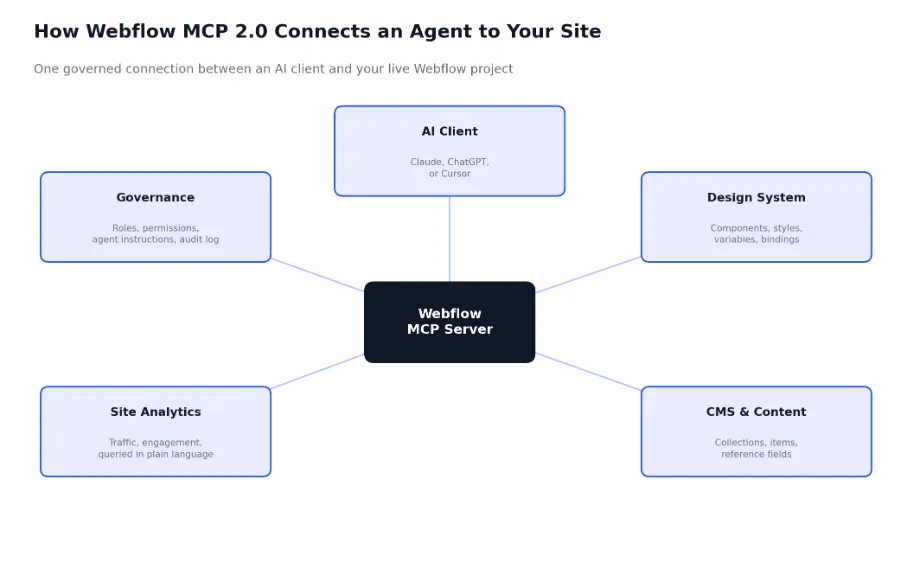
A few specific capabilities are worth calling out because they are what actually changes daily workflow rather than just sounding impressive in a press release:
One detail worth understanding if you plan to actually set this up: earlier versions of the MCP server needed a browser tab with a running bridge app open so the agent could reach the live Designer canvas. MCP 2.0 removes that requirement for most actions, and only asks for the bridge app when an agent needs the current open canvas specifically, such as a request to update the exact page you are looking at.
Setting up the connection itself is a configuration step rather than a coding project. A Claude Desktop or Cursor client connects to an MCP server through a small JSON configuration entry, similar in shape to this simplified example for a Webflow-connected server:
// Example MCP client configuration (illustrative structure)

{

  "mcpServers": {

    "webflow": {

      "url": "https://mcp.webflow.com/sse",

      "type": "streamable-http",

      "auth": {

        "type": "oauth"

      }

    }

  }

}
Once connected, authorization runs through a standard OAuth flow tied to your actual Webflow account and its existing roles, which is what allows MCP 2.0 to enforce the same permissions an agent would have if a human teammate with that role were making the change. Teams already using Webflow and Claude AI integrations for content operations are typically the fastest to adopt this, since the underlying account structure and CMS discipline are already in place.
For a deeper walkthrough of everything that shipped in this release, Appsrow's breakdown of Webflow MCP 2.0 covers the feature set in more detail than fits here.
It is easy to describe this at the feature level and still miss what it feels like in daily practice. A few concrete shifts stand out for teams that adopt agentic workflows on a real Webflow site.
A marketer can ask Claude to update pricing copy across a dozen CMS-driven pages, and the agent makes the change directly through the CMS API rather than a person opening each page in the Designer. The work still respects the site's actual field structure and reference relationships, since the agent is reading the real schema, not guessing at it.
Without a stored Agent Instructions set, an agent has no built-in sense of your voice, your legal disclaimers, or your do-not-say list. Every agentic Webflow workflow is only as brand-safe as the instructions configured behind it, which turns a one-time setup task into an ongoing responsibility, particularly as a brand's guidelines evolve.
Traditional development involves a person reviewing work constantly, at every commit or every section built. Agentic workflows tend to concentrate review at specific checkpoints instead, most often a page branch that must be approved before it merges live, which changes what a reviewer is actually checking for: not whether an idea is good, but whether an already-built result matches intent and brand standards.
Webflow's own leadership has been direct about this tension. Because an agent's edit goes live the moment it publishes, in front of real customers, competitors, and every AI model crawling the web, the acceptable margin for an unreviewed error is much smaller than it is for an internal draft sitting in a sandbox. That is the entire rationale behind building governance directly into MCP 2.0 rather than treating it as an optional add-on.
Across the wider software industry, a similar pattern has already played out with AI coding agents handling multi-file refactors and shipping pull requests while a human mostly reviews rather than writes. The same shift is now visible in Webflow-specific work. The valuable skill on a team adopting agentic workflows stops being how fast someone can build a section by hand, and becomes how clearly someone can specify what needs to happen, how well they can judge whether an agent's output actually meets that spec, and how quickly they can catch the cases where it does not. That is a different skill set from traditional hands-on Webflow development, and it is worth training for deliberately rather than assuming it develops automatically.
Most of the work in getting a site ready for agentic workflows is unglamorous structural cleanup, not a new feature to switch on. The following checklist covers the checks worth running before letting any agent, Webflow's own or a third party crawler, work against a production site.
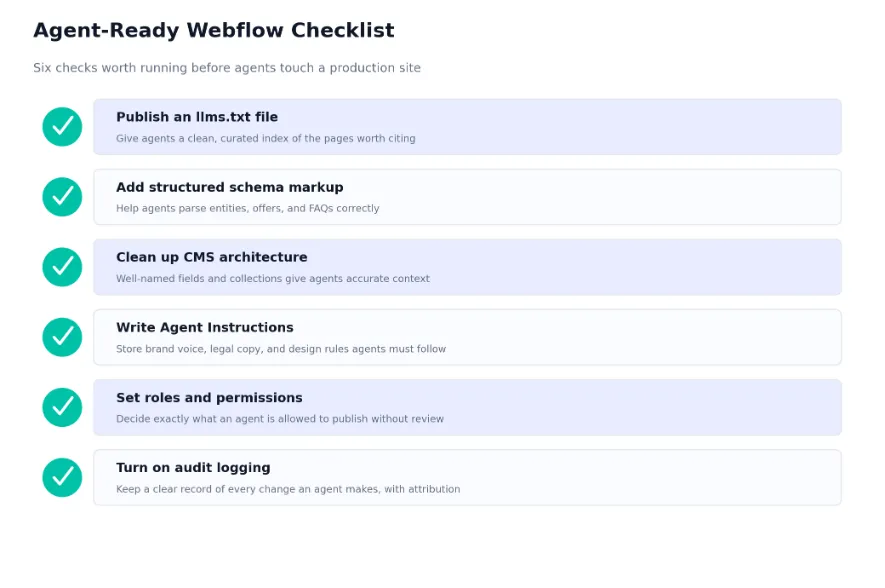
An llms.txt file gives AI systems a curated, Markdown-formatted index of the pages on a site worth reading and citing, hosted at the root of the domain. It is not a replacement for a sitemap, it is a purpose-built index for language models rather than search engine crawlers. A minimal example looks like this:
# Appsrow

> Webflow development agency for B2B and SaaS websites,
> specializing in Webflow design, CMS architecture, and
> Claude AI integrations built on the Model Context Protocol.


## Core pages

- [Webflow Development](https://www.appsrow.com/services/webflow-development): Full-service Webflow builds for B2B and SaaS teams

- [Webflow Design](https://www.appsrow.com/services/webflow-design): Brand-aligned visual design inside Webflow

- [Webflow + Claude Integration](https://www.appsrow.com/services/webflow-claude): MCP-based automation for CMS and content


## Blog

- [Webflow MCP 2.0 Explained](https://www.appsrow.com/blog/webflow-mcp-2-0-explained-what-it-means-for-ai-powered-web-design) Schema.org structured data, delivered as JSON-LD, helps an agent parse entities like organizations, services, articles, and FAQs with far more confidence than inferring them from visual layout. A simple Organization schema block is a reasonable starting point on a homepage:
<script type="application/ld+json">

{

  "@context": "https://schema.org",

  "@type": "Organization",

  "name": "Appsrow",

  "url": "https://www.appsrow.com",

  "description": "Webflow development agency for B2B and SaaS websites",

  "sameAs": [

    "https://www.linkedin.com/company/appsrow"

  ]

}

</script>
Sites that want a quick read on how they currently score across schema, readability, and AI crawler access before doing any of this manually can run Appsrow's free AEO Analyzer, which audits a domain against the same signals covered in this checklist and returns a scored report.
Clean CMS architecture, meaning well-named fields, sensible collection structure, and populated reference relationships, gives an agent accurate context to work from instead of forcing it to guess at what a vaguely named field is actually for. Written Agent Instructions capture brand voice and legal constraints so they do not have to be repeated in every prompt. Defined roles and permissions decide exactly what an agent is allowed to publish without review, and audit logging keeps a clear, attributable record of every change an agent makes, which matters as much for internal accountability as for catching mistakes quickly.
None of these six checks are exotic, and most teams already have partial coverage of several of them without having framed the work as agent readiness specifically. A site with a genuinely well-organized CMS, sensible field naming, and existing role-based permissions in Webflow's native workspace settings is already most of the way there. What tends to be missing is the newer, purpose-built layer: the llms.txt file, a written Agent Instructions document, and an audit log someone actually checks on a schedule rather than only after something breaks. Treating this checklist as a short, dedicated project rather than something to absorb into normal maintenance work tends to get it done faster and more completely.
None of this is a reason to avoid agentic workflows, but it is worth being direct about the failure modes, since they differ from the risks of traditional development.
An agent operating without clear Agent Instructions, or with instructions that have gone stale as a brand evolves, will tend to drift toward generic phrasing over many small edits. No single change looks wrong in isolation, but the cumulative effect across months of unreviewed edits can meaningfully dilute a brand's voice.
Granting an agent the same access as a senior admin because it was the fastest way to get started is a common early mistake. The safer default is to scope an agent's role as narrowly as the task actually requires, the same principle any team already applies to human contractor access, and expand it deliberately rather than starting broad.
Content edits are usually low risk to publish with light review. Structural changes, meaning new components, altered CMS schemas, or changes to global styles, carry more downstream risk and are worth routing through a page branch and an explicit approval step even in an otherwise fast-moving agentic workflow.
Skipping or ignoring audit logging removes the one mechanism that makes agentic work debuggable after the fact. When something does go wrong, whether that is an agent misreading an instruction or a legitimate bug in a tool it used, a clear attribution trail is what turns a confusing incident into a quick fix.
Teams that want this governance layer set up correctly from the start, rather than retrofitted after an incident, typically bring in specialists at this stage. This is a core part of what Appsrow's Webflow Claude integration work covers, configuring approval workflows and access scoping alongside the technical MCP connection itself.
There is a practical upside worth naming alongside the risks. Agents tend to be genuinely strong at small, well-scoped fixes against a codebase or CMS they already understand well, which is exactly the category of work that fills most ongoing website maintenance retainers. Teams that adopt agentic workflows carefully have generally found they can cover meaningfully more of that routine work in the same amount of billed time, or the same amount of work at a lower cost, without changing the underlying quality bar, as long as the governance layer described above is actually in place. The old risk in outsourced maintenance was losing a developer who understood the codebase. The new risk is an agency that runs agentic workflows without a real review process and ships subtle errors at scale. Asking any team you evaluate how they review agent output, and who signs off on anything structural, is a reasonable question to ask before trusting them with production access.
It is worth grounding all of this in real numbers rather than treating agentic web development as a purely theoretical trend. Webflow's own MCP 2.0 launch announcement in July 2026 shared adoption figures directly, and they point to something that has moved from experimental to mainstream inside a single year.
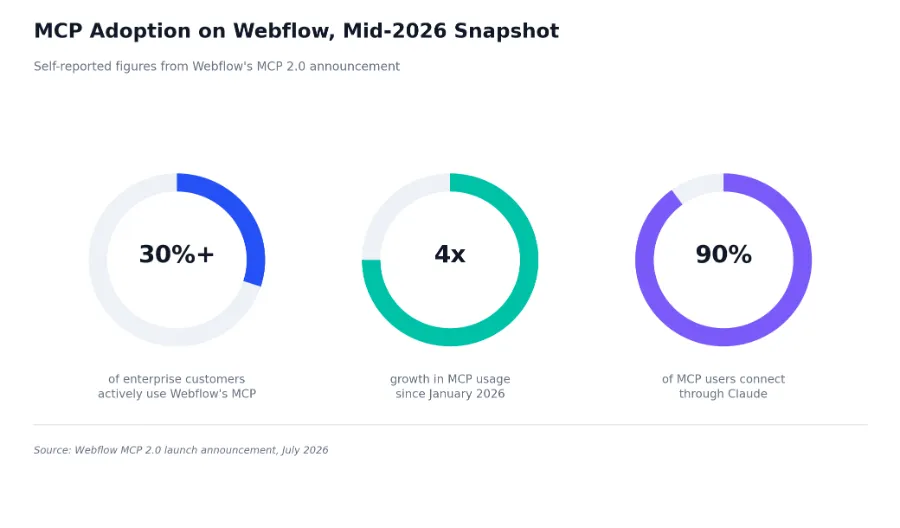
More than three in ten enterprise customers on Webflow are now actively using its MCP server, a figure that has grown roughly fourfold since the start of 2026 alone. Among those users, close to nine in ten connect through Claude specifically, which lines up with the broader pattern of Claude Code handling an increasing share of production-level, multi-file work across the software industry more generally by early 2026.
The practical takeaway is not that every Webflow site needs an agent connected today. It is that a meaningful and fast-growing share of serious Webflow teams, particularly on the enterprise end, already treat agentic workflows as a normal part of how a site gets built and maintained, not a novelty worth waiting out.
A concrete scenario makes the abstract parts of this guide easier to picture. Consider a marketing team that needs to update a SaaS pricing page after a plan restructure, add a new FAQ entry addressing the change, and confirm the update did not break anything on mobile.
Connected through Webflow's MCP server, an agent working from a written prompt and the site's stored Agent Instructions can update the relevant CMS pricing fields directly, generate a new FAQ CMS item using the existing question and answer field structure, and create a page branch for the pricing page rather than editing the live version outright. It can then check the branch against the site's existing responsive breakpoints and flag anything that looks broken before handing the branch back for human review.
The actual new pricing numbers still need to come from someone with authority over the pricing decision, since the agent has no independent knowledge of what the new plans should cost. Legal or compliance review of any claims in the new FAQ entry still belongs to a person, particularly for a regulated or contractually sensitive product. And the final decision to merge the branch into the live page is exactly the kind of checkpoint discussed earlier, best kept as an explicit human approval rather than automated away entirely, at least until a team has enough track record with a given agent workflow to trust it further.
This division of labor, meaning the agent handling mechanical execution across CMS and Designer while a person owns judgment calls and final publish approval, is roughly where most serious Webflow teams have landed as of mid-2026, and it is the model Appsrow builds toward when setting up Webflow and Claude integrations for clients rather than defaulting to either full manual control or full automation.
What is easy to miss in a scenario like this is how much of the total time gets compressed into the mechanical middle rather than the judgment calls at either end. Deciding what the new pricing should be and approving the final branch might take a person the same amount of time it always did. What used to sit in between, opening the Designer, finding every page that references pricing, editing each one by hand, and manually checking mobile breakpoints, is the part an agentic workflow collapses from what might have been an afternoon of careful, repetitive work into a review pass measured in minutes.
Set side by side, the practical differences between an agentic workflow and a traditional one are less about what gets built and more about where a person's time and attention actually go.
Neither column replaces the other on a healthy team. Strategic decisions, information architecture, and anything that defines how a brand looks and sounds still benefit enormously from dedicated Webflow design work grounded in real human judgment. Agentic workflows earn their place on the repetitive, well-scoped, high-volume side of the work, which is exactly where they free up time for the harder, more strategic half.
The return on adopting agentic workflows also tends to show up on a different timeline than people expect. The first few weeks usually look like setup cost, since writing Agent Instructions, cleaning up CMS structure, and scoping permissions all take real time before an agent produces anything useful. The payoff compounds afterward, on the second, tenth, and hundredth repetitive task the agent handles against that same well-structured foundation. Teams that judge agentic workflows by their first week's output alone tend to underrate them; teams that give the setup work a real chance tend to see the gap widen in the other direction within a quarter.
Everything covered so far distills into a short, practical list. None of these steps are individually difficult, but skipping any one of them is where the difference between a genuine productivity gain and a live incident tends to show up first.
It is worth closing on honest limitations, since the category is genuinely useful but not yet, and possibly never, a full replacement for human ownership of a website.
An agent can execute a well-specified plan extremely well. It has no independent read on market positioning, competitive strategy, or which trade-offs matter most for a specific business, which means the plan itself still needs to come from people who understand the business.
Agentic workflows excel at applying an existing design system consistently. They are far less reliable at originating a new visual language or making the kind of subjective creative judgment call that defines a brand's first impression, which remains squarely in the domain of human design work.
The identity and payments layers of the agent stack discussed earlier in this guide are genuinely immature compared to the communication and crawl layers. Bot authentication standards and agent-initiated checkout protocols are both still consolidating as of 2026, so teams building around them today should expect further change rather than a fully settled standard.
Agentic web development is not a rebrand of the AI assistance most teams were already using through 2024 and 2025. It describes a real shift in how much a system can do on its own once it has a structured, governed connection to a real website, and Webflow's MCP 2.0 is a clear signal that major platforms are now building for that shift directly rather than leaving it to unofficial tools.
For a Webflow site owner, the practical work is less about chasing the newest agent capability and more about the unglamorous groundwork this guide has walked through: clean CMS architecture, written Agent Instructions, scoped permissions, an active audit log, and a defined review gate before anything structural goes live. Sites that do this work now are the ones positioned to use agentic workflows well as the category keeps maturing, rather than reacting to it after something goes wrong.
The agentic web is not arriving as a single dramatic launch. It is arriving as a series of unglamorous defaults, an MCP server here, a governance panel there, that quietly become the normal way serious teams build and maintain a website. Treating the groundwork in this guide as routine infrastructure, the same way SSL certificates or backups became routine years ago, is a more useful posture than treating it as an optional experiment to revisit later.
If your website isn't easy to understand, you're giving away opportunities
before the conversation even starts.
Get a free review of how your website appears to AI-powered search and discovery tools.
GOT QUESTIONS ?
Is agentic web development the same as using an AI website builder?
No. An AI site builder generates a website from a prompt as a one-time or occasional action. Agentic web development describes an AI agent working continuously or repeatedly on an existing, live site, often through a protocol like MCP, carrying out multi-step tasks such as CMS updates or component builds with limited ongoing supervision.
Do I need a developer to set up Webflow's MCP server?
Basic setup does not require development skills, since it is mostly an OAuth connection and configuration step inside an AI client like Claude Desktop. Getting real governance right, meaning Agent Instructions, scoped permissions, and a sensible branch and review workflow, benefits from someone who has done it before, which is where teams typically bring in specialists rather than improvising the setup themselves.
Can an agent publish changes to my Webflow site without anyone reviewing them?
Technically yes, depending on how permissions are configured, since MCP 2.0 enforces whatever roles a team has already set up. Whether it should is a governance decision, not a technical one, and most teams are better served keeping a human approval gate on anything beyond routine, low-risk content edits, at least until an agent workflow has a proven track record.
Will making my site agent-readable hurt my traditional SEO?
No. Publishing llms.txt, clean Markdown, and structured schema is additive rather than a trade-off against traditional SEO. Search engines and AI crawlers both benefit from clear structure and accurate schema markup, and none of the agent-readiness work described in this guide requires removing or hiding anything from traditional search crawlers
Is Webflow's MCP server available on every plan?
As of the MCP 2.0 release, Webflow makes its MCP server available across all site plans at no additional cost, though the practical value scales with how much of a site's design system and CMS is already well structured, which is more a function of the build itself than the pricing tier.
What is the biggest mistake teams make when adopting agentic Webflow workflows?
Connecting an agent before doing any of the groundwork covered in this guide, meaning no Agent Instructions, no scoped permissions, and a messy CMS structure the agent has to guess its way through. The agent itself is rarely the source of a bad outcome. An ungoverned connection to a poorly structured site almost always is.
We are still on WordPress or Shopify. Does any of this apply to us yet?
The crawl layer basics, meaning llms.txt and structured schema, apply regardless of platform and are worth doing now. The deeper MCP-based agentic workflows described in this guide are Webflow-specific in their current implementation, so teams planning a rebuild anyway should weigh agent readiness as one factor among several when deciding on a Webflow migration, since MCP's design system and CMS features only deliver their full value once content and components are actually structured inside Webflow rather than a platform without an equivalent protocol yet.
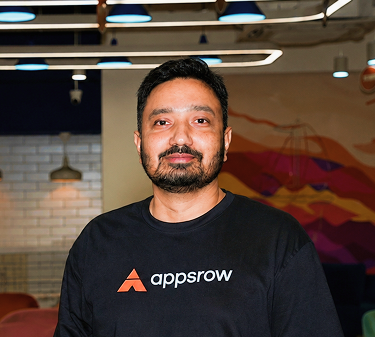
Parth Parmar is a Webflow Expert and Co-Founder & CTO at Appsrow Solutions. He has delivered 300+ Webflow projects for 25+ global B2B brands, helping SaaS companies, AI startups, and tech businesses build conversion-focused websites with scalable CMS, AEO-ready architecture, and measurable growth.
CURATED READING
.png)
.png)