


.png)
October 27, 2026
12 mins read
Webflow Agent Presence: How AI Agents Collaborate on the Canvas

Explore appsrow with AI
Webflow AI Site Builder has moved past the stage where it felt like a novelty. What started in 2024 as a way to skip the blank canvas has, by 2026, become a genuine starting point for real projects, generating a multi page site, a baseline design system, and a working CMS from nothing more than a written description of the business. That is a meaningful shift for anyone who builds or manages websites for a living.
But the part that gets lost in most coverage of the tool is what it actually produces once the initial excitement of a prompt turning into a website wears off. A generated homepage is easy to screenshot. A generated CMS schema, a component naming convention, or a Core Web Vitals score is not, and those are the pieces that decide whether a site holds up past the demo.
This article breaks down the four layers that matter most once you move past the prompt: components, CMS, styling, and performance. Each section explains what the AI builder generates by default, how it behaves under the surface, and what you should check by hand before the site goes live. We also touch on how this compares to hiring a specialist, and where Appsrow's own review of Webflow AI Site Builder landed after testing it on real projects.
It also helps to be clear about who this guide is written for. If you run marketing for a small business and just need a working site by Friday, most of the detail here will not matter much, and that is fine, since the tool is built to handle that case well on its own. This guide is aimed at the people who inherit what the AI produces after that first draft: in-house marketers who need to keep publishing content into a CMS for years, developers asked to extend a generated site with custom functionality, and agency teams asked to turn a fast draft into a client-ready production build. For that audience, the details underneath the prompt are the whole story, not a footnote.
Webflow AI Site Builder is one part of a broader set of AI tools now built into Webflow, alongside the conversational AI Assistant, AI Code Components, and AI powered SEO features. While AI Assistant works inside an existing project to generate sections, rewrite copy, or answer Designer questions, AI Site Builder is the tool used at the very start of a project. You describe the business, the audience, and the tone you want, and it scaffolds an entire website around that description.
The output is not a single landing page. In Webflow's own demonstrations, a single prompt typically produces a Home page, an About page, and a Services page, each filled with real section content rather than placeholder boxes. Every site the tool creates is built on Flowkit, Webflow's modular CSS framework, which gives the generated project a structured set of reusable utilities, components, and variables instead of one off inline styles.
As of 2026, AI Site Builder sits behind a paid Workspace plan. A free Starter workspace does not include access, while Core, Growth, and Enterprise plans unlock the full AI Site Builder, AI Assistant, and AI Code Components. Generating a site draws from your workspace's usage allocation rather than a separate per-generation credit system, which matters if you plan to run several prompts while refining a brief.
It is worth understanding how the tool got here, because the trajectory explains a lot about its current strengths. Webflow first introduced an AI site generation feature in 2024 as a way to soften the platform's famously steep learning curve, and early versions behaved much like most AI website builders of that era: a single generated page, heavy on placeholder text, light on any real underlying structure. By 2026, that early version has matured into something closer to a legitimate first pass at a real project, not a static mockup that needs to be rebuilt from scratch. The shift did not happen because the AI got dramatically smarter at design. It happened because Webflow rebuilt the foundation the AI generates onto, namely Flowkit, so that AI output inherits a proper component and token system instead of generating one-off styling for every element.
That distinction matters more than it sounds. A tool that generates a page that merely looks finished creates work later, since every section needs to be pulled apart and restructured before it can be maintained. A tool that generates a page built on a real design system creates a head start, since the underlying structure is already something a developer or designer would have built by hand. Webflow AI Site Builder in 2026 sits in the second category, which is the main reason it is worth a serious technical look rather than being dismissed as a gimmick.
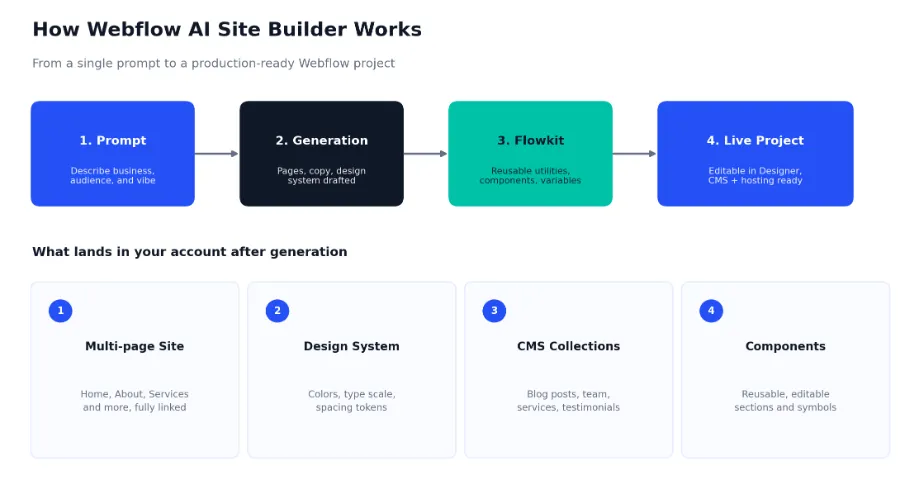
The workflow is intentionally short. You describe your business in plain language, for example a landing page for a mobile app with dark mode and animation, and the builder asks a small number of setup questions about audience and style before generating a full project inside the standard Webflow Designer.
A few things happen in that single generation step:
What matters most here is that none of this happens inside a restricted sandbox. The generated project uses the same Designer, the same CMS, the same hosting, and the same interactions panel as a site built by hand. That is a deliberate design choice on Webflow's part, and it is also the reason the tool is worth understanding at a technical level rather than treating it as a black box: everything it outputs is something you are expected to open up and edit.
Because the underlying project is standard Webflow, teams that already rely on Webflow integrations for their CRM, analytics, or automation stack can connect those same tools to an AI-generated site without any special workaround.
The first generation from a prompt rarely needs to be the final structure, and treating it as a single irreversible decision is a common early mistake. A vague prompt produces a generic result, closer to a stock template than something specific to the business, while a prompt that includes concrete details, meaning the actual audience, a rough tone description, and one or two competitor or reference sites, produces noticeably more usable output. It is worth spending real time on the brief itself before generating, the same way a good creative brief improves a human designer's first draft. Several rounds of regeneration with a refined prompt, before you commit to editing inside the Designer, is usually faster overall than generating once and manually fixing structural issues that a better prompt would have avoided.
Components are where the difference between a demo and a maintainable site becomes obvious. Webflow AI Site Builder does not generate a pile of unrelated divs for every section. It builds on Flowkit, which structures output into a layered system: design tokens at the base, utility classes on top of those tokens, then components assembled from utilities, and finally page layouts that arrange components.
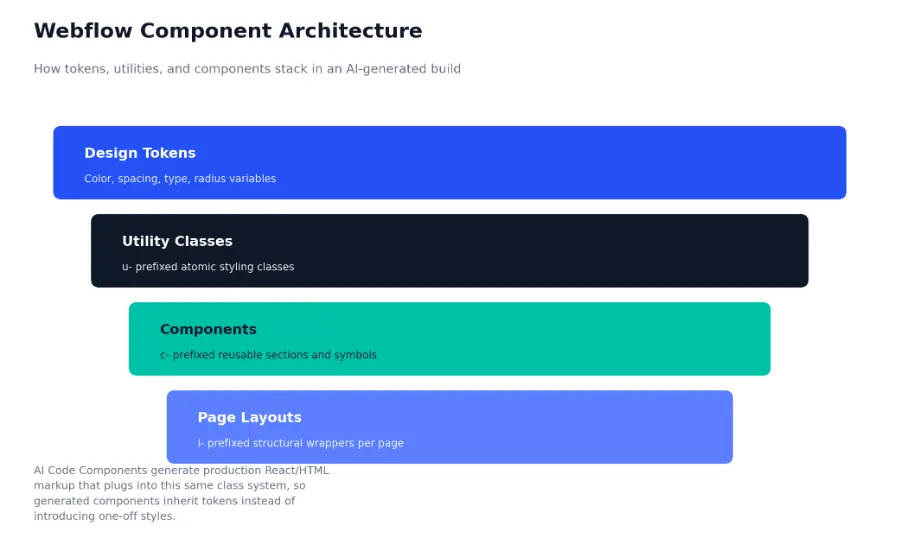
In practice, that means a pricing table, a testimonial slider, or a FAQ accordion generated by the AI is built from the same reusable classes as everything else on the page, rather than shipping with its own bespoke styling. When you go back and change a brand color or a spacing token, components built this way update everywhere at once instead of needing individual fixes.
Webflow distinguishes between older Symbols, which are simple reusable blocks with limited override options, and newer Components, which support properties, slots, and variants so the same component can look different across contexts without being duplicated. AI-generated sites lean on this newer component system, which is part of why they hold up better under later edits than older AI website builders that dropped a flat, static layout on the screen and called it finished.
AI Code Components
A separate but related feature, AI Code Components, generates production grade HTML, CSS, and JavaScript, or React components, from a natural language description. You can type something like a responsive pricing table with a monthly and yearly toggle, and the tool returns a working component you can drop into the page. Below is a simplified example of the kind of component markup this feature can produce for a pricing toggle:
// Pricing toggle component, generated then trimmed for clarity

function PricingToggle({ monthly, yearly }) {
  const [isYearly, setIsYearly] = React.useState(false);
  const price = isYearly ? yearly : monthly;

  return (

    <div className="c-pricing-card">
      <div className="c-pricing-toggle">
        <span>Monthly</span>
        <button
          className="u-toggle-switch"
          aria-pressed={isYearly}
          onClick={() => setIsYearly(!isYearly)}
        >
          <span className={isYearly ? "is-active" : ""} />
        </button>
        <span>Yearly</span>
      </div>
      <p className="c-pricing-amount">${price}/mo</p>
    </div>

  );

}
Two things are worth checking whenever a component like this ships from AI generation. First, confirm the interactive states, such as focus rings and the aria-pressed attribute shown above, actually work with keyboard navigation. Second, confirm the class names follow your existing convention rather than introducing a one off naming pattern, since inconsistent naming is the fastest way for a design system to degrade over a few months of edits.
Teams that need heavier custom component work beyond what the AI can produce, particularly multi step interactions or stateful logic, typically bring in a specialist at this stage. Appsrow's Webflow design and development teams regularly rebuild AI-generated components that need custom interaction logic the built-in tool cannot handle on its own.
A small AI-generated site with five pages rarely exposes any weakness in its component system, since there is not enough surface area for duplication to become a problem. The picture changes once a marketing team starts adding landing pages for every campaign, or a content team publishes dozens of blog posts that each reuse the same call to action block. Research presented at Webflow's own conference has pointed to component adoption, not the technical work of building components, as the harder half of the equation: teams cite governance, documentation, and consistent naming as the actual bottleneck once a design system needs to scale across a growing team, not the initial setup.
That finding lines up with what shows up in practice on AI-assisted builds. The AI does the easy 80 percent well, generating a reasonable first version of a component. The harder 20 percent, meaning deciding which variations are legitimate design decisions versus which are accidental duplication that should be merged back into one shared component, still needs a human owner. Assigning that ownership early, even informally, tends to save far more time over a year than any individual prompt refinement.
Content is the part of a website that changes constantly after launch, which is why the CMS structure a builder creates matters more over time than the initial page design. Webflow AI Site Builder reads the business description you provide and creates Content Collections that match the type of content that business is likely to publish, such as Blog Posts, Team Members, Services, or Case Studies.
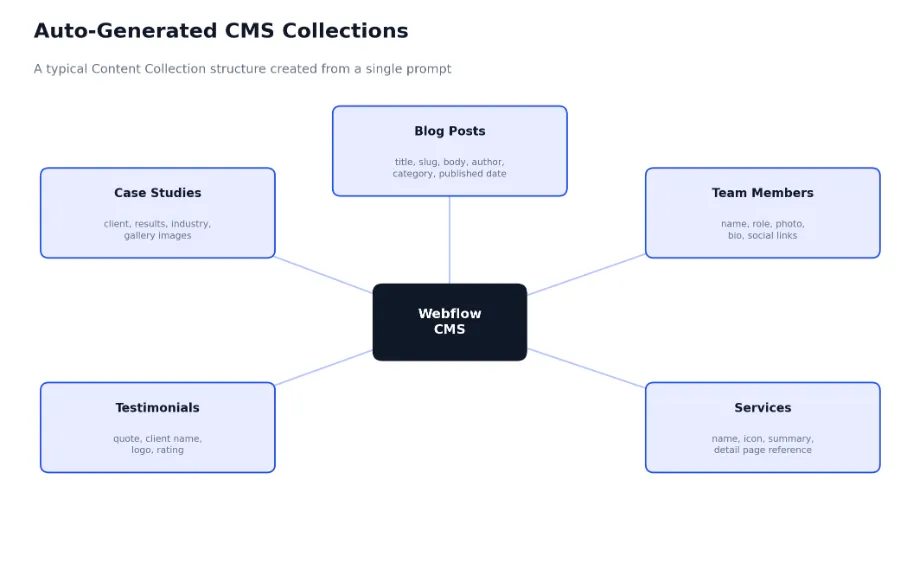
Each collection ships with a starting field set appropriate to its content type. A Blog Posts collection typically includes fields for title, slug, rich text body, author, category, and published date. A Team Members collection includes name, role, photo, and a short bio. These are reasonable defaults, but they are defaults, and almost every real project ends up adding fields the AI did not anticipate, such as a reading time estimate, a related posts reference field, or a custom schema field for structured data.
Because AI-generated collections are standard Webflow CMS collections, they are fully accessible through Webflow's Data API v2, the same as anything built by hand. That makes it straightforward to pull collection items into a custom build process, a static site generator, or an external app. A simple authenticated request to list items in a collection looks like this:
// Fetch published items from a Webflow CMS collection

const response = await fetch(
  `https://api.webflow.com/v2/collections/${collectionId}/items`,

  {
    method: 'GET',
    headers: {
      Authorization: `Bearer ${process.env.WEBFLOW_API_TOKEN}`,
      'accept-version': '2.0.0',
    },
  },
);

const data = await response.json();
const publishedPosts = data.items.filter((item) => item.isDraft === false);
This is also the layer where AI orchestration tools start to matter. Appsrow builds Webflow and Claude AI integrations using the Model Context Protocol to automate CMS updates, generate structured content at scale, and keep collections in sync with other business systems, which extends what the AI Site Builder starts with into an ongoing content operation rather than a one time generation.
One area the default AI-generated schema often underuses is reference fields, meaning the connections between collections rather than the collections themselves. A Case Studies collection, for example, benefits from a reference field pointing to a related Industry collection, or a multi-reference field connecting a case study to the specific services involved. Without those relationships in place, a site ends up with several collections that each hold good content but have no structured way to filter, cross-link, or generate related content automatically, which pushes that logic onto manual page building instead of the CMS doing it for you.
Adding these relationships is usually a short task if it happens early, since it just means adding a reference field and connecting existing items. It becomes a much longer task once hundreds of items exist without any relationship structure and someone has to go back and connect them one by one. Treat this as part of the same planning pass as field names and taxonomy, not a nice-to-have addition for later.
The most common mistake teams make with an AI-generated CMS is publishing dozens of blog posts or case studies into the default field structure before deciding on taxonomy, tagging, or reference relationships between collections. Restructuring a collection after two hundred live items are attached to it is far more expensive than spending an hour on the schema before content production starts. If you are moving content over from another platform rather than starting fresh, the same planning applies to a Webflow migration, where preserving URL structure and SEO equity depends on getting the CMS schema right before the switch.
Styling is the layer most people evaluate first, since it is the most visible, but it is also the layer with the least room for AI judgment. The AI Assistant reads your existing design system, meaning colors, typography, spacing, and existing components, and generates new sections that match it. AI Site Builder does the same thing in reverse: it establishes the design tokens first, based on your prompt and any brand references you provide, and then generates every page against those tokens.
It helps to understand roughly how the matching happens, even at a surface level. When you provide brand references, whether that is a described color preference, an uploaded logo, or an existing site to draw inspiration from, the AI extracts a limited palette and a small set of type choices rather than attempting to replicate every visual detail. That constraint is deliberate. A generated site with twelve competing accent colors and four typefaces would be unusable as a starting point, so the tool favors a restrained, coherent token set over an exhaustive one, and expects you to expand it deliberately as real brand needs surface.
In Webflow's Variables panel, this typically includes:
A useful naming convention that pairs well with this token structure, and one several Webflow teams now use as a standard, prefixes classes by role: u- for utility classes, c- for components, and l- for layout wrappers. Generated projects do not always follow this exact convention out of the box, so it is worth normalizing class names early, before a project grows past a handful of pages and renaming becomes disruptive.
Two areas consistently need human attention after generation. The first is heavily customized design systems: the AI performs best against fairly standard layout patterns and gets less reliable once a brand has an unusual class naming history or a highly bespoke visual language. The second is brand voice inside the visual system itself, such as illustration style, photography treatment, or micro interaction personality, which the AI can approximate but rarely nails without a designer's pass. This is usually the point where teams bring in dedicated Webflow design support to take a generated draft and align it fully with brand guidelines rather than starting the visual design over from scratch.
A generated site can look complete within minutes, but Core Web Vitals, meaning Largest Contentful Paint (LCP), Interaction to Next Paint (INP), and Cumulative Layout Shift (CLS), are earned through configuration choices the AI does not always get right by default. Since these metrics factor directly into both user experience and search rankings, they deserve a dedicated check before any AI-generated build goes live.
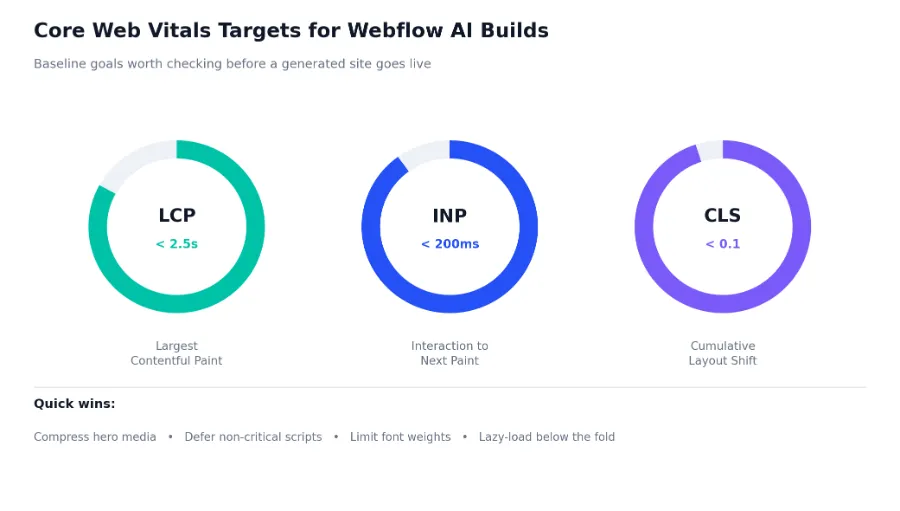
The general targets to check a generated site against are an LCP under 2.5 seconds, an INP under 200 milliseconds, and a CLS score under 0.1. Webflow's platform handles a fair amount of this automatically now, including responsive image variants, semantic HTML output, and built-in script minification, but a few areas still commonly need manual attention after AI generation:
Lazy loading below the fold media is one of the simplest wins here, and where the built-in behavior needs a nudge, a small custom code embed handles it cleanly:
// Lazy-load below-the-fold images with an IntersectionObserver

document.addEventListener('DOMContentLoaded', () => {
  const targets = document.querySelectorAll('img[data-lazy]');
  const observer = new IntersectionObserver(
    (entries, obs) => {
      entries.forEach((entry) => {
        if (entry.isIntersecting) {
          const img = entry.target;

          img.src = img.dataset.lazy;

          img.removeAttribute('data-lazy');

          obs.unobserve(img);
        }
      });
    },
    { rootMargin: '200px 0px' },
  );

  targets.forEach((img) => observer.observe(img));
});
Run a generated site through Google PageSpeed Insights or the Web Vitals browser extension right after generation, then again after your edits, so you have a before and after baseline. This is also where ongoing Webflow maintenance pays off, since performance tends to drift as more CMS content, embeds, and third party scripts get added over the life of a site, not just at launch.
It is also worth separating what the platform is responsible for from what your build choices are responsible for. Webflow's own infrastructure, including its hosting layer and image delivery, has continued to improve independently of anything AI related, and further work on more selective CSS output is understood to be in progress, which would reduce global stylesheet size across every Webflow site over time. That kind of platform level improvement is worth tracking, but it is not a reason to skip a manual review today. A generated site published this month still needs to meet Core Web Vitals targets on the infrastructure available right now, not on whatever improvements arrive later in the year.
It helps to walk through a realistic prompt end to end, since the abstract description of components, CMS, and styling lands differently once you see how they interact on one project. Consider a prompt describing a project management SaaS product aimed at small marketing teams, with a modern, confident tone and a blue and white color scheme.
Within a few minutes, the builder typically returns a Home page with a hero section, a feature grid, a social proof section, and a pricing section, alongside a Features page, a Pricing page, and an About page. Section copy references the described product category directly rather than using generic filler, and the pricing section usually ships as a component with monthly and yearly states already wired up, close to the toggle pattern shown earlier in this guide. A Blog Posts collection and a Testimonials collection are typically created automatically, since both content types are common for SaaS marketing sites.
On a project like this, a few gaps tend to show up consistently once you start editing:
None of these gaps are unusual or a sign the tool failed. They are the normal difference between a fast, structurally sound first draft and a finished product ready for paid traffic. On projects like this, the fastest path to launch is usually to let the AI handle the first hour of work, structure, copy scaffolding, and a starting design system, then hand the remaining list off to a team that does this daily. This is exactly the handoff point where Appsrow's Webflow development team most often gets involved, taking a generated SaaS draft through integration, real content, and a pre-launch technical review.
It helps to see where AI Site Builder sits relative to other AI website builders and to fully custom development, since each approach trades off differently across CMS depth, code ownership, and long term scalability.
Cost comparisons across these approaches tend to focus only on the sticker price of the workspace plan or the freelancer's rate, which misses the bigger factor: total cost of ownership over the life of the site. A cheap AI-generated site with a disorganized CMS and no performance review can cost more within eighteen months, in lost search visibility and rebuild work, than a slightly more expensive build done correctly the first time. The right comparison is not which option is cheapest to launch, but which option produces a site that is still easy to extend and maintain a year later.
The practical takeaway is that Webflow AI Site Builder is not competing with fully custom development so much as it is compressing the distance between an idea and a working first draft. Where it earns its place is in giving teams, and the agencies that support them, a faster starting point that still respects proper CMS architecture and a real component system, rather than a disposable static mockup. You can see this play out across the range of projects in Appsrow's case studies, where AI-assisted drafts and fully custom builds both feed into the same production-grade Webflow standard.
Everything covered so far points toward the same short list of habits. None of these are complicated, but they are easy to skip when a generated site already looks presentable, and skipping them is exactly where the gap between a fast draft and a durable production site opens up.
None of this is a case against using the tool, but a few honest limitations are worth planning around rather than discovering after launch.
The AI performs best against standard templates and predictable class structures. Once a design system has an unusual naming history, deeply nested components, or highly specific brand constraints, output quality drops and manual cleanup increases.
Multi step animations, scroll driven effects, and stateful logic that depends on user behavior across a session still need manual setup in the Interactions panel or through custom code, even when AI Code Components can generate the surrounding markup.
The AI does not know your conversion goals, your audience research, or your competitive positioning. It builds what you describe, not necessarily what you should be building, which is why the prompt itself, and the strategy behind it, still matters more than the tool.
AI Site Builder can flag some accessibility issues as it works, such as low contrast text or missing alt text, and that live feedback is genuinely useful. It is not the same as a full accessibility review. Automated suggestions catch a narrow band of issues reliably, typically contrast ratios and missing attributes, but they do not reliably catch focus order problems, screen reader labeling on custom components, or keyboard traps inside interactive elements like the pricing toggle shown earlier in this guide. Any AI-generated site heading toward a public launch, and particularly one for a regulated industry like healthcare or finance, still needs a manual accessibility pass rather than relying on the built-in suggestions alone.
Webflow AI Site Builder earns the attention it is getting in 2026, not because it replaces strategic thinking or hands-on development, but because it compresses the distance between an idea and something real to work with. Understanding what it actually generates, meaning components built on Flowkit, structured CMS collections, a token-based styling system, and a performance baseline that still needs tuning, is what separates teams that use the tool well from teams that publish the first draft and call it finished.
Used deliberately, with a clear CMS plan, a consistent class naming approach, and a proper performance and accessibility pass before launch, it is a genuinely useful starting point for a production Webflow site rather than a novelty. Used carelessly, it produces the same problems any rushed website build produces, just faster.
The tool is best understood as a compression of time, not a replacement for judgment. It shortens the distance between deciding to build a website and having a real, editable Webflow project to react to, but every decision that determines whether a site converts visitors, ranks well, and holds up as content scales still sits with the people directing it. Treat the output as a strong first draft built on solid technical foundations, review it against the checkpoints covered in this guide, and the gap between a fast AI-generated site and a genuinely production-ready one closes quickly.
If your website isn't easy to understand, you're giving away opportunities
before the conversation even starts.
Get a free review of how your website appears to AI-powered search and discovery tools.
GOT QUESTIONS ?
Is Webflow AI Site Builder free to use?
No. As of 2026, it requires a paid Workspace plan. The free Starter workspace does not include access to AI Site Builder, AI Assistant, or AI Code Components. Core, Growth, and Enterprise workspace plans include full access, with generation usage drawn from your workspace allocation rather than separate per-generation credits.
Can I edit everything the AI generates?
Yes. The output uses standard Webflow elements, components, and CMS collections, so you can restyle, restructure, rewrite, or delete anything it creates. The AI is designed to solve the blank page problem, not to hand you a finished, untouchable site.
Does the generated site come with SEO basics in place?
It handles a reasonable baseline, including meta titles, descriptions, alt text, and semantic HTML, and Webflow's broader AI-powered SEO features can suggest schema markup as well. That said, structured internal linking, entity optimization, and content depth still benefit from a dedicated review, which is the focus of Appsrow's AEO and SEO service for Webflow sites.
How is AI Site Builder different from the AI Assistant?
AI Site Builder generates an entire multi page website structure from a single prompt and is used at the start of a project. AI Assistant works inside an existing project to generate individual sections, rewrite copy, or modify layouts through conversational prompts, and is used throughout ongoing work rather than only at kickoff.
Will using AI Site Builder hurt my site's SEO compared to a hand-built site?
Not inherently. Search engines evaluate the rendered output, meaning semantic HTML, page speed, and content quality, rather than whether AI was involved in generating a page. The risk is indirect: if generated copy stays generic and thin, or if performance issues from the generation step are never fixed, rankings suffer for the same reasons they would on any poorly maintained hand-built site. A generated site with rewritten, specific copy and a proper Core Web Vitals pass performs the same in search as an equivalent hand-built page.
Can an AI-generated Webflow site scale to an enterprise-level build?
The underlying project can, since it is a standard Webflow site with full CMS, hosting, and permissions available at every plan tier. Whether it should without a professional review depends on the complexity involved, particularly around CMS architecture, integrations, and performance at scale, which is where teams typically bring in dedicated Webflow development support.
What happens if I want to heavily customize a generated design system later?
You can, since nothing about the generated tokens or components is locked. The practical caution is timing: changing core tokens like primary color or the type scale after dozens of pages and CMS items already reference them is more work than making that decision early. Where possible, finalize the core design tokens in the first working session, treat everything downstream of them as flexible, and expect a rebrand or major redesign later on to be a deliberate project rather than a quick tweak, the same as it would be on a hand built site.

Sandeepsingh Sisodiya is the CEO of Appsrow and a Webflow leader in Ahmedabad, India. He focuses on SaaS growth, digital transformation, and building high-converting website strategies.
CURATED READING
.png)
.png)